 By
iPhone or Android? It’s one of the most common questions people ask before buying a phone, and there’s no single right answer. Both are excellent in 2026. The better choice depends on your budget, the devices you already own, and how much you like to customize. Here’s an honest, side-by-side comparison to help you decide.
Short answer: choose an iPhone if you want a simple, consistent experience, long software support, strong resale value, and you use (or plan to use) a Mac, iPad or Apple Watch. Choose Android if you want more choice of prices and designs, more customization, features like expandable storage on some models, or you rely on Google services and Windows. At the high end, both are equally good at cameras, speed and security.
Last updated: October 2026.
iPhone vs Android at a glance
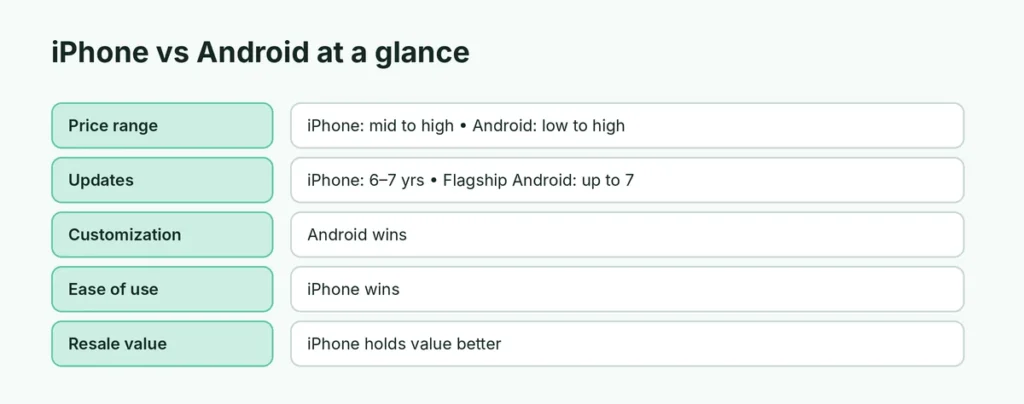
| iPhone | Android | |
|---|---|---|
| Who makes it | Only Apple | Samsung, Google, Motorola, OnePlus, Xiaomi and many more |
| Price range | Mid to very high | Very low to very high |
| Software updates | Typically 6 to 7 years of iOS updates | Up to 7 years on recent Pixel and Samsung flagships; much less on many budget phones |
| Customization | Moderate (widgets, icons, lock screen) | High (launchers, default apps, layouts) |
| App store | App Store only (with some regional exceptions) | Google Play plus other stores |
| Works best with | Mac, iPad, Apple Watch, AirPods | Windows PCs, Chromebooks, Google services |
| Messaging | iMessage + RCS | Google Messages (RCS) |
| Resale value | Holds value well | Drops faster on most models |
| Charging port | USB-C (iPhone 15 and later) | USB-C |
Price: Android wins on choice
Android phones range from about $100 to over $1,800 for foldables, so there’s something for every budget. iPhones start in the mid-range with the “e” models and go up to premium Pro and foldable models. If you need a good phone for under $300, Android gives you far more options.
On the other hand, iPhones keep their resale value better, so the real cost over several years can be closer than the price tags suggest.
Ease of use: iPhone is simpler
iPhones look and work the same on every model, and Apple designs both the hardware and software. That makes them easy for beginners and older users, and easy to help someone else with.
Android depends on the brand: Samsung, Pixel and Xiaomi all look different and put settings in different places. That’s more choice, but also more to learn. Many people find Pixel phones the simplest Android experience.
Customization: Android wins
Android lets you:
- change the whole home screen with a launcher,
- pick default apps for almost everything,
- place widgets and icons anywhere,
- install apps from outside Google Play (with care).
iPhone has become more flexible (free icon placement, widgets, custom lock screens, default browser and email apps), but Android still offers more control.
Software updates and security
Both platforms are secure when kept up to date. Apple supports iPhones for many years, and updates arrive on all supported models on day one. Google Pixel and recent Samsung Galaxy flagships now promise up to 7 years of updates too, but many budget Android phones get only 2 to 4 years, and updates may arrive later.
Tip for any phone: install updates promptly. Here’s how to update your iPhone.
Cameras: a tie at the top
Flagship iPhones, Pixels and Galaxy phones all take excellent photos and video. iPhones are often praised for consistent video and natural colors; Pixels for processing and night photos; Samsung for zoom. In the mid-range, results vary more by model than by platform.
Ecosystem: what else do you own?
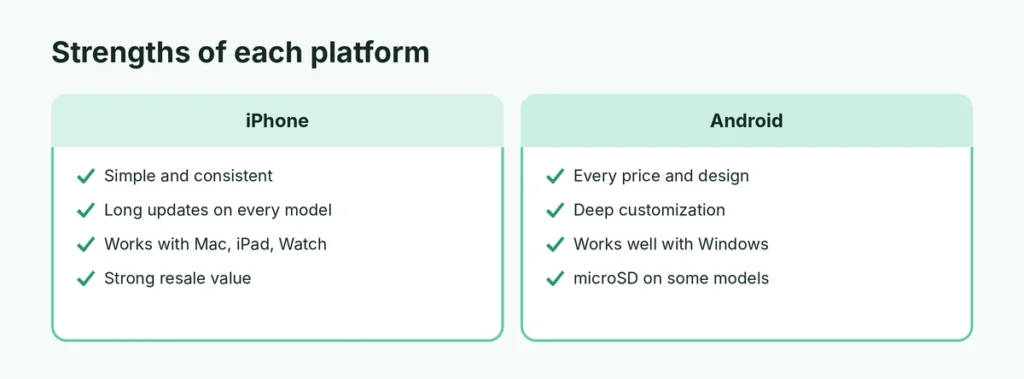
This is often the deciding factor:
- Mac, iPad, Apple Watch, AirPods: iPhone works seamlessly with them (AirDrop, Handoff, iMessage on Mac, Apple Watch only pairs with iPhone).
- Windows PC: both work; Android has deeper integration with Windows through Phone Link.
- Google services and Chromebook: Android fits naturally, though Google’s apps also work well on iPhone.
AirPods and Android work, with limits: here’s how to pair AirPods with Android.
Messaging and family
In the US, iMessage and FaceTime are popular, especially with younger users. Since iOS 18, iPhones support RCS, so texting between iPhone and Android now includes typing indicators, high-quality photos and better group chats. Apps like WhatsApp work identically on both, which matters more in many countries.
Privacy
Apple builds much of its marketing around privacy, with features like App Tracking Transparency. Google’s Android also offers strong privacy controls, and Pixel phones get security updates quickly. On either platform, the biggest privacy wins come from your own settings: review app permissions and turn off what you don’t need. Here’s how to stop AI chatbots training on your data as one example.
Storage and accessories
- Expandable storage: a few Android phones still have a microSD slot; iPhones never do. If you’re always short of space on iPhone, here’s how to get more storage on iPhone without iCloud.
- Chargers: both use USB-C now, so cables are interchangeable.
- Cases and accessories: iPhones have the widest selection because there are fewer models.
Battery life
Battery life depends more on the specific model than the platform. Large Android phones and iPhone Pro Max and Plus models are typically the longest-lasting. Check reviews of the exact model you’re considering.
Switching between them
Moving from Android to iPhone, or the other way, is easier than ever: Apple’s Move to iOS app and Android’s setup tools transfer contacts, photos, messages and more. WhatsApp chats can be transferred between platforms during setup. Back up first: how to back up an Android phone or how to back up an iPhone.
Total cost over 4 years (example)
| Mid-range iPhone | Mid-range Android | |
|---|---|---|
| Purchase price | Higher | Lower |
| Updates | Long support on all models | Long on Pixel/Galaxy A series; shorter on many others |
| Resale after 3–4 years | Good | Lower |
| Accessories | Plenty, often pricier | Plenty, wide price range |
The gap narrows when you count resale value and support length, so compare the specific models you’re considering rather than the platform alone.
For older users and kids
- Older users: iPhones are consistent and easy to help with remotely, and Assistive Access offers a simplified mode. Android phones like Pixels and Samsungs offer Easy mode with bigger icons and text, often at a lower price.
- Kids: both have strong parental controls: Screen Time on iPhone (how to set up Screen Time) and Google Family Link on Android. Choose what the parent uses, so you can help with settings.
Repairs and durability
Both platforms have tough flagship models with strong glass and water resistance. Repair costs depend on the brand: Apple and Samsung have official repair networks and self-repair programs, and many Android phones have cheaper replacement parts. Insurance (AppleCare+ or a carrier/brand plan) is worth considering for expensive phones.
Lost or stolen phones
Both platforms let you find, lock and erase a lost phone, and both have anti-theft protection that stops thieves from reusing it. Here’s what to do if you lose an iPhone or lose an Android phone.
Which should you choose?
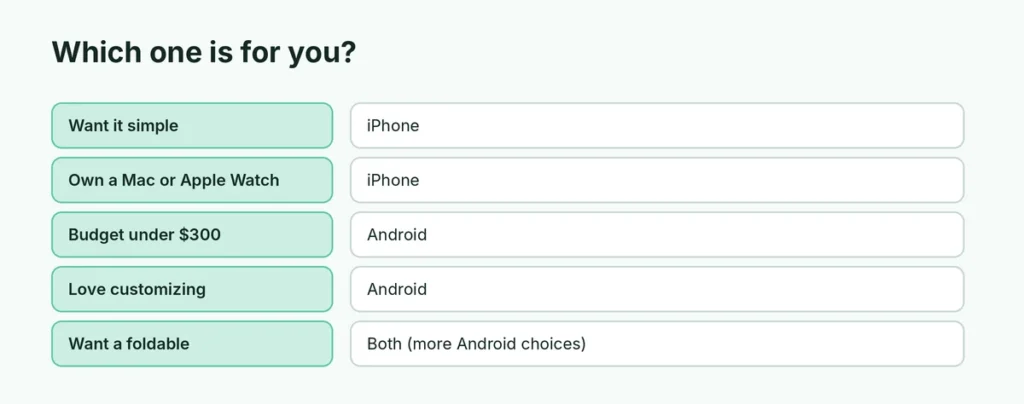
| If you… | Choose |
|---|---|
| Want the simplest phone to use | iPhone |
| Own a Mac, iPad or Apple Watch | iPhone |
| Need a good phone under $300 | Android |
| Love customizing your phone | Android |
| Want the longest updates on a budget | iPhone (or a Pixel/Galaxy A with long support) |
| Use a Windows PC heavily | Either (Android has deeper Windows integration) |
| Want a foldable | Both offer one; Android has more choices |
The short version
There’s no wrong choice in 2026. iPhone offers simplicity, long support, strong resale value and the best fit with other Apple devices. Android offers more prices, designs and customization, and pairs nicely with Windows and Google services. Decide based on your budget, what other devices you use, and how much control you want, then try both in a store if you can.