By
By 
When you chat with an AI assistant, your conversations may be used to improve future versions of the model, unless you turn that off. For most of the big chatbots it’s one setting, but it’s named differently everywhere and it’s rarely where you’d look first.
This guide shows where the setting is in ChatGPT, Gemini, Claude, Copilot and Meta AI, what turning it off does and doesn’t do, and the one habit that protects you better than any setting.
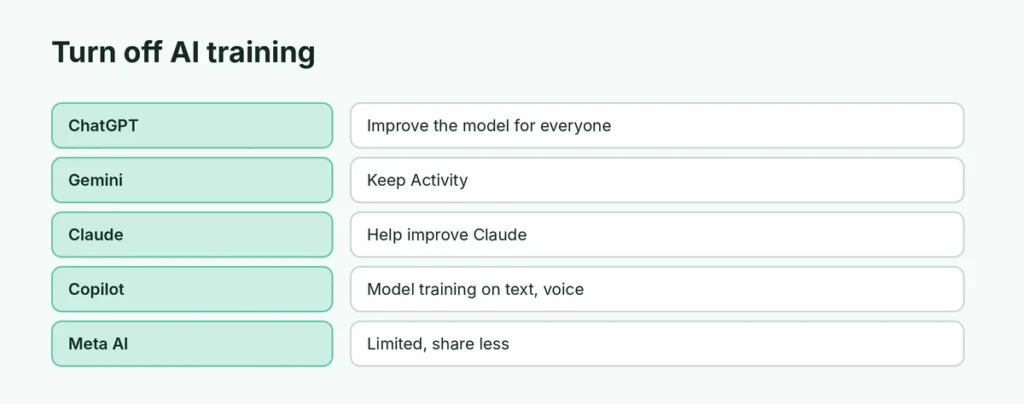
Short answer: in ChatGPT turn off Improve the model for everyone, in Gemini turn off Keep Activity, in Claude turn off Help improve Claude, and in Copilot turn off Model training. Then still avoid pasting anything you’d be upset to see leaked.
Applies to: ChatGPT, Google Gemini, Claude, Microsoft Copilot and Meta AI on web, Android and iPhone (personal accounts), October 2026. AI companies change these settings often, so check the current wording in each app.
The settings at a glance
| Chatbot | Where to go | Turn off |
|---|---|---|
| ChatGPT | Settings → Data controls | Improve the model for everyone |
| Gemini | Activity (Gemini Apps Activity) | Keep Activity |
| Claude | Settings → Privacy | Help improve Claude |
| Copilot | Profile → Settings → Privacy | Model training on text and voice |
| Meta AI | Privacy Center (some regions only) | Object to AI use where offered |
Tip: for one sensitive question, use a Temporary Chat in ChatGPT or an incognito chat in Claude instead of changing anything.
What “training on your data” means
Training means your conversations can be included in the material used to build and improve future models. In practice that’s usually done with personal details filtered out and sometimes with human reviewers reading samples. It doesn’t mean another user can ask the chatbot for your chat. But it does mean your text leaves your control and may be kept for a long time.
ChatGPT
- Open Settings → Data controls.
- Turn off Improve the model for everyone.
This applies to future chats on that account, on every device. For one-off sensitive questions, you can also start a Temporary Chat, which isn’t saved to your history or used for training.
Turning the setting off doesn’t delete what you’ve already shared. To delete chats, use the delete option in your chat history; for data requests, OpenAI has a privacy portal linked from its privacy policy. Business and Enterprise accounts aren’t used for training by default.
Google Gemini
- In the Gemini app or at gemini.google.com, open Activity (in older versions: Gemini Apps Activity).
- Turn off Keep Activity.
With it off, your future chats aren’t used to improve Google’s models, unless you send feedback. Google still keeps chats for up to 72 hours to run the service and for safety. You can also delete past activity on the same page. Note that some conversations reviewed by humans may be kept separately for longer, so don’t share private details even with this off.
Claude
- Open Settings → Privacy.
- Turn off Help improve Claude.
Anthropic asks consumer users to choose whether their chats can be used to improve Claude. With the setting off, your chats aren’t used for training. Incognito chats are never used for training, whichever way the setting is set. Work and API accounts are covered by separate commercial terms.
Microsoft Copilot
- In Copilot, open your profile → Settings → Privacy.
- Turn off Model training on text, and Model training on voice if you use voice.
The exact menu differs a little between the Copilot app, the website and Windows, so look for “model training” under privacy. Copilot used through a work or school account has its own protections and isn’t used to train the underlying models.
Meta AI (WhatsApp, Instagram, Facebook)
Meta AI is the hardest. There’s no simple on/off switch in most countries. Meta lets people object to their information being used for AI in some regions (mainly Europe and the UK) through the Privacy Center, but elsewhere the choice is limited.
What you can do everywhere:
- Don’t share personal or sensitive information in chats with Meta AI.
- Delete your Meta AI conversations from within the app where the option is offered.
- Remember that in a WhatsApp chat, Meta AI only sees messages that are sent to it or where it’s mentioned. Your normal end-to-end encrypted chats aren’t readable by Meta.
What turning it off doesn’t do
- It doesn’t delete the past. Data shared before you changed the setting may already have been used.
- It doesn’t stop storage. Most services still keep chats for some time for safety and abuse checks.
- Feedback is separate. Giving a thumbs up or down can send that conversation for review even when training is off.
- It’s per account. If you use the same chatbot on a second account, change the setting there too.
The habit that protects you most
Settings change, and you can’t see what happens on the company’s servers. The safest rule is simply: don’t paste in what you wouldn’t email to a stranger. That includes passwords and codes, national ID and bank details, other people’s personal information, private client documents and medical records. Replace names and numbers with placeholders (“Client A”, “0000”) before asking for help.
Related guides
- How to delete your ChatGPT history
- How to turn off Gemini
- Claude vs ChatGPT
The short version
ChatGPT: Data controls → Improve the model for everyone → off. Gemini: Keep Activity → off. Claude: Privacy → Help improve Claude → off. Copilot: Privacy → Model training → off. Meta AI: limited options, so share less. None of these deletes the past, so the best protection is not sharing sensitive information at all. If you’re deciding which ChatGPT plan to use, see ChatGPT Free vs Plus in 2026, and for a broader look at where AI is heading, read what artificial general intelligence is. On an iPhone, your browser keeps its own record too: here’s how to delete search history on iPhone.
Sources
- OpenAI Help Center: Data Controls FAQ
- Google: Gemini Apps Privacy Hub
- Anthropic: Updates to our consumer terms
- Microsoft Support: Microsoft Copilot privacy controls