By
By 
Whether it’s a stranger leaving nasty comments, an ex you don’t want watching your videos, or a spam account sending you links, blocking on TikTok takes a few seconds. The block is private, works both ways, and can be undone at any time. TikTok also has a bulk option that blocks up to 100 accounts at once from your comments, which is a lifesaver if a video goes viral for the wrong reasons.
Short answer: open the person’s profile, tap the share arrow or ⋯ in the top-right corner, tap Block, and confirm. To block lots of commenters at once, long-press a comment on your video, tap Manage multiple comments, select up to 100, then tap More → Block accounts.
Last updated: October 2026. TikTok sometimes moves buttons between app versions; if an icon looks different, the menu options are the same.
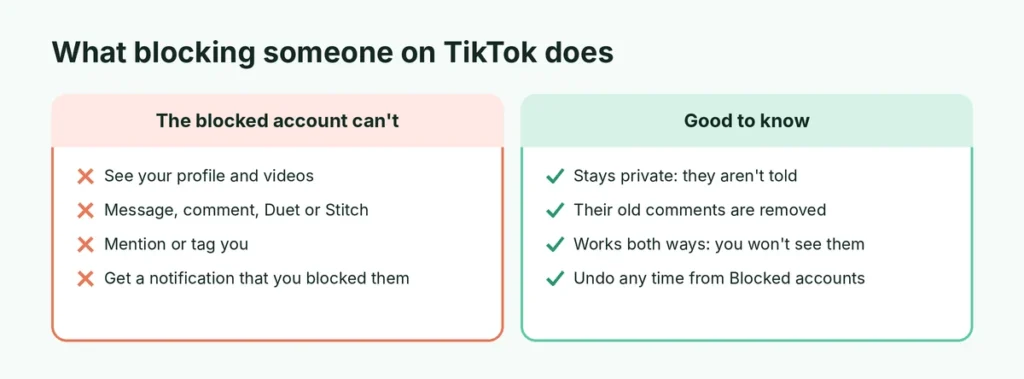
What happens when you block someone on TikTok
| The blocked person… | Yes or no |
|---|---|
| Is told they’ve been blocked | No, TikTok doesn’t notify them |
| Can see your profile and videos | No, your profile appears unavailable to them |
| Can message you | No, messages fail to send |
| Can comment, like, Duet or Stitch your videos | No |
| Can mention or tag you | No |
| Keeps their old comments on your videos | No, they’re removed |
| Can still see your content if they’re logged out or use another account | Possibly, see below |
Blocking also works in reverse: you won’t see their videos, comments or live streams either.
Method 1: Block someone from their profile
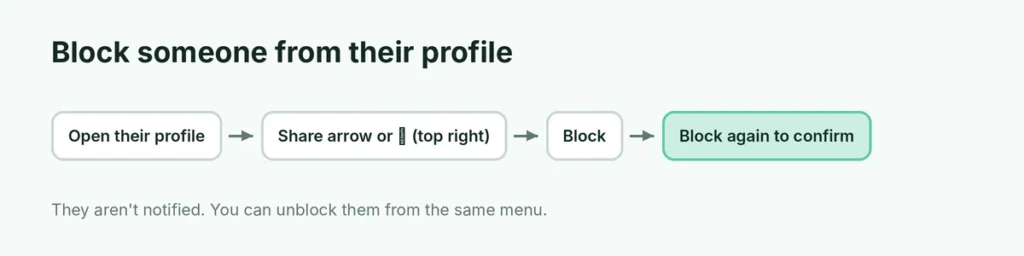
This works on iPhone and Android.
- Open TikTok and go to the person’s profile. Tap their username on a video or comment, or search for it.
- Tap the share arrow (or the ⋯ icon) in the top-right corner of their profile.
- Tap Block.
- Tap Block again to confirm.
Their profile now shows that you’ve blocked them, with an Unblock button.
Block from a direct message
If someone is messaging you:
- Open the conversation in your Inbox.
- Tap their name or profile picture at the top to open their profile.
- Follow the steps above: share arrow or ⋯ → Block.
Method 2: Block many accounts at once from comments
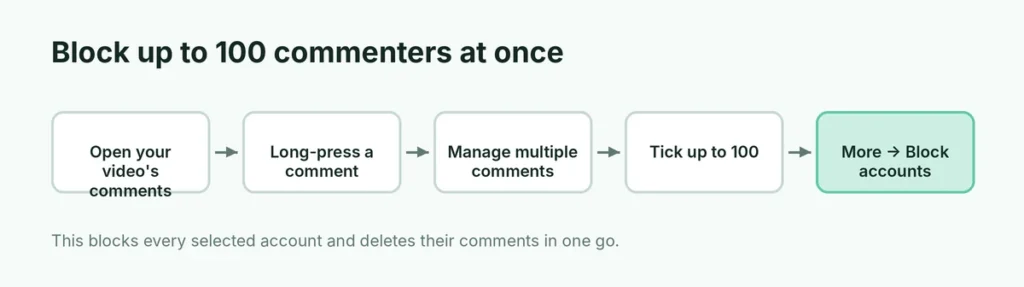
When a video attracts lots of rude or spam comments, blocking one by one is slow. TikTok lets you block in bulk:
- Open the video and tap the comments icon.
- Long-press one of the comments you want to deal with, or tap the edit icon at the top of the comments.
- Tap Manage multiple comments.
- Tick up to 100 comments.
- Tap More → Block accounts and confirm.
This blocks every account you selected and deletes their comments in one go. You can only do this on your own videos.
Method 3: Block someone on a computer
- Go to tiktok.com and sign in.
- Open the person’s profile.
- Click the ⋯ button next to their name.
- Click Block and confirm.
Block someone during a LIVE
If someone is causing trouble in your live stream:
- Tap their name or comment in the live chat.
- Tap Block (you may also see Mute or Remove from LIVE).
Mute silences them in the chat for a while, Remove kicks them out of that live stream, and Block stops them from contacting you at all. You can also set up keyword filters for LIVE comments in your LIVE settings before you go live.
Block someone from your followers list
To block a follower you no longer want:
- Go to your Profile and tap Followers.
- Tap the person’s name to open their profile.
- Tap the share arrow or ⋯ → Block.
If you just want them off your list without blocking, tap the ⋯ next to their name in your followers list and choose Remove this follower.
How to unblock someone on TikTok
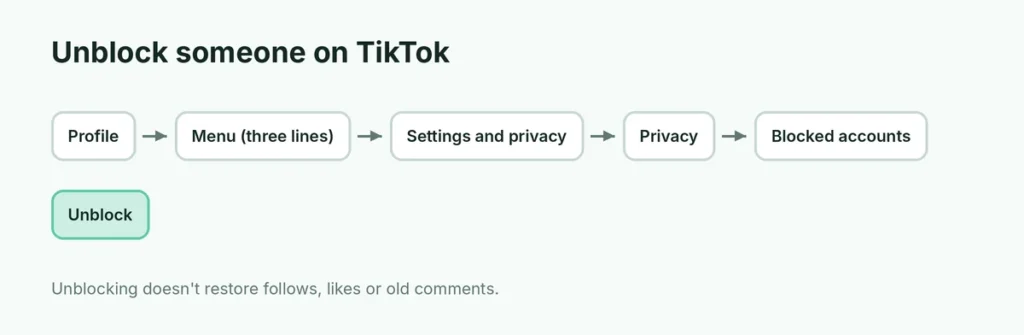
From their profile
Search for their username, open the profile and tap Unblock.
From your settings (if you can’t remember their name)
- Go to your Profile and tap ☰ (top right).
- Tap Settings and privacy.
- Tap Privacy → Blocked accounts.
- Tap Unblock next to the person.
Unblocking doesn’t automatically make you follow each other again, and their old comments and likes on your videos don’t come back.
Block vs. mute vs. restrict on other apps
If you use several social apps, it helps to know how TikTok’s options compare:
| App | Full block | Softer option |
|---|---|---|
| TikTok | Block | Remove follower, comment filters, private account |
| Block | Restrict (their comments are only visible to them), Mute | |
| Block | Unfollow, Take a Break | |
| Block | Mute chat, Archive |
TikTok’s tools are a little blunter than Instagram’s, so on TikTok a private account and comment filters do the job that “Restrict” does elsewhere.
Does blocking stop them seeing your comments on other videos?
Mostly, yes. Once blocked, the person generally can’t see your comments under other creators’ videos, and you won’t see theirs. If you both comment on a popular video, the app may still show a comment in rare cases, for example in a cached or shared view, but they can’t reply to you or interact with you.
Not ready to block? Softer options
Blocking cuts off all contact. If you just want less of someone, TikTok has quieter tools:
| Option | What it does | Where |
|---|---|---|
| Remove a follower | Takes them off your follower list; they can follow again unless your account is private | Your followers list → ⋯ next to their name |
| Limit who can message you | Stops messages from people you don’t follow back | Settings and privacy → Privacy → Direct messages |
| Filter comments | Hides comments with keywords you choose, or holds all comments for approval | Settings and privacy → Privacy → Comments |
| Make your account private | Only approved followers see your videos | Settings and privacy → Privacy → Private account |
| Not interested | Shows you less of a creator’s content | Long-press a video → Not interested |
Combining a private account with comment filters prevents most unwanted contact without blocking anyone.
Block or report?
Blocking protects you. Reporting tells TikTok that an account or video breaks its rules. If someone is harassing, threatening, impersonating you, or posting harmful content, do both:
- Report: on their profile, tap the share arrow or ⋯ → Report and choose the reason. For a specific video or comment, long-press it and tap Report.
- Block: follow Method 1.
Reports are anonymous; the person isn’t told who reported them. For serious threats, keep screenshots and contact local police as well.
Why a blocked person might still see your videos
A block applies to one TikTok account. Someone you’ve blocked could still:
- view your public videos while logged out, or from a different account,
- see videos other people reposted, Duetted or shared outside TikTok.
If that worries you, switch to a private account so only approved followers see your videos, and check Settings and privacy → Privacy for options on downloads, Duets and Stitches. Turning off Downloads stops people saving your videos to their phone.
How to tell if someone blocked you on TikTok
TikTok doesn’t send a notification, but there are signs:
- Their profile shows “This account is private” or “User not found” for you, while a friend can still see it.
- Your messages to them fail with a “Couldn’t send message” error.
- They disappear from your following list, and you can’t follow them again.
An account that has been deleted or banned looks similar, so these signs aren’t certain proof. Don’t try to work around a block by creating another account; it can count as harassment under TikTok’s rules.
What if they create a new account?
A block only covers the account you blocked. If the same person keeps coming back with new accounts:
- Block each new account as it appears.
- Report the accounts for harassment or ban evasion; TikTok can act against everyone behind them.
- Switch to a private account and turn on comment filters so new accounts can’t reach you.
- In Settings and privacy → Privacy, limit who can Duet, Stitch, mention and message you to Friends or No one.
Protecting a teenager’s account
If you’re a parent, TikTok’s Family Pairing lets you link your account to your teen’s and manage settings like direct messages, screen time and who can comment. Find it in Settings and privacy → Family Pairing. Blocking and reporting work the same way on teen accounts, and you can sit down together to review the Blocked accounts list.
A quick safety checklist
If you’re blocking someone because they made you feel unsafe, take a minute for these too:
- Screenshot threatening messages or comments before blocking, since some disappear afterwards.
- Report the account, not just block it.
- Check your other apps, such as Instagram, Snapchat and WhatsApp, and block the person there as well.
- Tell someone you trust, and contact local police if there are threats of violence.
The short version
Open the profile, tap the share arrow or ⋯, then Block. To block up to 100 commenters at once, long-press a comment → Manage multiple comments → More → Block accounts. Unblock any time from Settings and privacy → Privacy → Blocked accounts. The person isn’t notified, and if you want extra privacy, make your account private. Done with the app altogether? Here’s how to delete your Instagram account and the same steps for deleting your WhatsApp account.