By
By 
Dropped your iPhone 16 in the sink, or wondering whether you can take it to the pool? The iPhone 16 handles water much better than older iPhones, but “water-resistant” isn’t the same as waterproof, and water damage still isn’t covered by Apple’s warranty. Here’s what the rating really means and what to do if your phone gets wet.
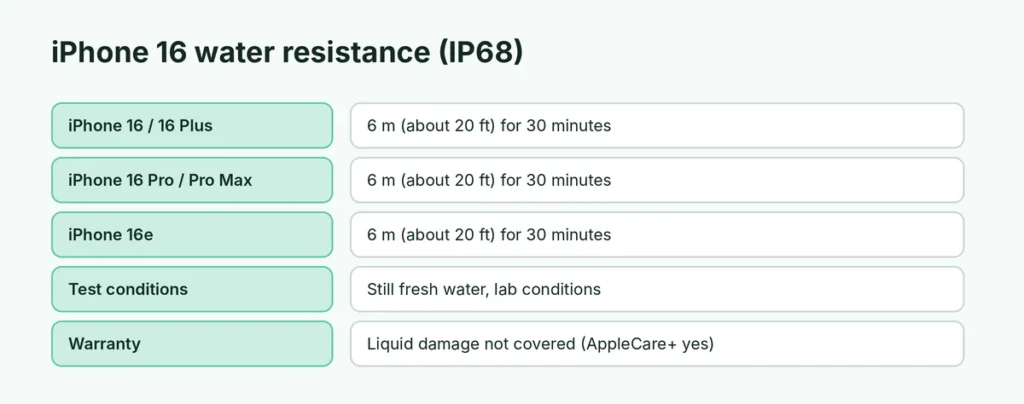
Short answer: no iPhone is fully waterproof, but every iPhone 16 model (iPhone 16, 16 Plus, 16 Pro, 16 Pro Max and 16e) is water-resistant to IP68: Apple rates it for a maximum depth of 6 meters (about 20 feet) for up to 30 minutes in fresh water, in lab conditions. It will usually survive rain, splashes and a quick drop in water, but avoid swimming, the ocean, hot tubs and showers, and remember liquid damage isn’t covered by the standard warranty.
Last updated: October 2026.
What does IP68 mean?
IP stands for “Ingress Protection”, an international standard (IEC 60529) for how well a device keeps out dust and water.
- The 6 means it’s fully protected against dust.
- The 8 means it’s protected against continuous immersion in water, under conditions set by the manufacturer. Apple’s condition is 6 meters for 30 minutes.
Apple lists the rating for every model on its water and dust resistance support page. The tests are done in still, fresh water at room temperature. Real life is harder: moving water, pressure from jumping in, salt, chlorine, soap and heat all make leaks more likely.
Water resistance of every iPhone 16 model
| Model | Rating | Maximum depth | Time |
|---|---|---|---|
| iPhone 16 | IP68 | 6 m (about 20 ft) | 30 minutes |
| iPhone 16 Plus | IP68 | 6 m (about 20 ft) | 30 minutes |
| iPhone 16 Pro | IP68 | 6 m (about 20 ft) | 30 minutes |
| iPhone 16 Pro Max | IP68 | 6 m (about 20 ft) | 30 minutes |
| iPhone 16e | IP68 | 6 m (about 20 ft) | 30 minutes |
So the iPhone 16 Pro Max is not more waterproof than the regular iPhone 16; they share the same rating. The same 6-meter rating applies to the iPhone 12 through iPhone 15 Pro models and to the newer iPhone 17 and iPhone 18 Pro models.
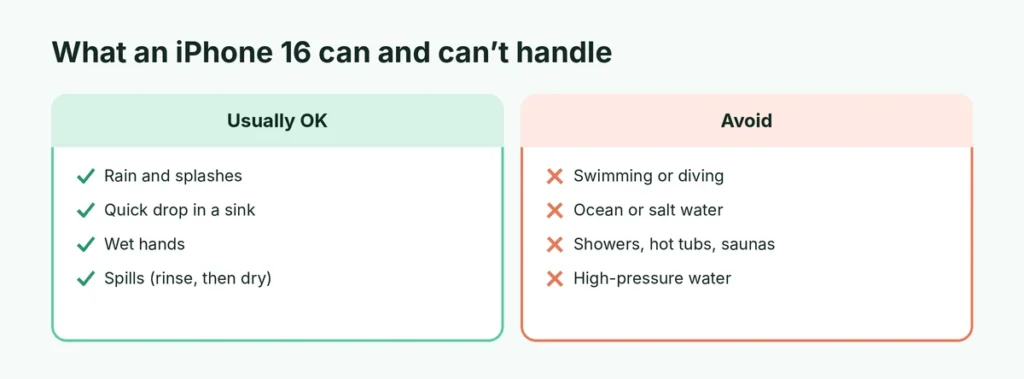
What the iPhone 16 can (and can’t) handle
| Situation | Usually OK? |
|---|---|
| Rain, splashes, wet hands | ✅ Yes |
| Quick drop in a sink, toilet or puddle | ✅ Usually, if you take it out fast and dry it |
| Spilled coffee, juice or soda | ⚠️ Rinse with clean water and dry; sticky liquids can damage the speaker and buttons |
| Underwater photos in a pool | ⚠️ Risky: chlorine and movement make leaks more likely |
| Swimming, diving, snorkeling | ❌ No |
| Ocean or salt water | ❌ No: salt corrodes the ports |
| Showers, saunas, hot tubs | ❌ No: steam and heat weaken the seals |
| High-pressure water (jets, waterslides) | ❌ No |
Water resistance wears off over time
The seals that keep water out aren’t permanent. Apple notes that water resistance can decrease as a result of normal wear. It gets weaker if:
- the phone has been dropped or the frame is bent,
- the screen or back glass has been cracked or replaced by an unofficial repair shop,
- the phone has been exposed to heat (a hot car, a sauna),
- it’s an older phone: a two-year-old iPhone is less water-resistant than a new one.
So treat any water contact as a risk, even on a new iPhone 16.
Is water damage covered by the warranty?
No. Apple’s one-year limited warranty does not cover liquid damage, even though the phone is water-resistant. Every iPhone has liquid contact indicators inside the SIM tray slot that turn red when they touch water, so Apple can tell.
If you have AppleCare+, liquid damage is covered under accidental damage protection, with a service fee. Check your coverage in Settings → General → AppleCare & Warranty.
Your iPhone 16 got wet: what to do now
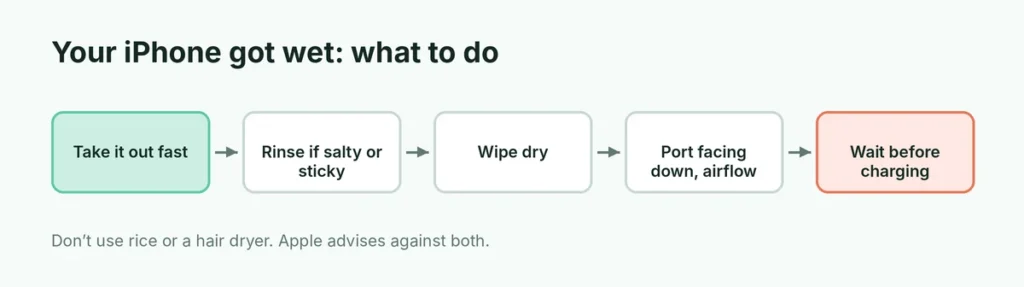
- Take it out immediately and switch off the case if it holds water.
- Rinse with clean tap water if it was in anything other than fresh water (soda, coffee, salt water, chlorinated water), then dry it.
- Wipe it dry with a soft, lint-free cloth.
- Tap the phone gently against your hand with the USB-C port facing down to let water drain out.
- Leave it to dry in a dry place with some airflow, for example in front of a fan blowing cool air.
- Don’t charge it until the port is completely dry, usually at least 30 minutes, and sometimes up to a day.
Don’t: put it in rice (Apple specifically advises against this; rice dust can get into the phone), use a hair dryer or heater, or push cotton swabs or paper into the port.
“Liquid Detected in USB-C Connector” alert
If you plug in a cable while the port is wet, your iPhone shows a Liquid Detected warning and stops charging through the cable to protect the phone. Unplug it and let it dry with the port facing down. You can still charge with MagSafe or another wireless charger in the meantime. Only tap Emergency Override if you urgently need to charge, as charging a wet port can cause corrosion.
Speaker sounds muffled after getting wet?
Water trapped in the speaker grilles often makes sound quiet or crackly. Let the phone dry with the speakers facing down; the sound usually returns within a few hours. If it doesn’t come back after a day, contact Apple Support.
Signs your iPhone has water damage
- The screen flickers, shows lines, or has dark or foggy patches.
- The camera lens fogs up on the inside.
- Speakers or microphones stay muffled after drying.
- Face ID stops working, or the phone restarts by itself.
- It won’t charge even after the port is dry.
If you see these, back up your iPhone right away (here’s how to back up an iPhone) and book a repair with Apple or an authorized service provider. If it freezes, a hard reset may get it responding long enough to back up.
Is the iPhone 16 waterproof enough for the beach or pool?
It will usually survive splashes at the beach or pool, but sand, salt and chlorine are its enemies. A cheap waterproof pouch (IPX8-rated) is a good idea if you want photos in the water. Rinse the phone with fresh water and dry it if it gets splashed with salt or pool water.
Does a case make the iPhone 16 waterproof?
Most cases don’t. Regular cases can actually trap water against the phone. Only cases sold as waterproof (rated IP68 or “IPX8” for a stated depth) seal the ports and buttons. If you often use your phone near water, at the beach, on boats or while fishing, a proper waterproof case or pouch is cheap protection.
Can I take underwater photos with an iPhone 16?
Technically the iPhone 16 can survive brief, shallow dips, but Apple doesn’t recommend using it underwater, and the touchscreen doesn’t respond properly when wet. Pressing the shutter underwater is unreliable, and any leak wouldn’t be covered by the warranty. For underwater photos, use a waterproof pouch or housing and the volume button as the shutter.
Is the iPhone 16 more water-resistant than older iPhones?
| Models | Rating |
|---|---|
| iPhone 7 and 8 | IP67, 1 m for 30 minutes |
| iPhone X, XR | IP67, 1 m for 30 minutes |
| iPhone XS, 11 | IP68, 2 m |
| iPhone 11 Pro, 11 Pro Max | IP68, 4 m |
| iPhone 12 to iPhone 16 | IP68, 6 m for 30 minutes |
The short version
The iPhone 16, 16 Plus, 16 Pro, 16 Pro Max and 16e are IP68 water-resistant, rated for 6 meters for 30 minutes in fresh water, but they aren’t waterproof. Rain and quick drops are usually fine; swimming, salt water, showers and hot tubs are not. Water damage isn’t covered by the standard warranty (AppleCare+ covers it as accidental damage). If your phone gets wet, rinse off anything sticky or salty, dry it with the port facing down, don’t use rice, and don’t charge until it’s dry.