By
By 
Daylight saving time ends in the US this Sunday, November 1, 2026, and the most common question every year is the same: will my phone change the time by itself, and will my alarm still go off on time? Usually yes, but this year there’s a twist. Several Canadian provinces have stopped changing their clocks, and Google has warned that some Android phones may show the wrong time. Here’s what happens, and the two settings to check before Sunday.
Short answer: yes, iPhones and Android phones change the time automatically when daylight saving time ends at 2:00 a.m. on Sunday, November 1, 2026, as long as automatic date and time is turned on. On iPhone, check Settings → General → Date & Time → Set Automatically. On Android, check Settings → Date & time → Set time automatically and Set time zone automatically. Your alarms follow the phone’s clock, so they’ll ring at the right time.
Applies to: iPhone (iOS 18 and later) and Android phones (Samsung, Google Pixel, Motorola and others) in the US and Canada, for the November 1, 2026 time change.
When do the clocks change?
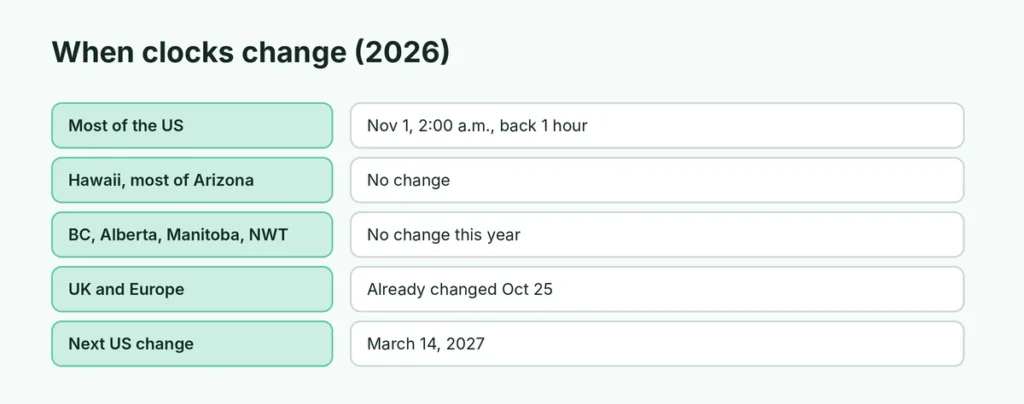
| Where | 2026 change | What happens |
|---|---|---|
| Most of the US | Sunday, Nov. 1, 2:00 a.m. | Clocks go back 1 hour to 1:00 a.m. |
| Hawaii, most of Arizona, US territories | No change | They don’t use daylight saving time |
| Most of Canada (Ontario, Quebec, Atlantic) | Sunday, Nov. 1, 2:00 a.m. | Clocks go back 1 hour |
| British Columbia, Alberta, Manitoba, Northwest Territories, parts of northwestern Ontario | No change this year | Stopping seasonal clock changes |
| UK and most of Europe | Already happened, Oct. 25 | Clocks went back 1 hour |
| Next US change | Sunday, March 14, 2027 | Clocks go forward 1 hour |
Will my phone change the time automatically?
Yes, in almost every case. Your phone doesn’t count the days itself: it uses your carrier’s network and a built-in list of time zone rules. When the change happens overnight, the clock simply jumps from 1:59 a.m. back to 1:00 a.m.
It only goes wrong when:
- Automatic time is turned off, often because you changed the time by hand once, for a game or while traveling.
- The phone hasn’t installed recent updates, so it doesn’t know about new time zone rules. This matters most in the Canadian provinces that stopped changing their clocks this year.
- Location access for time zones is off, so the phone guesses the wrong time zone.
Check your iPhone (1 minute)
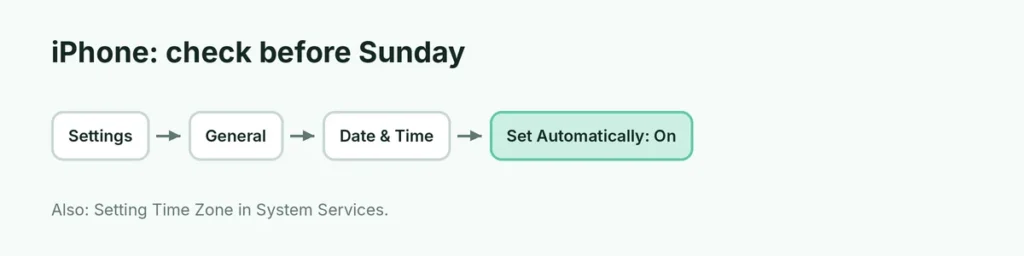
- Open Settings → General → Date & Time.
- Turn on Set Automatically.
- Go to Settings → Privacy & Security → Location Services → System Services and turn on Setting Time Zone.
- Install any waiting update in Settings → General → Software Update. If your iPhone says updated time zone information is available, restart it, and your Apple Watch too.
If Set Automatically is gray, a Screen Time passcode or a work profile is usually blocking it. See how to change the time on iPhone for the manual steps.
Check your Android phone (1 minute)
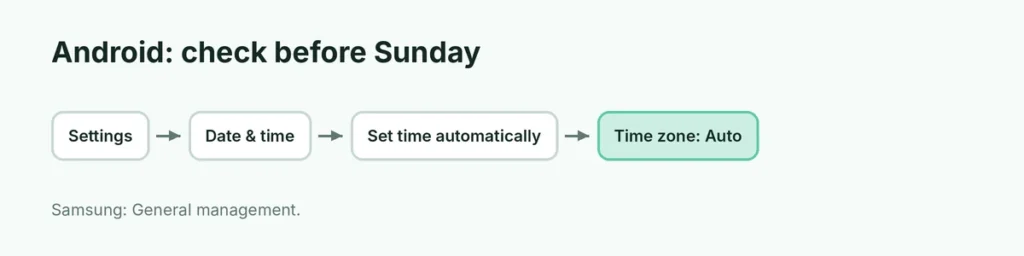
- Open Settings and search for Date & time.
- Turn on Set time automatically (sometimes called Automatic date and time).
- Turn on Set time zone automatically, and Use location to set time zone if you see it.
- Install any waiting system update and restart the phone.
On Samsung phones it’s under Settings → General management → Date and time. Menu names vary a little by brand and Android version.
Live in BC, Alberta, Manitoba or the NWT?
These regions are dropping the seasonal clock change. If your phone hasn’t received the new time zone rules, it may fall back an hour when it shouldn’t on November 1. Google said some Android and ChromeOS devices might not get the update in time.
If your clock is wrong on Sunday morning:
- Install any available update and restart.
- If it’s still wrong, turn off Set time zone automatically and choose your time zone by hand.
- If your phone no longer gets updates at all, turn off automatic time and set the time manually.
Check your Google Calendar too. Some appointments may appear an hour off; Google says it will fix most automatically, but the one-click fix banners only appear in Calendar on the web, not in the phone apps.
What about my alarms?
Phone alarms are set to a clock time, not a countdown, so a 7:00 a.m. alarm still rings at 7:00 a.m. on the new time. Two things to double-check:
- Alarms between 1:00 and 2:00 a.m. on Nov. 1, because that hour happens twice.
- Smart speakers, car clocks, ovens and older watches that don’t connect to the internet. These are the ones you’ll usually have to change by hand.
Related guides
- How to change the time on iPhone
- How to change the time zone on iPhone
- How to use 24-hour time on iPhone
The short version
Clocks go back one hour at 2:00 a.m. on Sunday, November 1, 2026, in most of the US and Canada. iPhones and Android phones change automatically if automatic date and time and automatic time zone are on, and alarms adjust with them. Install updates before Sunday, especially in BC, Alberta, Manitoba and the NWT, where clocks aren’t changing this year, and set the time manually if your phone gets it wrong.
Sources
- Apple Support: If you can’t change the time or time zone on your Apple device
- TechRepublic: Will your iPhone or Android change time on Nov. 1? Check these settings
- MobileSyrup: Google shares time fix ahead of the daylight saving time change
- FOX 5 New York: When daylight saving time ends in 2026