By
By 
AI writing tools are now built into the apps most people already use: Gmail, Google Docs, Word and Outlook. They can draft an email from one line, rewrite a paragraph more politely, or summarize a long thread. But what’s free and what needs a subscription is confusing, and the plans changed several times in 2025 and 2026. Here’s what each assistant does, what it costs, and how to get most of the benefit for free.
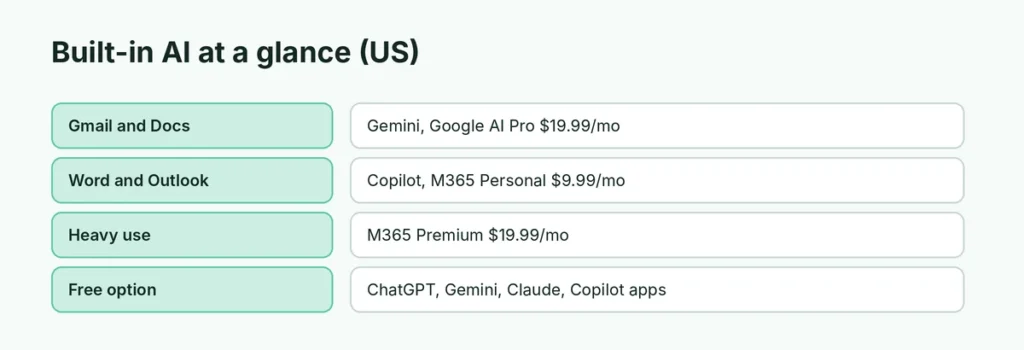
Short answer: the AI inside Gmail and Docs comes with Google’s paid AI plans (such as Google AI Pro, $19.99/month in the US) or a Google Workspace work account. The AI inside Word and Outlook comes with Microsoft 365 Personal ($9.99/month), Family or Premium ($19.99/month), with different usage limits. For free, use the ChatGPT, Gemini, Claude or Copilot apps alongside your documents and paste the result in.
Applies to: Gmail, Google Docs, Microsoft Word and Outlook with US plan prices as of October 2026. Prices and limits vary by country and change often; check the plan pages before buying.
What these assistants actually do
Built-in AI writing assistants mostly help with four jobs:
- Draft from a prompt: “Write a polite reply saying I’ll send the report on Monday.”
- Rewrite: make text shorter, more formal, friendlier or clearer.
- Summarize: turn a long email thread or document into a few points.
- Proofread: fix grammar and tone beyond the old spell-checker.
The advantage of having it built in is that the AI can see the email or document you’re working on, so you don’t have to copy and paste.
Built-in AI at a glance
| Google (Gmail, Docs) | Microsoft (Word, Outlook) | Free chatbot apps | |
|---|---|---|---|
| Name | Gemini, Help me write | Copilot | ChatGPT, Gemini, Claude, Copilot |
| Works inside your email or document | Yes | Yes | No, copy and paste |
| Personal plan price (US) | Google AI Pro $19.99/month | Microsoft 365 Personal $9.99, Premium $19.99/month | $0 |
| Work accounts | Most Google Workspace plans | Microsoft 365 Copilot for business | Varies |
| Usage limits | Depends on plan | Personal and Family limited; Premium much higher | Daily limits on free plans |
Google: Gemini in Gmail and Docs
In Gmail and Google Docs, Gemini appears as Help me write and a Gemini side panel that can summarize, draft and answer questions about your emails and files.
- Personal Gmail accounts: the full Gemini features in Gmail, Docs and Drive come with Google’s paid AI plans. Google AI Pro costs $19.99/month in the US. Google also sells a cheaper Google AI Plus plan in some countries; check what it includes in your country before buying.
- Work and school accounts: Google includes Gemini in most Google Workspace business plans. Ask your IT admin whether it’s turned on.
- Free: the Gemini app and gemini.google.com are free, but they don’t write inside your Gmail drafts.
Don’t want it? Here’s how to turn off Gemini.
Microsoft: Copilot in Word and Outlook
In Word and Outlook, Copilot can draft, rewrite and summarize from a button in the toolbar, and it can summarize email threads in Outlook.
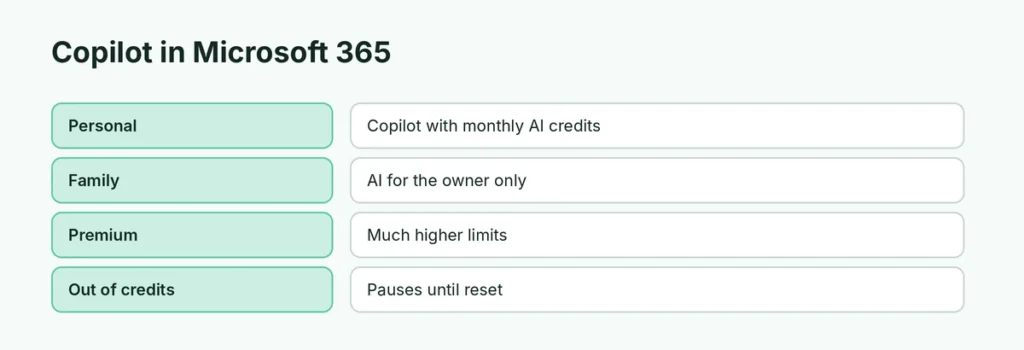
- Microsoft 365 Personal ($9.99/month or $99.99/year): includes Copilot in Word, Excel, PowerPoint and Outlook, with a monthly allowance of AI credits.
- Microsoft 365 Family ($12.99/month): includes Copilot, but only the subscription owner can use the AI features, not the other family members.
- Microsoft 365 Premium ($19.99/month): much higher AI usage limits, for people who use Copilot every day.
- Free: the Copilot app and copilot.microsoft.com are free and can write and rewrite text, but they don’t work inside your Word documents.
When you run out of AI credits, the feature pauses until your allowance resets. You can check what’s left under Services & subscriptions in your Microsoft account. If the button bothers you, here’s how to turn off Copilot in Word, and if it stops responding, see Copilot not working.
The free way to get most of the benefit
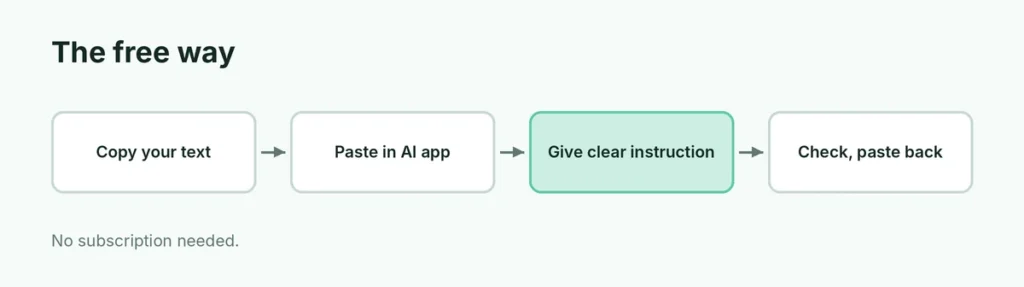
You don’t need a subscription to use AI for writing. The free plans of ChatGPT, Gemini, Claude and Copilot all write, rewrite and summarize well. The workflow is simple:
- Copy the email or paragraph you need help with.
- Paste it into the AI app with a clear instruction: “Rewrite this to be shorter and more polite” or “Summarize this in three bullet points”.
- Read the result, fix anything wrong, and paste it back.
Example: “Here’s an email from a customer. Write a friendly reply under 100 words that apologizes for the delay and says the order ships Friday.”
It takes a few more clicks than the built-in versions, but for occasional use that’s a small price compared with a monthly subscription. For better results, see how to use ChatGPT effectively, or start with how to use Copilot.
Is it worth paying?
Paying makes sense if:
- you write long emails or documents every day and the time saved adds up;
- you need the AI to work across your files, such as summarizing a folder of documents or answering questions about your inbox;
- you already pay for Microsoft 365 or Google storage, so the AI is a small extra;
- your employer pays for it (check before buying your own).
It’s usually not worth it if you only need help a few times a week. The free apps cover that. If you’re weighing ChatGPT’s paid plan instead, see ChatGPT Free vs Plus.
Use AI writing tools carefully
- Check every fact, name and number. AI tools sometimes state wrong details confidently, especially dates and figures.
- Make it sound like you. Edit the draft so it doesn’t read like generic AI text, especially in messages to people who know you.
- Watch what you paste in. Don’t paste passwords, ID numbers or confidential client information into any AI tool. Here’s how to stop AI chatbots training on your data.
- Follow your workplace or school rules. Some ban AI tools for certain work; if you use AI in schoolwork, here’s how to cite ChatGPT.
Related guides
- What is artificial general intelligence (AGI)?
- Claude vs ChatGPT
- How to use ChatGPT
The short version
AI writing help inside Gmail and Docs comes with Google’s paid AI plans or a Workspace work account, and inside Word and Outlook with Microsoft 365 Personal, Family (owner only) or Premium, at different usage limits. For occasional use, the free ChatGPT, Gemini, Claude and Copilot apps do the same jobs with a copy and paste. Pay only if you write every day, and always check what the AI writes.
Sources
- Microsoft: Copilot pricing plans for individuals
- Computerworld: Copilot AI comes to Microsoft 365 plans: everything you need to know
- Google Workspace: Google AI in Workspace
- Digital Applied: Google AI plans compared: Free vs Plus vs Pro vs Ultra (2026)