By
By 
WhatsApp backups to Google Drive fail more often than people realise, and usually silently. You only find out when you get a new phone and the restore screen shows a backup from months ago, or nothing at all. The cause is almost always one of a handful of settings, and since 2024 the most common one has been storage.
This guide covers each cause, how to check for it and how to fix it, then how to confirm your backup actually worked.
Short answer: the most common cause is a full Google account: WhatsApp backups on Android count toward your 15 GB of free Google storage, shared with Gmail and Google Photos. Free up space or turn off Include videos in Settings → Chats → Chat backup. Then check the right Google account is selected, allow WhatsApp to run in the background, and tap Back up on Wi-Fi with the charger connected.
Applies to: WhatsApp on Android phones (Samsung, Google Pixel, Motorola, Xiaomi and others) backing up to Google Drive, October 2026. iPhone backs up to iCloud instead.
Quick checklist
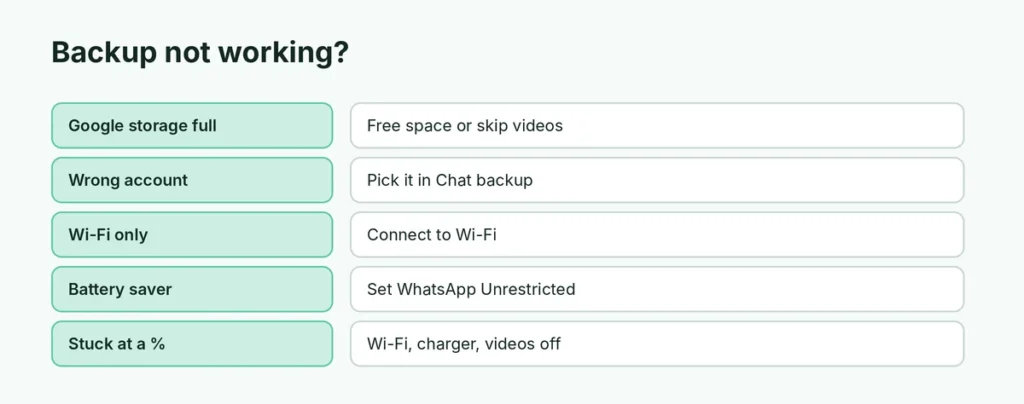
| Problem | Where to check | Fix |
|---|---|---|
| Google storage full | one.google.com/storage | Free space or exclude videos |
| Wrong or no Google account | Chat backup → Google account | Pick the right account |
| Wi-Fi only | Chat backup → Back up using cellular | Connect to Wi-Fi or allow cellular |
| Battery saver | Settings → Apps → WhatsApp → Battery | Set to Unrestricted |
| Phone storage full | Settings → Storage | Free space on the phone |
| Stuck at a percentage | Chat backup | Wi-Fi, charger, videos off |
First: check when your last backup actually happened
Open WhatsApp → Settings → Chats → Chat backup. At the top you’ll see Last backup with a date, time and size, plus the Google account it’s saved to.
If the date is today or yesterday, your backups are working. If it’s old, or it says “Never”, work through the causes below.
Cause 1: Your Google storage is full
Since 2024, WhatsApp backups on Android count toward your Google account storage. Every free Google account gets 15 GB, shared between Gmail, Google Photos and Drive. When it’s full, WhatsApp backups stop, and photos and emails often use up the space without you noticing.
Check it: open one.google.com/storage or the Google Drive app → Storage. If you’re at or near 15 GB, that’s your problem.
Fix it, in order of effort:
- Exclude videos from the backup. In Chat backup, turn off Include videos. Videos are usually the biggest part of a WhatsApp backup, and turning them off can shrink it dramatically.
- Delete large files inside WhatsApp. Settings → Storage and data → Manage storage shows the biggest files and chats. Clearing forwarded videos and old media here makes every future backup smaller.
- Free up space in Gmail or Google Photos. The same 15 GB covers everything.
- Buy more storage. A Google One plan adds space if you’d rather keep everything.
Cause 2: No Google account, or the wrong one
In Chat backup, check the Google account line. If it says none, or shows an old account you no longer use, tap it and choose the right one. If your account isn’t in the list, add it first in your phone’s Settings → Accounts.
Cause 3: Backup is set to Wi-Fi only
By default WhatsApp only backs up over Wi-Fi. If you’re mostly on mobile data, backups may never start. In Chat backup, turn on Back up using cellular if your data plan allows it, or make sure you connect to Wi-Fi regularly.
Cause 4: Your phone’s battery saver is stopping it
Automatic backups run in the background, usually at night. Many Android phones restrict background activity aggressively to save battery, which can kill a backup halfway through.
Allow WhatsApp to run in the background: go to Settings → Apps → WhatsApp → Battery and set it to Unrestricted. On Samsung phones, also check Settings → Battery → Background usage limits and make sure WhatsApp isn’t in Sleeping apps or Deep sleeping apps. The exact menu names differ between brands and Android versions.
Cause 5: The phone itself is almost full
WhatsApp prepares the backup on your phone before uploading it, so it needs free space on the phone too. If your phone storage is nearly full, free up at least as much space as the backup size shown in Chat backup.
Cause 6: Backup is stuck at a percentage
A backup that stops at the same percentage every time is usually choking on large videos or a weak connection.
- Connect to a stable Wi-Fi network and plug the phone in.
- Turn off Include videos and tap Back up again.
- If it completes, you can turn videos back on and let the next backup add them gradually.
Also make sure Google Play services is up to date in the Play Store, because WhatsApp uses it to talk to Google Drive.
About end-to-end encrypted backups
If you turned on End-to-end encrypted backup, your backup is protected by a password or 64-digit key that only you have. That’s good for privacy, but if you forget it, nobody can recover the backup, including WhatsApp and Google. Write the password down somewhere safe. If you’ve already lost it, turn encrypted backup off and on again with a new password and run a fresh backup straight away, so your next restore uses one you can open.
How to confirm the backup really worked
After fixing the cause, tap Back up in Chat backup and wait for it to finish. Then check two things:
- Last backup in WhatsApp shows today’s date and a sensible size.
- In the Google Drive app, go to Storage → Backups (or Menu → Backups). You should see a WhatsApp backup with today’s date.
Then set Back up to Google Drive to Daily so it keeps happening without you thinking about it.
Related guides
- Free cloud storage compared: Google Drive vs MEGA and more
- Android storage almost full? How to free space
- How to back up an Android phone
The short version
Most failed WhatsApp backups are a full 15 GB Google account. Turn off Include videos, clear big files in Manage storage, and make sure the right Google account is selected. Allow WhatsApp to run in the background, back up on Wi-Fi with the charger connected, and confirm the backup appears in Google Drive. A working backup is also your only real way to recover deleted WhatsApp messages. Setting up backups for the first time? Follow our guide on how to back up WhatsApp chats on Android.
Sources
- Google Help: How your Google storage works
- 9to5Google: WhatsApp backups will count toward Google account storage