By
By 
Spam calls have gone from an occasional annoyance to a daily interruption for many iPhone owners: fake car warranties, “your package couldn’t be delivered,” robocalls that hang up the moment you answer. The good news is that iOS 26 finally gave the iPhone a proper tool against them, and combined with a couple of free carrier and government options, you can cut spam calls down to almost nothing without missing the calls you actually want.
Short answer: go to Settings → Apps → Phone → Screen Unknown Callers and choose Ask Reason for Calling. Your iPhone then answers calls from numbers you don’t know, asks who’s calling and why, and only rings if you decide to take it. Add your carrier’s free spam filter, and register your number on your country’s Do Not Call list.
Last updated: October 2026. Written for iOS 26 and iOS 27. On iOS 25 and earlier, use Silence Unknown Callers instead.
Why you get so many spam calls
Most spam calls aren’t personal. Autodialers ring huge blocks of numbers in sequence, so a brand-new number can start getting calls within days. Others come from numbers leaked in data breaches, entered on online forms, or listed on shopping and contest sites. Many calls also use spoofing: the caller fakes the number shown on your screen, often to look local, like your own area code. That’s why blocking one number rarely helps and why tools that screen every unknown caller work much better.
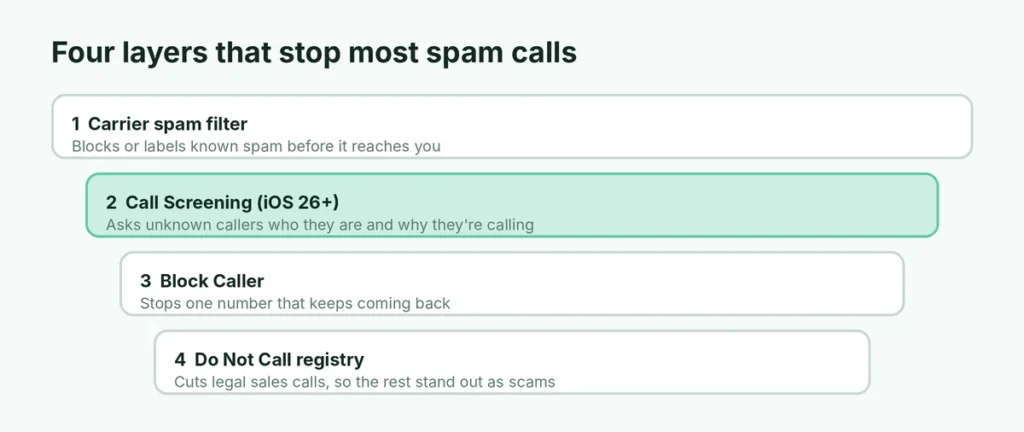
Your options at a glance
| Tool | What it does | Best for | Cost |
|---|---|---|---|
| Call Screening (Ask Reason for Calling) | iPhone answers unknown numbers and asks why they’re calling | Most people | Free, built in (iOS 26+) |
| Silence unknown callers | Unknown numbers go straight to voicemail without ringing | Maximum quiet | Free, built in |
| Block a number | Stops one specific number | Repeat callers | Free, built in |
| Carrier spam filter | Your carrier flags or blocks known spam numbers | Extra layer | Free basic tier on major US carriers |
| Do Not Call registry | Tells legitimate telemarketers not to call | Sales calls | Free |
| Call blocking apps | Use large shared spam databases | Heavy spam | Free and paid |
You don’t need all of them. Call Screening plus your carrier’s free filter handles most spam for most people.
Method 1: Turn on Call Screening (the best option)
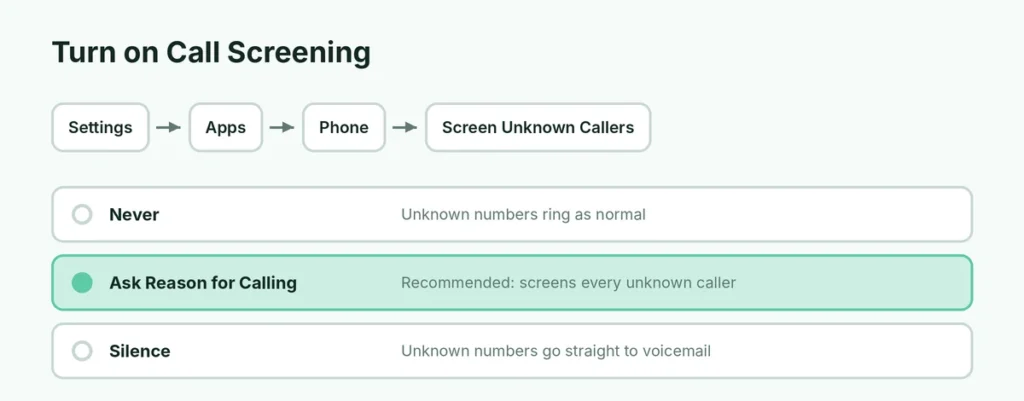
Call Screening arrived in iOS 26 and works on every iPhone that can run it. It doesn’t need Apple Intelligence.
- Open Settings.
- Tap Apps, then Phone.
- Scroll to Screen Unknown Callers.
- Choose Ask Reason for Calling.
How Call Screening works
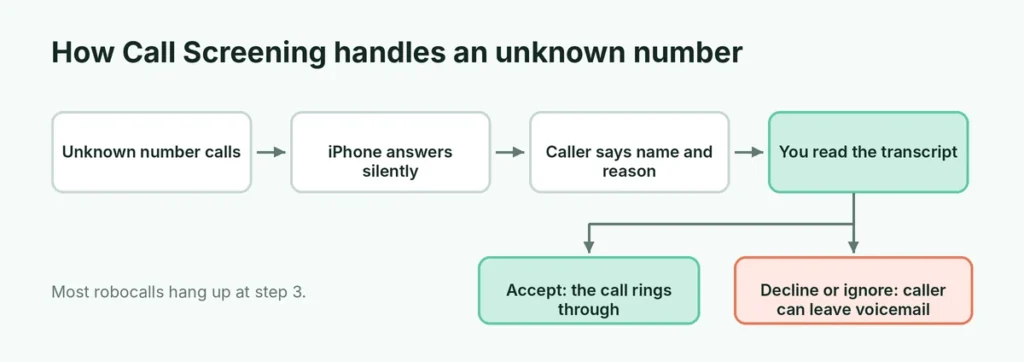
When a number that isn’t in your contacts calls you:
- Your iPhone answers silently and an automated voice asks the caller for their name and reason for calling.
- You get a quiet alert while this happens. Your phone doesn’t ring yet.
- When the caller answers, you see a live transcript of what they said on your screen.
- You decide: tap to accept the call or reject it. If you do nothing, the caller can leave a voicemail.
Robocalls and most scammers simply hang up when asked to explain themselves, so you never hear about them. A real caller, like a delivery driver or a doctor’s office calling from an unknown number, gets through with a clear message such as “This is Sarah from Dr. Patel’s office about your appointment.”
Numbers saved in your Contacts are never screened, and neither are numbers you’ve recently called or ones that appear in your Messages or Mail in a way iOS recognizes. Add important numbers to Contacts so they always ring through.
Method 2: Silence unknown callers completely
If you want total quiet and you rarely get important calls from new numbers, choose Silence instead.
- Go to Settings → Apps → Phone → Screen Unknown Callers.
- Choose Silence.
Calls from unknown numbers go straight to voicemail without ringing, and appear in your recent calls list. The risk is obvious: a school, hospital or new client calling from an unknown number won’t ring either, so check your voicemail regularly.
On iPhones still running iOS 25 or earlier, the equivalent setting is called Silence Unknown Callers and lives in Settings → Phone.
Method 3: Block a specific number
For one persistent number:
- Open the Phone app and go to Recents (or the calls list).
- Tap the info (i) button next to the number.
- Scroll down and tap Block Caller, then Block Contact.
Blocked numbers can’t call, message or FaceTime you. You can see and remove them in Settings → Apps → Phone → Blocked Contacts.
Blocking works well for a specific person or company, but most spam calls use a different, often spoofed, number each time, so blocking alone won’t keep up.
Method 4: Use your carrier’s free spam filter
Your mobile carrier sees spam traffic across millions of customers and can flag or block it before it reaches you. In the US, the big three all have a free tier:
- AT&T: ActiveArmor
- Verizon: Call Filter
- T-Mobile: Scam Shield
Download your carrier’s app from the App Store and turn on spam blocking or the highest spam filter level that doesn’t block calls you want. In the UK, Canada and Australia, check your carrier’s website for its call-blocking or scam-protection options; many offer one free.
Calls your carrier labels as “Spam Risk” or “Scam Likely” are almost never worth answering.
Method 5: Add your number to the Do Not Call list
Do Not Call registries won’t stop scammers, who ignore the law, but they do cut down legitimate sales calls, which makes the remaining calls easier to recognize as scams.
| Country | Registry |
|---|---|
| United States | National Do Not Call Registry: donotcall.gov |
| United Kingdom | Telephone Preference Service (TPS): tpsonline.org.uk |
| Canada | National Do Not Call List (DNCL): lnnte-dncl.gc.ca |
| Australia | Do Not Call Register: donotcall.gov.au |
Registration is free. In the US, if you still get sales calls after 31 days, you can report them through the registry.
Method 6: Use a call-blocking app
If you still get a lot of spam, a dedicated app can check incoming calls against a large database of reported spam numbers.
- Install a call-blocking app you trust from the App Store. Check recent reviews and the privacy section of the App Store listing first.
- Go to Settings → Apps → Phone → Call Blocking & Identification.
- Turn on the app.
Some of these apps want access to your contacts or ask for a subscription for full protection. With Call Screening built in since iOS 26, many people find they no longer need one.
Spam texts and voicemail too
Spam calls often come with spam texts. In Settings → Apps → Messages, turn on Screen Unknown Senders (called Filter Unknown Senders on older versions). Messages from unknown numbers move to a separate list without notifications.
To report a spam text in the US, UK and many other countries, forward it to 7726 (it spells SPAM on a keypad). Your carrier uses these reports to block spam numbers.
How to recognize a scam call
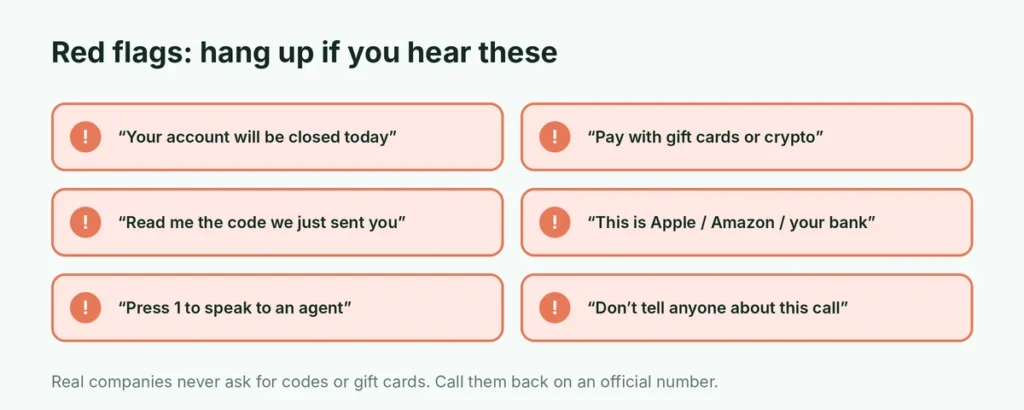
Even with screening on, some scam calls get through, often because the caller sounds convincing. Common warning signs:
- Urgency or threats: “Your account will be closed today,” “There’s a warrant for your arrest,” “Your Social Security number has been suspended.”
- Requests for unusual payment: gift cards, cryptocurrency, wire transfers or payment apps.
- Asking you to confirm personal details they should already have, such as your date of birth or account number.
- A caller pretending to be Apple, Amazon, your bank or a government agency who reached you out of the blue.
- Pressure to stay on the line or not to tell anyone.
Real organizations don’t operate this way. If you’re unsure, hang up and contact the company using a number from its official website or your card.
What never to do with a spam call
- Don’t press any number to “speak to an operator” or “be removed from the list.” It confirms your number is active and often leads to more calls.
- Don’t say “yes” to questions like “Can you hear me?” Hang up instead.
- Don’t call back missed calls from unknown international numbers. Some scams charge high fees for returned calls.
- Never share a verification code. No real bank, Apple or carrier employee will ask you to read out a code sent to your phone.
If a call claims to be from your bank, hang up and call the number on the back of your card.
Let Live Voicemail help
When an unknown caller leaves a message, Live Voicemail shows a real-time transcript on your screen while they’re speaking, so you can pick up if it turns out to be important. It’s on by default; check Settings → Apps → Phone → Live Voicemail. Together with Call Screening, it means you can safely ignore unknown numbers without worrying about missing something urgent.
Report spam calls
Reporting helps authorities and carriers track spam operations:
- US: report robocalls and scams at reportfraud.ftc.gov.
- UK: report scam calls to Action Fraud or your carrier.
- On your iPhone, rejecting a screened call or using Block Caller also helps your device recognize patterns.
The short version
Turn on Settings → Apps → Phone → Screen Unknown Callers → Ask Reason for Calling so your iPhone screens unknown numbers for you. Add your carrier’s free spam filter, register on your country’s Do Not Call list, block repeat offenders, and turn on Screen Unknown Senders for texts. Never press buttons or share codes on a suspicious call. If you also want to stop people tracking a lost phone, see how to turn off Find My iPhone correctly, and keep your browsing private with our guide to deleting search history on iPhone. Want to call someone without showing your own number? Here’s how to block your number when calling.