By
By 
For years the answer to “can I schedule a WhatsApp message?” was “not without a third-party app”. That is finally changing. In October 2026, WhatsApp started rolling out a built-in “send later” option to beta testers, first on Android and then on iPhone. This guide explains how the new feature works, how to check whether you have it, and what to do safely until it reaches your phone.
Short answer: yes, WhatsApp now has a built-in scheduler, but it’s still in beta. Type your message, tap and hold the Send button, pick a date and time between 10 minutes and two weeks ahead, and confirm. If holding Send does nothing, the feature hasn’t reached your account yet: save the message as a draft and set a phone reminder instead.
Applies to: WhatsApp on Android (beta 2.26.40.7 and later) and iPhone (beta testers since October 22, 2026). Not yet on WhatsApp Web or the desktop app. Last checked October 2026.
Does WhatsApp have a schedule message option?
Yes, but not for everyone yet. As of October 2026:
- Android: rolling out to some beta testers since October 12, starting with WhatsApp beta 2.26.40.7, with a wider release expected in the following weeks.
- iPhone: rolling out to some TestFlight beta testers since October 22.
- WhatsApp Web and desktop: not confirmed yet.
If the feature hasn’t reached you, there’s nothing you can switch on to get it early, other than joining the beta (covered below).
How the new scheduler works
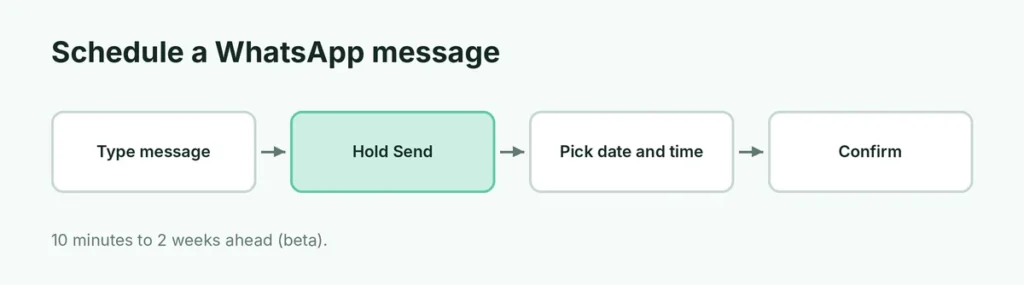
- Open the chat and type your message.
- Tap and hold the Send button instead of tapping it.
- Choose the date and time you want it sent.
- Confirm. The message waits and is sent automatically at that time, even if WhatsApp is closed.
For a photo or video, choose it from the gallery picker as usual, then tap and hold Send.
What you can schedule: text, links, and one photo or video per message.
How far ahead: at least 10 minutes from now and up to two weeks ahead.
Where to find scheduled messages: open the chat’s info screen. Scheduled messages are listed there, and you can delete one before it goes out. The other person gets no notice that a message was scheduled, or that you deleted one.
In groups: the message goes only to people who were in the group when you scheduled it.
| Details | |
|---|---|
| How | Tap and hold Send, pick date and time |
| Earliest | 10 minutes from now |
| Latest | Two weeks ahead |
| What | Text, links, one photo or video per message |
| Manage | Chat info screen (or group info) |
| Recipient sees | A normal message at the scheduled time |
How to check if you have it
Update WhatsApp from the Play Store or App Store, open any chat, type something and press and hold the Send button. If a time picker appears, you have it. If nothing happens, the rollout hasn’t reached you yet.
Getting the feature early with the beta
You can join the WhatsApp beta from the Play Store: open WhatsApp’s page, scroll down to Join the beta, and tap Join. Beta versions can have bugs, and the beta program is often full, in which case the button doesn’t appear. Even inside the beta, features reach people gradually.
Until it arrives: safe ways to send on time
Set a reminder for yourself. Write the message now, leave it unsent in the chat (WhatsApp keeps drafts), and set a phone alarm or Google Calendar reminder for the moment you want to send it. It’s one tap when the reminder goes off, and it’s completely safe.
Use an Event for group plans. If you’re scheduling a meeting or call in a group, WhatsApp’s Event option (tap the attach icon in a group chat) sends reminders to everyone automatically.
WhatsApp Business away and greeting messages. If you run a business, the WhatsApp Business app can send automatic greeting and away messages. These aren’t scheduled one-off messages, but they cover the “reply when I’m offline” need.
Why to avoid third-party scheduler apps
Apps that claim to schedule WhatsApp messages usually work by taking control of your screen through Android’s Accessibility permission, opening WhatsApp and pressing Send for you. That means:
- they can see everything on your screen, including other apps and passwords;
- your phone often has to be unlocked at the scheduled time;
- automating WhatsApp with unofficial tools can break WhatsApp’s terms.
With an official scheduler weeks away for most people, it isn’t worth giving any app that much access.
Related guides
- How to see if someone blocked you on WhatsApp
- How to message on WhatsApp without saving the number
- WhatsApp Web vs the desktop app
The short version
WhatsApp is rolling out a built-in scheduler: type your message, tap and hold Send, and pick a time between 10 minutes and two weeks ahead. As of October 2026 it’s reaching Android and iPhone beta testers first. Until you have it, save the message as a draft and set a reminder, and avoid scheduler apps that ask for Accessibility access. If you use WhatsApp on a computer too, see our WhatsApp Web login guide. Wondering whether another app does it better? Read our honest Telegram vs WhatsApp comparison.