By
By 
Claude and ChatGPT are two of the most popular AI assistants, and both cost the same $20 a month for their main paid plan. So which one should you use? They’re closer than ever, but they still have different strengths. Here’s a fact-based comparison of features, pricing and the tasks each one handles best, so you can decide for yourself.
Disclosure: this article was researched and drafted with the help of AI tools, including Claude (made by Anthropic). To keep it fair, it sticks to published features and prices, and we recommend trying both free plans before paying for either.
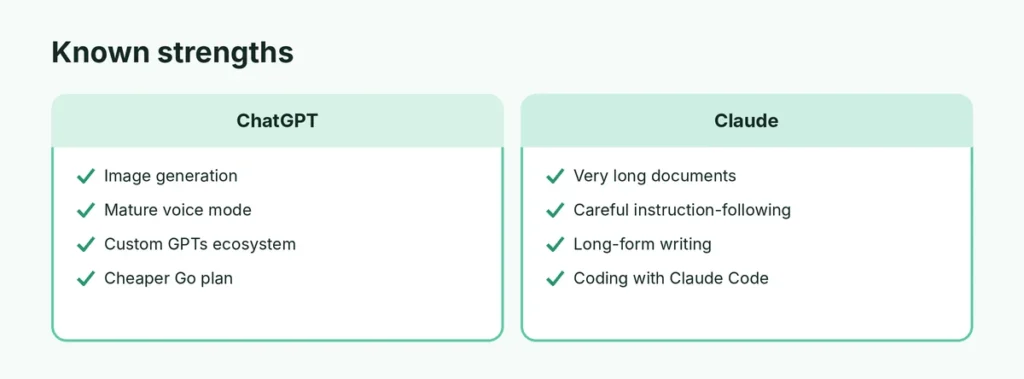
Short answer: both are excellent for everyday questions, writing and research. ChatGPT stands out for image generation, voice conversations, its very large ecosystem of custom GPTs and a cheaper Go plan. Claude is known for long-document work, careful instruction-following, writing style and coding, with a very large context window. The best choice depends on what you do most; many people use the free plans of both.
Last updated: October 2026. Prices are US prices and may change; check each company’s pricing page.
Claude vs ChatGPT at a glance
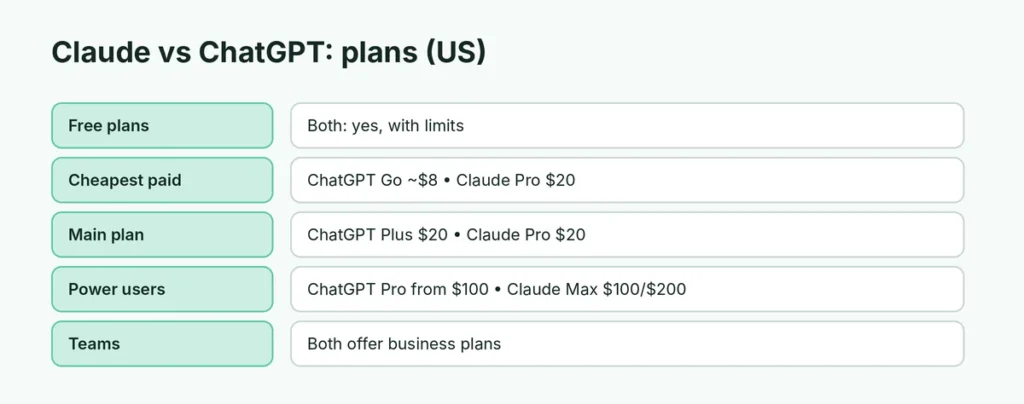
| ChatGPT (OpenAI) | Claude (Anthropic) | |
|---|---|---|
| Free plan | Yes | Yes |
| Cheapest paid plan | Go (about $8/month) | Pro ($20/month, or about $17/month billed yearly) |
| Main paid plan | Plus ($20/month) | Pro ($20/month) |
| Power-user plans | Pro (from $100/month) | Max ($100 or $200/month) |
| Image generation | ✅ Built in | ❌ Not built in (can analyze images) |
| Voice conversations | ✅ Advanced voice mode | ✅ Available, more limited |
| Web search | ✅ | ✅ |
| File and image upload | ✅ | ✅ |
| Very long documents | Good | Very strong (large context window) |
| Custom assistants | Custom GPTs and GPT Store | Projects and Skills |
| Coding tools | Codex | Claude Code |
| Desktop agent / task mode | ChatGPT Work | Claude Cowork and Claude in Chrome |
Writing and editing
Both write well. Users and reviewers often describe Claude’s writing as more natural and better at following detailed style instructions, while ChatGPT is very versatile and fast at producing many variations. The difference matters most for long, careful pieces such as reports, essays and documentation.
Tip: whichever you use, give clear instructions about audience, tone and length. Here’s a beginner’s guide on how to use ChatGPT with a prompt formula that works for both.
Long documents and research
Claude supports a very large context window (how much text it can consider at once), which helps when you upload long PDFs, contracts, codebases or books. ChatGPT also handles large files, with limits that vary by plan. If you regularly work with very long documents, Claude has an edge; for quick research with sources, both offer web search.
Images, voice and multimedia
This is ChatGPT’s clearest advantage:
- Image generation: ChatGPT can create and edit images from text. Claude doesn’t generate images.
- Voice: ChatGPT’s voice mode is more mature for natural spoken conversation, language practice and hands-free use.
If you want an all-in-one assistant for pictures, voice and chat, ChatGPT is the more complete package.
Coding
Both are strong at programming. Developers often choose Claude for large coding tasks and its Claude Code tool, while ChatGPT offers Codex and a wide set of integrations. For beginners learning to code, either is a great tutor.
Getting tasks done (agents)
Both companies now offer modes that complete multi-step tasks for you:
- ChatGPT Work can research, build documents, spreadsheets and presentations, and take actions with your approval. Here’s how ChatGPT Work replaced agent mode.
- Claude offers Cowork for desktop tasks with your files, plus Claude in Chrome for browser tasks, on paid plans.
These features change quickly, so check what’s included in each plan before you subscribe.
Free plans compared
Both free plans are genuinely useful:
- ChatGPT Free: chat, web search, file uploads, voice and limited image generation, with daily limits.
- Claude Free: chat, file uploads and web search, with usage limits that reset every few hours.
Start with both free plans for a week using your real tasks. You’ll quickly see which one you prefer.
Privacy and data
Both let you control whether your chats are used to improve their models, and both offer temporary or incognito chats. Settings change over time, so review them yourself: here’s how to stop ChatGPT, Gemini and Claude training on your data.
Reliability
Both services occasionally have outages or errors at busy times. If ChatGPT isn’t working for you, see ChatGPT not working: quick fixes and how to fix the ChatGPT network error.
Mobile and desktop apps
Both offer apps for iPhone, Android, Mac and Windows, plus web versions:
- ChatGPT apps are known for their voice mode, camera input (point your phone at something and ask about it) and image creation on the go.
- Claude apps support chat, file and photo uploads, Projects, and voice input, and sync with the web version.
If you mainly use AI on your phone, try both apps for a few days; the feel of the app matters as much as the model.
Accuracy: double-check both
Both assistants can make mistakes, invent sources or sound confident when they’re wrong. For anything important (health, money, legal, news), ask for sources, open them, and verify. Neither should be your only source for decisions.
Using them at work
Both offer business plans with admin controls and promises not to train on your company’s data by default:
- ChatGPT Business and Enterprise
- Claude Team and Enterprise
Check your company’s policy before pasting work documents into a personal AI account.
Example prompts to test both
Try the same prompts in each free plan and compare:
- “Summarize this document in 5 bullet points for a busy manager: [paste text].”
- “Rewrite this email to sound friendlier but still firm: [email].”
- “Explain how a 401(k) works with a simple example.”
- “Plan a 3-day budget trip to Chicago with a daily schedule.”
- “Find the bug in this code and explain the fix: [code].”
Which should you choose?
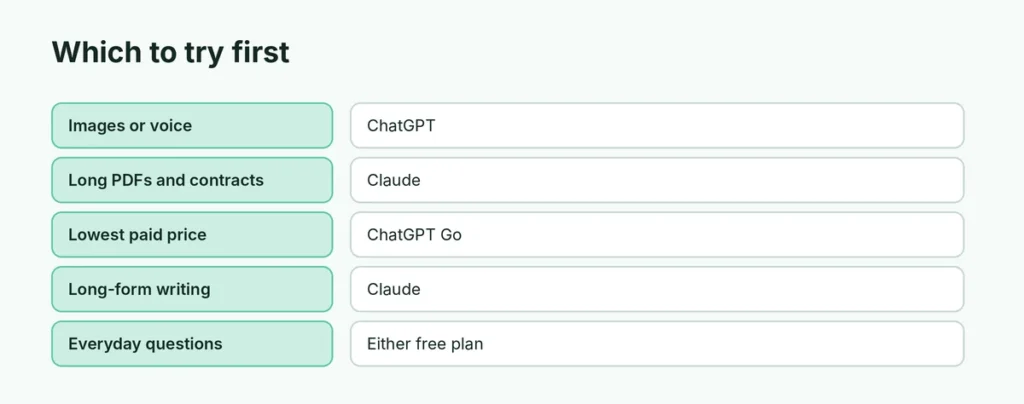
| If you mostly… | Try first |
|---|---|
| Create images or want voice chat | ChatGPT |
| Want the cheapest paid plan | ChatGPT Go |
| Work with long documents, contracts or books | Claude |
| Write long-form content with a specific style | Claude |
| Write code in large projects | Both are strong; many developers prefer Claude |
| Want a huge library of custom assistants | ChatGPT |
| Just ask everyday questions | Either free plan |
Can you use both?
Yes, and many people do: the free plans of both cost nothing, and using each for its strengths is often the best approach. If you subscribe to one and later change your mind, here’s how to cancel a ChatGPT subscription.
The short version
Claude and ChatGPT are both top-tier AI assistants at the same $20/month for their main plans. ChatGPT is the more all-round package, with image generation, strong voice mode, custom GPTs and a cheaper Go plan. Claude is favored for long documents, careful writing and coding. Try both free plans with your own tasks before paying, and choose the one that fits how you work.