By
By 
Signed up for ChatGPT Plus to try it, and now you want to stop paying? Canceling is quick, but there’s one catch that confuses many people: you have to cancel in the same place you subscribed. A subscription bought in the iPhone app can’t be canceled on chatgpt.com, and deleting the app doesn’t stop the charges.
Short answer: if you subscribed on the website, go to chatgpt.com → your profile icon → Settings → Account (or Subscription) → Manage → Cancel plan. If you subscribed in the iPhone app, cancel in Settings → your name → Subscriptions → ChatGPT. If you subscribed on Android, cancel in the Play Store → profile → Payments & subscriptions → Subscriptions → ChatGPT. You keep paid features until the end of the current billing period.
Last updated: October 2026. Applies to ChatGPT Go, Plus and Pro personal plans.
Step 1: Find out where you subscribed
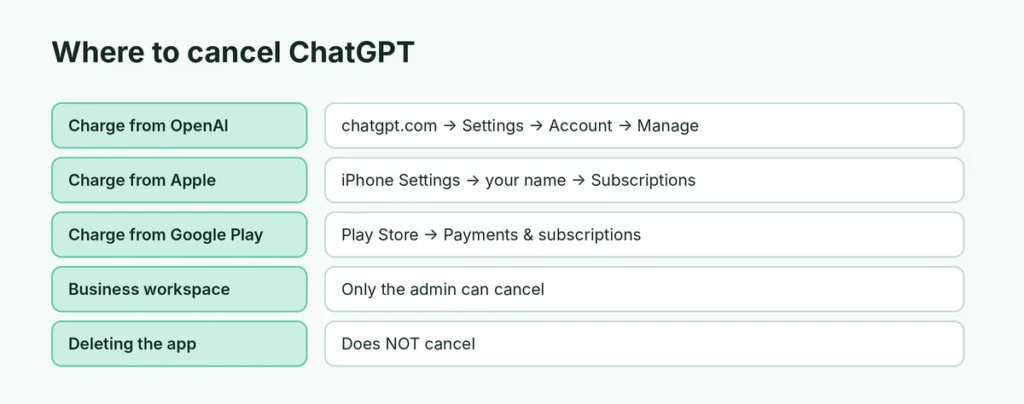
Look at the receipt email or your bank statement:
| The charge says | You subscribed through | Cancel in |
|---|---|---|
| OpenAI / ChatGPT | The website (chatgpt.com) | ChatGPT settings |
| Apple.com/bill | The iPhone or iPad app | iPhone Settings → Subscriptions |
| Google / Google Play | The Android app | Google Play Store |
If you’re not sure, open ChatGPT on the web → Settings → Account: subscriptions billed through Apple or Google usually show a note telling you to manage them there.
Cancel on the website (chatgpt.com)
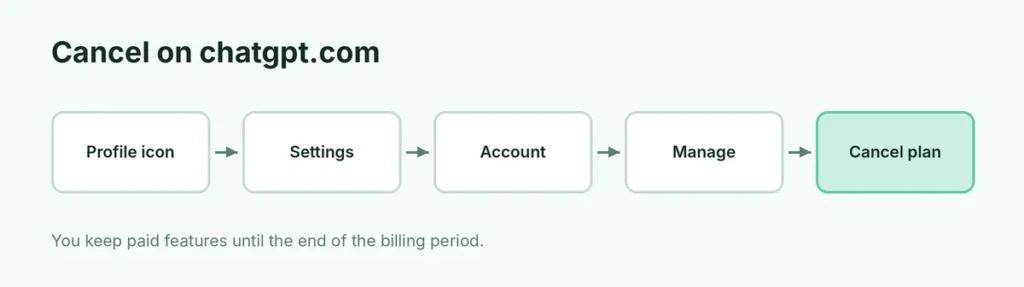
- Sign in at chatgpt.com on a computer or phone browser.
- Click your profile icon (bottom left on desktop) → Settings.
- Open Account (on some layouts Subscription or Plan).
- Click Manage next to your plan.
- Click Cancel plan (or Cancel subscription) and confirm.
You’ll see the date your paid access ends. Menu names change from time to time, but Settings → Manage → Cancel is always the path.
Cancel on iPhone or iPad (App Store)
- Open the Settings app.
- Tap your name at the top → Subscriptions.
- Tap ChatGPT.
- Tap Cancel Subscription and confirm.
You can also open the App Store → tap your profile picture → Subscriptions.
Cancel on Android (Google Play)
- Open the Play Store.
- Tap your profile picture → Payments & subscriptions → Subscriptions.
- Tap ChatGPT → Cancel subscription, and follow the prompts.
Make sure you’re signed in to the same Google account you used to subscribe.
What happens after you cancel?
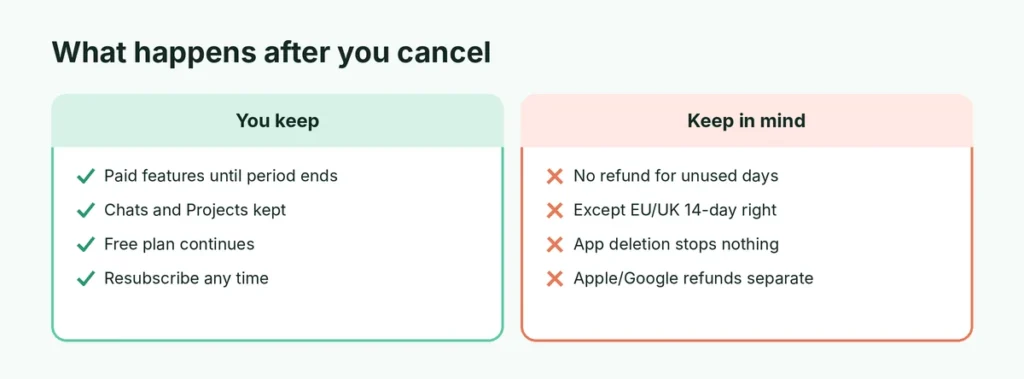
- You keep Go, Plus or Pro features until the end of the billing period you’ve paid for.
- Then your account switches to the free plan. You can keep using ChatGPT for free.
- Your chats, Projects, custom GPTs and saved memories stay in your account.
- You can resubscribe any time from the upgrade or plans page.
Can I get a refund?
OpenAI’s general policy is that subscriptions aren’t refunded for the unused part of a month. There are exceptions:
- In the EU, UK and some other regions, consumer laws may give you a right to cancel within 14 days of buying.
- Subscriptions bought through Apple or Google follow their refund rules: request one at reportaproblem.apple.com or through the Play Store’s order history.
- If you were charged by mistake or twice, contact OpenAI through the Help chat on chatgpt.com.
Cancel before the renewal date
Subscriptions renew automatically. Cancel at least a day before your renewal date to avoid being charged for another month. You’ll find the date in your plan details or receipt email.
Downgrade instead of canceling
If you mainly want to pay less:
- ChatGPT Go is a cheaper paid plan with higher limits than the free plan, available in many countries.
- On a Pro plan, you can switch down to Plus in Settings → Account → Manage.
Not sure what you lose on the free plan? Here’s a comparison of ChatGPT Free vs Plus.
Business and Team workspaces
If you use ChatGPT through a Business (formerly Team) or Enterprise workspace, only the workspace owner or admin can cancel or remove seats, in the workspace’s Admin or Billing settings. Leaving the workspace doesn’t cancel your company’s bill.
Delete your ChatGPT account entirely
Canceling stops payments but keeps your account. To delete everything, go to Settings → Data Controls (or Account) → Delete account. This is permanent: your chats are erased and you usually can’t reuse the same email for a new account right away. Cancel any App Store or Google Play subscription first, because deleting the account doesn’t stop those charges.
Before you go, you can also export your chats: Settings → Data Controls → Export data.
Cancel ChatGPT Pro or a yearly plan
Pro plans cancel the same way as Plus: Settings → Account → Manage → Cancel plan on chatgpt.com, or through Apple or Google if you subscribed there. If you paid annually, canceling stops the renewal; you keep access until the end of the paid year, and OpenAI generally doesn’t refund the rest of the year except where local law requires.
Cancel the free trial before you’re charged
If you started a promotional trial or discounted first month, cancel before the date shown in your plan details, or you’ll be charged the normal price. Canceling right after starting a trial usually still lets you use the paid features until the trial ends.
Turn off auto-renew without losing access now
Canceling is turning off auto-renew: you won’t lose anything immediately. A good habit is to set a calendar reminder a few days before any renewal so you can decide whether to keep paying.
Check your subscriptions regularly
Small subscriptions add up. Every few months, review:
- iPhone: Settings → your name → Subscriptions.
- Android: Play Store → profile → Payments & subscriptions → Subscriptions.
- Bank or card statement: look for recurring charges you forgot about.
Still being charged after canceling?
- Check the date: a charge just before you canceled is for the current month.
- Check for two subscriptions: one on the web and one through Apple or Google.
- Check other accounts: you may have subscribed with a different email or Google account.
- Contact OpenAI support (Help → chat) with your receipt, or Apple/Google if billed by them.
Thinking of switching AI assistant?
If you’re canceling to try a different assistant, here’s an honest Claude vs ChatGPT comparison, and if ChatGPT stopped working for you, see ChatGPT not working: quick fixes.
The short version
Cancel where you subscribed: chatgpt.com → Settings → Account → Manage → Cancel plan for web subscriptions, iPhone Settings → your name → Subscriptions for the iPhone app, and Play Store → Payments & subscriptions for Android. Deleting the app doesn’t cancel anything. You keep paid features until the period ends, your chats are kept, and refunds are generally not given except where local law or Apple/Google rules allow.