 By
Deleting a Google account removes everything connected to it: Gmail, Google Drive files, Google Photos, YouTube channel, contacts, calendar and any apps or movies you bought on Google Play. It can’t be undone after a short time, so it’s worth doing carefully. Here’s how to delete a Google account on a computer, Android or iPhone, what to save first, and the safer alternatives.
Short answer: go to myaccount.google.com → Data & privacy → scroll to More options → Delete your Google Account. Sign in again, read the warnings, tick both boxes and click Delete Account. Download your data first with Google Takeout (takeout.google.com). If you only want to remove the account from a phone, use Settings → Passwords & accounts → Remove account instead; that doesn’t delete it.
Last updated: November 2026.
Delete vs. remove: which do you need?
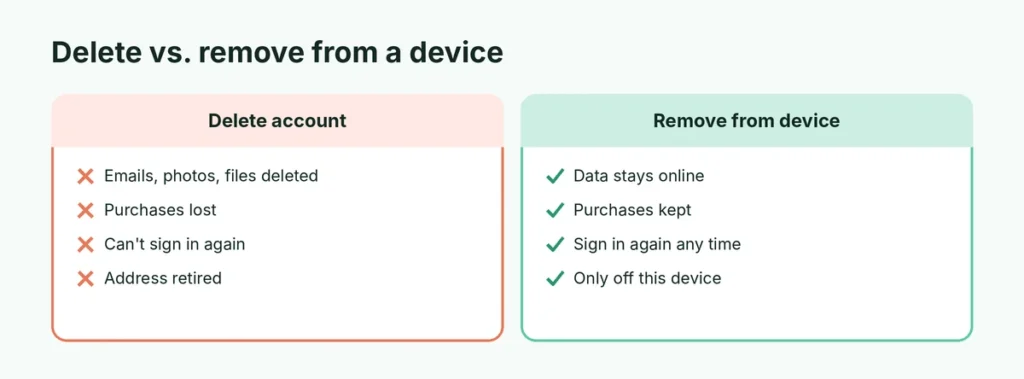
These two are often confused:
| Delete Google account | Remove account from a device | |
|---|---|---|
| Account still exists | No | Yes |
| Emails, photos, files | Deleted | Kept online |
| Can sign in again later | No (after a short time) | Yes |
| Where to do it | myaccount.google.com | Phone or computer settings |
If you’re selling or giving away a phone, you only need to remove the account (and factory reset the Android phone). If you’re done with Google for good, delete it.
Before you delete: save what you need
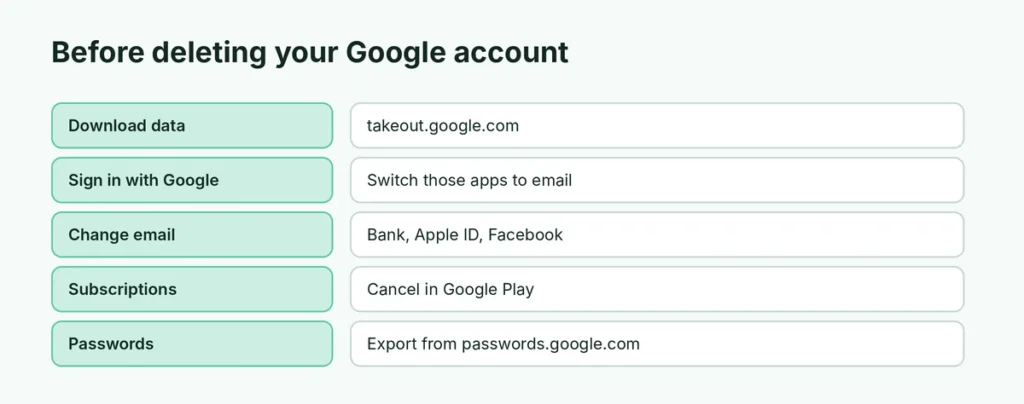
- Download your data: go to takeout.google.com. Everything is selected by default. Click Next step, choose how to receive the files (download link by email, or add to Drive, Dropbox or OneDrive) and click Create export. Big accounts can take hours or days.
- Move your photos: Google Photos can be a large part of the export. Check the download works before deleting.
- Update sign-ins: many apps and websites use “Sign in with Google”. Change those accounts to an email and password first, or you’ll be locked out of them.
- Change the email on important accounts: banks, Apple ID, Facebook, Amazon and others that send password resets to your Gmail.
- Cancel subscriptions: YouTube Premium, Google One and app subscriptions should be cancelled in Google Play → Payments & subscriptions.
- Android phone: if it’s your only Google account on an Android phone, you’ll need another account to download apps from the Play Store.
How to delete a Google account on a computer
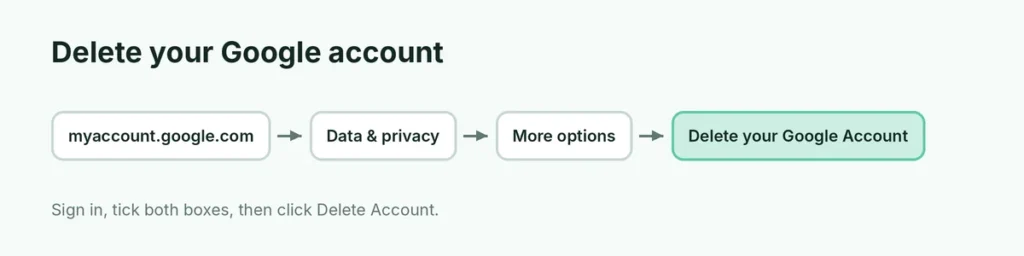
- Go to myaccount.google.com and sign in.
- Click Data & privacy in the left menu.
- Scroll down to More options and click Delete your Google Account.
- Sign in again to confirm it’s you.
- Read the list of what will be deleted. Click Download your data if you haven’t yet.
- Tick the boxes confirming you understand you’re still responsible for any pending charges and that you want to delete the account.
- Click Delete Account.
How to delete a Google account on Android
- Open Settings → Google → Manage your Google Account.
- Tap the Data & privacy tab.
- Scroll to More options → Delete your Google Account.
- Sign in, review the warnings, tick the boxes and tap Delete Account.
After deleting, the account is removed from your phone, and apps that used it will ask you to sign in with another account.
How to delete a Google account on iPhone
- Open the Gmail or Google app and tap your profile picture → Manage your Google Account. (Or open myaccount.google.com in Safari.)
- Tap Data & privacy → Delete your Google Account.
- Sign in, review the list, tick the boxes and tap Delete Account.
What happens when you delete a Google account
- All data is deleted: Gmail, Drive, Photos, Calendar, Contacts, Keep, YouTube channel and history.
- Purchases are lost: apps, movies, books and music bought on Google Play.
- Subscriptions stop: but you’re still responsible for any charges already owed.
- Your Gmail address is retired forever: nobody can use it again, including you.
- Your Android phone may not get app updates from the Play Store until you add another account.
- Chrome sync stops: saved passwords and bookmarks in your Google account are deleted. Export passwords first from passwords.google.com → Settings → Export passwords.
Can I recover a deleted Google account?
Possibly, but only for a short time. Go to accounts.google.com/signin/recovery and enter your email address. If the account was deleted recently, Google may offer to restore it. After that window, the data is permanently erased. Google doesn’t publish an exact number of days, so don’t count on recovery.
Delete only part of your Google account
You don’t have to delete everything. On myaccount.google.com → Data & privacy → Delete a Google service, you can delete only:
- Gmail: see how to delete only your Gmail account and keep YouTube and Photos.
- YouTube channel: removes videos, comments and playlists, but keeps the Google account.
- Other services listed on that page.
You can also delete your activity (search history, YouTube history, location history) under Data & privacy → History settings, and turn on Auto-delete.
How do I delete a Google account from someone else’s phone?
If you signed in on a friend’s phone or a shop’s computer and forgot to sign out:
- Go to myaccount.google.com → Security → Your devices → Manage all devices.
- Tap the device you don’t use anymore → Sign out.
This signs you out remotely, without deleting your account. Then change your password for extra safety: here’s how to change your Gmail password.
How do I delete a child’s Google account?
If you manage your child’s account with Family Link:
- Open the Family Link app and select your child.
- Tap Controls → Account settings → Account info → Delete account.
- Follow the steps and confirm.
Why can’t I delete my Google account?
- Work or school account: only the organization’s administrator can delete it. Ask your IT team.
- Wrong account: check the profile picture at the top of the page. You might be signed in to another account.
- Can’t sign in: you must recover the account first with Forgot password?
- Active subscription or Play balance: cancel subscriptions and use up or accept losing any Play balance before deleting.
Is deleting a Google account the same as deactivating it?
Google doesn’t offer a “deactivate” option like Facebook does. Your choices are:
- Leave the account unused: after two years of no activity, Google may delete it under its inactive account policy.
- Sign out everywhere and stop using it.
- Delete it permanently.
If you want to pause an account but keep its data, just sign out and leave it. Signing in once in a while keeps it active.
Related guides
- How to delete only Gmail and keep your Google account
- How to recover a Google account without your phone or email
The short version
Download your data from takeout.google.com, update apps that use “Sign in with Google”, and cancel subscriptions. Then go to myaccount.google.com → Data & privacy → Delete your Google Account, sign in, tick the boxes and click Delete Account. To keep the account but take it off a phone, use Remove account in your phone’s settings instead.