By
By 
A laptop battery that lasted six hours when new often manages three or four after a couple of years. That’s normal chemistry, not a fault, but the way most people use their laptops makes it happen much faster than it needs to. The two biggest causes are heat and keeping the battery at 100% all the time. Here’s why batteries wear out, how to check your battery’s health on Windows, and the settings that slow the wear down.
Short answer: lithium-ion batteries lose capacity with every charge cycle, and lose it faster when they’re hot or held at full charge. To slow it down, keep the laptop cool and off soft surfaces, turn on your laptop maker’s battery charge limit (often 80%) if it’s usually plugged in, and avoid regularly running it down to 0%. Check health with powercfg /batteryreport on Windows.
Applies to: Windows laptops with lithium-ion or lithium-polymer batteries, including Lenovo, ASUS, Dell and HP models, October 2026. Setting names vary by model.
Why laptop batteries lose capacity
Laptops use lithium-ion (or lithium-polymer) batteries. Every time a battery charges and discharges, small chemical changes inside it permanently reduce how much energy it can hold. This is measured in charge cycles: one full cycle means using 100% of the battery’s capacity, whether in one go or as two 50% top-ups.
Most laptop batteries are designed to keep around 80% of their original capacity after several hundred cycles; the exact number depends on the model and how it’s treated. After that the decline continues, and you notice shorter battery life.
Battery University, a long-running battery research resource, puts it simply: environmental conditions such as heat, not cycling alone, decide how long a lithium-ion battery lasts.
What wears a battery out fastest
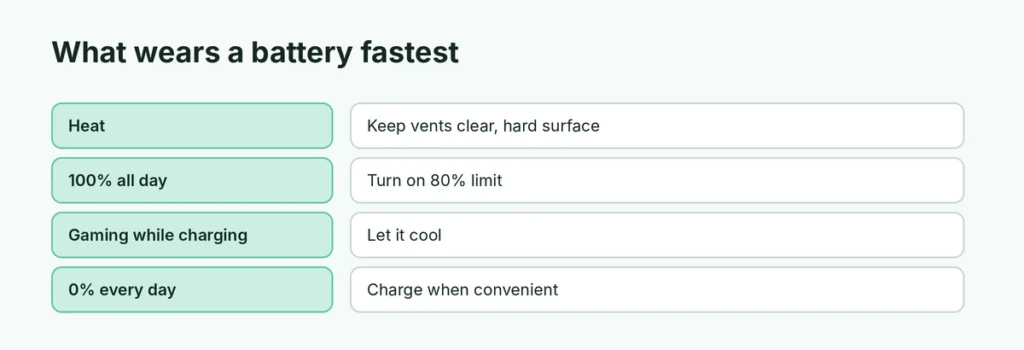
| Habit | Effect on the battery | Better habit |
|---|---|---|
| Using it on a bed or lap | Blocks vents, raises heat | Use a desk or a hard surface |
| Plugged in at 100% all day | Holds the battery at high voltage | Turn on an 80% charge limit |
| Gaming while charging for hours | Heat plus full charge | Let it cool, use a stand |
| Running to 0% every day | Deep discharges add stress | Charge whenever convenient |
| Leaving it in a hot car | Fast, permanent capacity loss | Keep it in the shade or take it with you |
Heat: the biggest enemy
High temperature speeds up the chemical wear more than anything else. Common causes:
- Using the laptop on a bed, pillow or lap, which blocks the air vents.
- Gaming or video editing for hours while charging.
- Leaving it in a hot car or in direct sun.
- Dust-clogged fans that can’t cool properly.
Lenovo recommends charging between 50°F and 95°F (10°C to 35°C). In hot weather, keeping the vents clear and the laptop on a hard surface makes a real difference.
Sitting at 100% all day
A battery kept at full charge for long periods, especially while warm, wears faster than one kept around the middle. Many people use their laptop plugged in all day, which keeps it at 100% for hours. That’s why manufacturers added charge limits.
Running it down to 0% regularly
Deep discharges add stress. Lithium-ion batteries have no memory effect, so partial charges are fine and you don’t need to “train” the battery with full drains. Charge whenever it’s convenient.
Check your battery health on Windows
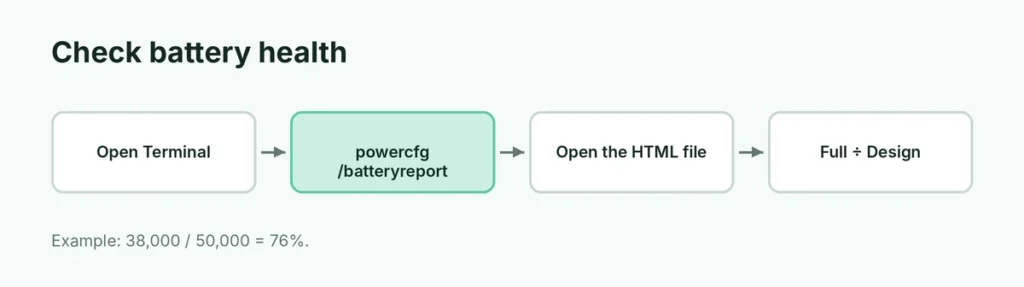
Windows can create a detailed battery report:
- Right-click the Start button and open Terminal (or Command Prompt).
- Type powercfg /batteryreport and press Enter.
- Windows saves a file called battery-report.html and shows where. Open it in your browser.
Look at two numbers near the top: Design capacity (what the battery held when new) and Full charge capacity (what it holds now). Divide the second by the first to get the battery’s health.
Example: 38,000 mWh ÷ 50,000 mWh = 76% health. A brand-new laptop can briefly show slightly more than 100%, which is normal. The report also shows the cycle count on many laptops.
How to slow battery wear

1. Turn on a charge limit if you’re usually plugged in
Most major laptop brands include a setting that stops charging before 100% to protect the battery. It’s usually in the manufacturer’s own app:
- Lenovo: Lenovo Vantage, battery settings, Conservation mode. It keeps the charge at about 75% to 80% while plugged in.
- ASUS: MyASUS, Device Settings, Battery Care Mode (Battery Health Charging). Balanced Mode stops at 80%, and Maximum Lifespan Mode stops at 60%.
- Dell: Dell Power Manager or Dell Optimizer, with a mode for laptops that are primarily plugged in.
- HP: Battery Health Manager, in HP’s app or the BIOS on many models.
The exact names vary by model. If you use the laptop plugged in most of the day, this is the single most useful setting. Switch back to full charge before a long trip.
2. Keep it cool
Use it on a desk or a hard surface, keep the vents clear, and have the fans cleaned if the laptop gets hot quickly. A simple laptop stand improves airflow. A slow, hot laptop is often working too hard in the background; see how to fix a slow computer on Windows 11.
3. Charge in the middle
Keeping the battery roughly between 20% and 80% is gentler than living at the extremes. You don’t have to be strict about it; it’s a habit, not a rule.
4. Store it at half charge
If you won’t use the laptop for weeks, leave it at about half charge, switched off, somewhere cool.
5. Reduce the load on the battery
Lower screen brightness, close heavy browser tabs and update drivers. Chrome is a common culprit: here’s what to do when Chrome uses too much RAM, and how to update drivers on Windows 11.
When to replace the battery
Replacement makes sense when the battery no longer lasts long enough for how you use it, usually below about 60–70% health, or immediately if you see swelling: a raised keyboard, a trackpad that doesn’t click properly, or a case that no longer closes flat.
A swollen battery is a safety risk. Stop using the laptop on battery and have it replaced by an authorized service center, with an original or good-quality battery for your exact model.
Related guides
- How to turn on a Lenovo laptop
- Blue screen on Windows 11? How to fix it
- How to update drivers on Windows 11
The short version
Laptop batteries wear with every charge cycle, and heat and sitting at 100% speed that up. Check health with powercfg /batteryreport, turn on your laptop maker’s charge limit (Lenovo Conservation mode, ASUS Balanced Mode) if it’s usually plugged in, keep it cool and off soft surfaces, and replace it right away if it swells.
Sources
- Battery University: BU-808: How to prolong lithium-based batteries
- ASUS Support: Introduction to ASUS Battery Health Charging
- Lenovo User Guide: Stay energetic (battery charging)
- How-To Geek: How to generate a battery health report on Windows