By
By 
Those little check marks next to your WhatsApp messages tell you exactly how far a message got: sent, delivered or read. Once you know what each one means, you’ll stop wondering whether someone is ignoring you or just hasn’t opened the app yet.
Short answer: one gray tick means your message was sent but not yet delivered to the other phone. Two gray ticks mean it was delivered to their phone. Two blue ticks mean they read it. A small clock icon means it hasn’t been sent yet, usually because you’re offline.
Last updated: October 2026. Applies to WhatsApp on Android, iPhone, Web and desktop.
WhatsApp check marks at a glance
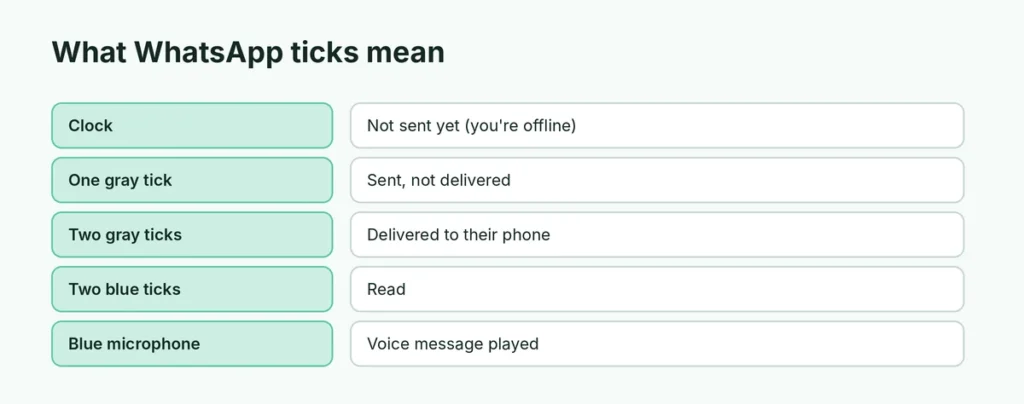
| Icon | Meaning |
|---|---|
| 🕓 Clock | Not sent yet (waiting for your internet connection) |
| ✓ One gray tick | Sent to WhatsApp’s servers, not delivered yet |
| ✓✓ Two gray ticks | Delivered to the recipient’s phone |
| ✓✓ Two blue ticks | Read (opened) by the recipient |
| 🎤 Blue microphone | Voice message was played |
What does one check mark mean on WhatsApp?
One gray tick means your message left your phone and reached WhatsApp’s servers, but hasn’t reached the other person’s phone yet. Common reasons:
- their phone is switched off or out of battery,
- they have no internet connection (or Wi-Fi only and they’re out),
- they haven’t opened WhatsApp in a while and the phone restricts background apps,
- they blocked you (in that case it never changes).
If it stays on one tick for a few hours, it’s usually just their phone or connection. If it stays on one tick for days and their profile photo and last seen have disappeared, see how to know if someone blocked you on WhatsApp.
What do two gray ticks mean?
Two gray ticks mean the message was delivered to the other person’s phone. They may have seen the notification, but haven’t opened the chat yet, or they’ve turned off read receipts (see below).
What do two blue ticks mean?
Two blue ticks mean the person opened the chat and the message was shown on their screen. That’s what people call “left on read”.
Blue ticks don’t always mean they read every word carefully: the message is marked read as soon as the chat is open.
Why do I never see blue ticks from someone?
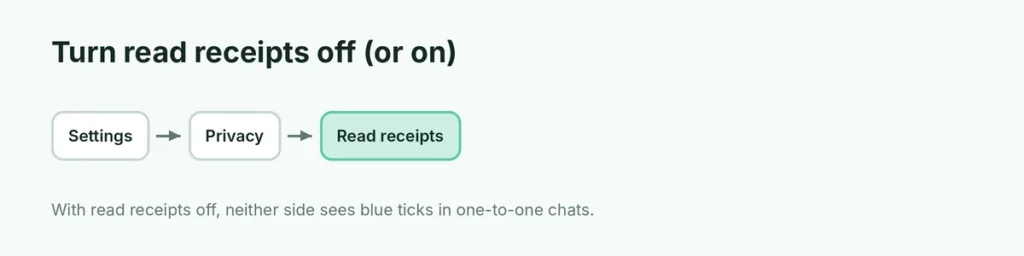
If a contact’s messages always stay at two gray ticks, they’ve probably turned off Read receipts:
Settings → Privacy → Read receipts → off.
When read receipts are off, neither side sees blue ticks for one-to-one chats. Two exceptions: group chats and voice messages still show read and played status.
How ticks work in group chats
In groups, the ticks show the status for everyone:
- Two gray ticks = delivered to all members.
- Two blue ticks = all members have read it.
To see who has read it so far, press and hold your message → tap Info (Android: tap the ⓘ icon; iPhone: swipe left on the message). You’ll see Read by and Delivered to lists with times.
Voice messages: blue microphone
For voice messages, the microphone icon turns blue when the recipient plays it. This works even if they’ve turned read receipts off.
Check exactly when a message was read
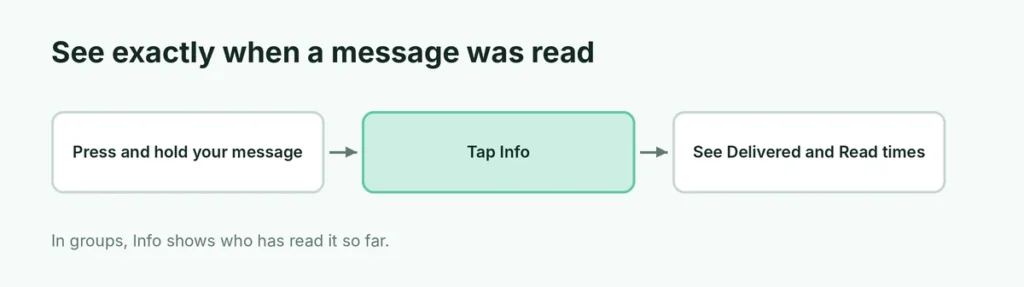
- Press and hold your sent message (on iPhone you can also swipe left on it).
- Tap Info.
- You’ll see Delivered and Read (or Played) with exact times.
Why does my message show a clock?
The clock means WhatsApp hasn’t been able to send it yet. Check:
- Your internet: turn Wi-Fi or mobile data off and on.
- Airplane mode is off.
- WhatsApp isn’t restricted: on Android, Settings → Apps → WhatsApp → Mobile data → allow background data.
- Restart the phone if it stays stuck.
If WhatsApp Web shows the clock, the problem is usually the computer’s internet. Here’s how to fix WhatsApp Web not connecting or the QR code not scanning.
Ticks on WhatsApp Web and desktop
The ticks work exactly the same on WhatsApp Web and the desktop app. Opening a chat on the computer marks messages as read (blue ticks) just like on the phone. Here’s the complete WhatsApp Web login guide.
Can I read a message without sending blue ticks?
Turning off read receipts hides blue ticks in both directions. A few other ways people avoid “seen” without changing settings:
- Read the notification preview on the lock screen or notification shade without opening the chat.
- On Android, long-press the chat in the chat list to see a short preview.
Whatever you choose, remember the other person can still see two gray ticks, which tells them the message was delivered.
Why did my tick go from one to two when they were offline?
Delivery happens when their phone connects to the internet, even if they don’t open WhatsApp. So you may see two gray ticks while their “last seen” still shows an old time. That’s normal.
Ticks on photos, videos and documents
Media and files use the same ticks. A photo or video shows the clock while it uploads, then one tick, two ticks and blue ticks as it’s delivered and viewed. For View Once photos and videos, you’ll see Opened once the person has viewed it. Large videos on slow connections can stay on the clock for a while.
Ticks for status updates
Status updates don’t use ticks. Instead, open your status and swipe up (or tap the eye icon) to see who viewed it. If you’ve turned off read receipts, you won’t see who viewed your status either, and others won’t see that you viewed theirs.
Why did my message show two ticks, then go back to one?
This sometimes happens when a person’s phone reconnects or when you look at the chat on a different device (for example, WhatsApp Web) before it syncs. It usually corrects itself within a minute. If a message stays wrong, close and reopen WhatsApp.
Do ticks work the same on iPhone and Android?
Yes. The meaning is identical on WhatsApp for iPhone, Android, Web and desktop. The only differences are where you find Info (swipe left on the message on iPhone, or long-press and tap the ⓘ icon on Android) and how settings menus are arranged.
WhatsApp ticks vs. other apps
| App | Sent | Delivered | Read |
|---|---|---|---|
| One gray tick | Two gray ticks | Two blue ticks | |
| Facebook Messenger | Empty circle with tick | Filled circle with tick | Tiny profile photo |
| Telegram | One tick | (no separate delivered) | Two ticks |
| iMessage | “Delivered” label | “Delivered” | “Read” (if enabled) |
Quick reference
| Situation | What you’ll see |
|---|---|
| Their phone is off | One gray tick until it’s back on |
| They’re online but haven’t opened your chat | Two gray ticks |
| They opened the chat | Two blue ticks |
| They turned off read receipts | Two gray ticks (never blue) |
| You’re offline | Clock |
| They blocked you | One gray tick forever |
The short version
On WhatsApp, a clock means not sent, one gray tick means sent, two gray ticks mean delivered, and two blue ticks mean read. If someone never shows blue ticks, they’ve likely turned off read receipts. In groups, blue ticks appear only when everyone has read the message, and Info shows exactly who read it and when.