By
By 
Want to screenshot a funny chat or save a photo someone sent you, but worried WhatsApp will tell them? Unlike Snapchat, WhatsApp does not send screenshot alerts. But there are a few places where WhatsApp now stops you from taking a screenshot at all.
Short answer: no, WhatsApp does not notify anyone when you take a screenshot of a chat, status, profile or call. The only exception is View Once photos and videos: WhatsApp blocks screenshots and screen recordings of them (you get a black screen or a “screenshot blocked” message), but it still doesn’t send a notification. On Android, WhatsApp also blocks screenshots of other people’s profile photos.
Last updated: October 2026. Applies to WhatsApp on Android and iPhone.
Does WhatsApp notify screenshots of chats?
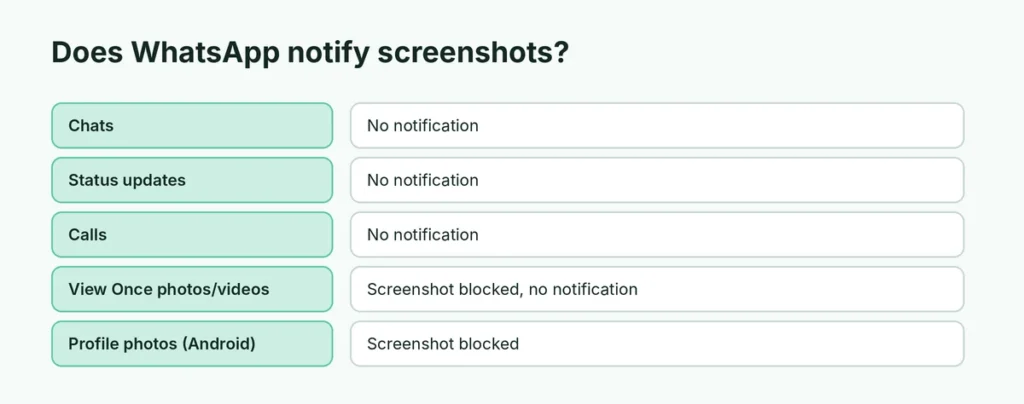
No. You can screenshot any one-to-one or group chat and the other person won’t know. WhatsApp has never had a screenshot notification feature for chats, and there’s no setting that turns one on.
The same goes for:
- Status updates (stories): no notification.
- Profile info, “About” and contact details: no notification.
- Voice and video calls: no notification for screenshots.
- Channels and Communities: no notification.
Keep in mind the other person can always screenshot your messages too, so anything you send can be saved.
View Once photos and videos: screenshots are blocked
View Once media is designed to disappear after it’s opened once. To protect it, WhatsApp blocks screenshots and screen recordings of View Once photos and videos.
What happens if you try:
- Android: the screenshot fails, or shows a message such as “Can’t take screenshot due to security policy”, or the saved image is black.
- iPhone: the screenshot or recording shows a black screen where the photo or video was.
Even here, WhatsApp doesn’t notify the sender that you tried. It simply stops the capture.
View Once voice messages also play once and can’t be saved or forwarded.
Profile photos on Android
WhatsApp blocks screenshots of other people’s profile photos on Android when you open them full screen. You’ll see a notice that the screenshot couldn’t be taken. Again, no notification is sent.
Does WhatsApp notify when you screen record?
No. Screen recording a chat doesn’t send any alert. Like screenshots, recordings of View Once media are blocked and appear black.
Advanced Chat Privacy: what it blocks
WhatsApp’s Advanced Chat Privacy setting (open a chat → tap the name → Advanced chat privacy) stops others in that chat from exporting the chat and from auto-saving media to their phone’s gallery. It doesn’t block screenshots and doesn’t notify anyone about them. It’s useful for sensitive group chats.
How to send a photo that can’t be screenshotted
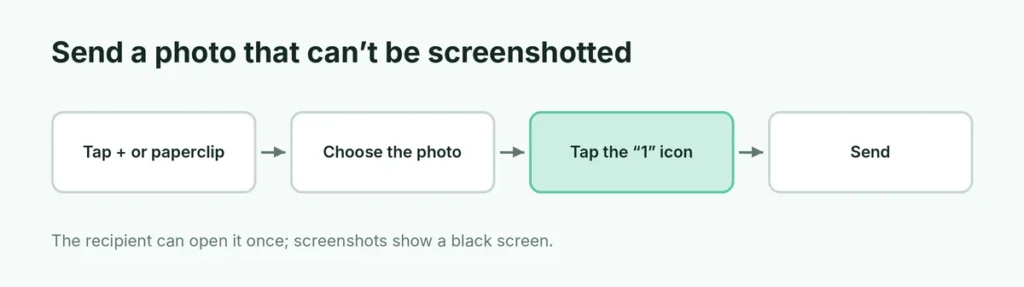
If you’re the one sending something private:
- Open the chat and tap + (iPhone) or the paperclip (Android) → Photos & videos.
- Pick the photo.
- Tap the “1” icon next to the send button to turn on View Once.
- Send.
The recipient can open it once, can’t forward, save or screenshot it, and you’ll see Opened in the chat after they view it. Remember that someone could still photograph the screen with another phone, so don’t send anything you’d be devastated to see shared.
Other apps compared
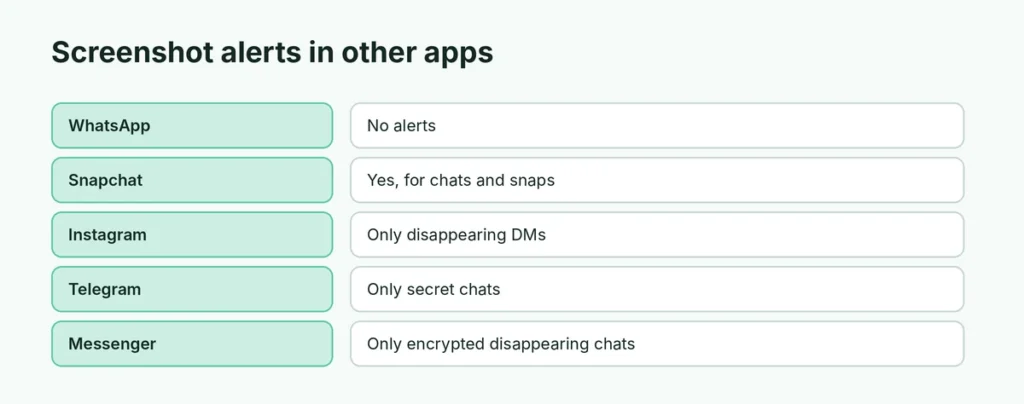
| App | Screenshot notification? |
|---|---|
| No (View Once screenshots blocked) | |
| Snapchat | Yes, for chats and snaps |
| Only for disappearing photos and videos in DMs | |
| Telegram | Only in secret chats; screenshots blocked in some cases |
| Facebook Messenger | Only in end-to-end encrypted chats with disappearing messages |
If you’re choosing between apps for privacy, here’s a Telegram vs WhatsApp comparison.
Can someone tell if you saved their WhatsApp photo?
No. Saving a normal photo or video (tap it → Save or the download icon) doesn’t notify the sender. WhatsApp may save media to your gallery automatically depending on Settings → Chats → Save to Photos (iPhone) or Media visibility (Android).
Can people tell if you viewed their status?
Yes, normally. When you view someone’s status, they see your name in the viewers list. The exception: if you turn off read receipts (Settings → Privacy → Read receipts), you won’t appear in their viewers list, but you also won’t see who viewed yours. Taking a screenshot of a status still doesn’t send any alert.
Do disappearing messages notify screenshots?
No. Disappearing messages (which delete themselves after 24 hours, 7 days or 90 days) don’t block or report screenshots. Anyone in the chat can screenshot them before they disappear. Disappearing messages are meant to keep your chat history tidy, not to stop copying.
What about WhatsApp Web and desktop?
There’s no screenshot detection on WhatsApp Web or the desktop app, and View Once media can’t be opened on them at all for privacy reasons: you’ll need your phone. You can use the computer’s screenshot tool on any other chat without anyone being notified. If you share a computer, remember to log out afterward: here’s how to log out of WhatsApp Web remotely.
Screenshots of View Once on older phones or apps
If someone uses an outdated version of WhatsApp, a modified app or a screen-mirroring trick, protections like the View Once screenshot block may not work. That’s another reason to treat View Once as “harder to save”, not “impossible to save”. Never send anything you’d regret seeing shared, especially to people you don’t know well.
What to do if someone shares your screenshot
If someone shares private messages or photos of you without permission:
- Don’t respond in anger; save evidence (screenshots of where it was shared, with dates).
- Report the account or message in WhatsApp: open the chat → tap the name → Report.
- Block the person if they’re harassing you.
- For intimate images or threats, contact local authorities; many countries have laws against sharing private images.
Is it OK to screenshot chats?
It’s legal in most places to screenshot messages sent to you, but sharing them without permission can hurt relationships and, in some situations, break privacy laws or workplace rules. A good rule: if you wouldn’t forward the message, don’t share the screenshot.
Protect your own WhatsApp
Since anyone can screenshot your messages, privacy also means controlling who can see your account:
- Check which computers are logged in: how to check WhatsApp linked devices.
- Log out of computers you’re not using: log out of WhatsApp Web remotely.
- Back up chats you want to keep: how to back up WhatsApp chats.
The short version
WhatsApp doesn’t notify anyone about screenshots or screen recordings, in chats, status, calls or profiles. It blocks screenshots of View Once photos and videos (and other people’s profile photos on Android), but even then it doesn’t alert the other person. To send something that can’t be screenshotted easily, use View Once, and remember a second phone’s camera can still capture it.