 By
RCS (Rich Communication Services) is the upgraded texting standard that adds typing indicators, read receipts, high-quality photos and group chats between Android phones and iPhones. Sometimes you need to turn it off: messages fail to send, you’re switching phones, or you just prefer plain SMS. Here’s how to turn off RCS messages on Android and iPhone.
Short answer: in Google Messages, tap your profile picture → Messages settings → RCS chats and turn off Turn on RCS chats. In Samsung Messages, tap three dots → Settings → Chat settings and turn off Chat features. On iPhone (iOS 18 and later), go to Settings → Apps → Messages → RCS Messaging and turn it off. If you’ve left your old phone behind, deregister your number at messages.google.com/disable-chat.
Applies to: Google Messages, Samsung Messages and iPhone on iOS 18 or later. Last checked in October 2026.
What changes when RCS is off
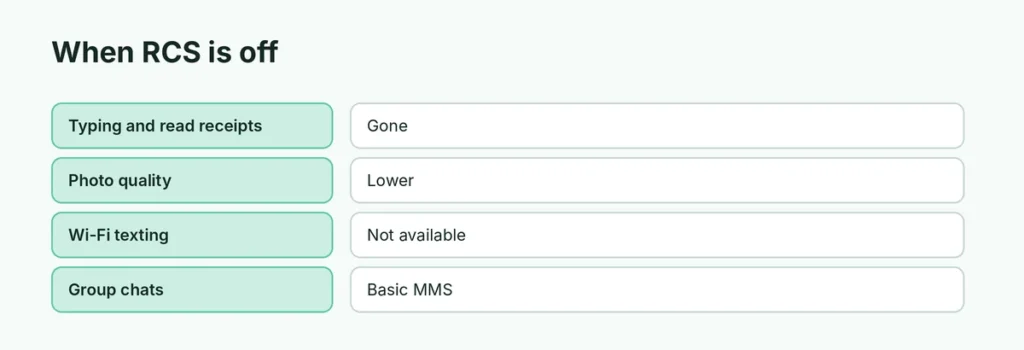
| Feature | RCS on | RCS off (SMS/MMS) |
|---|---|---|
| Typing indicators | Yes | No |
| Read receipts | Yes | No |
| Photo and video quality | High | Lower (compressed) |
| Works over Wi-Fi | Yes | No, needs mobile signal |
| Group chats | Full features | Basic MMS groups |
| Carrier charges | Uses data | May use SMS/MMS allowance |
How to turn off RCS in Google Messages
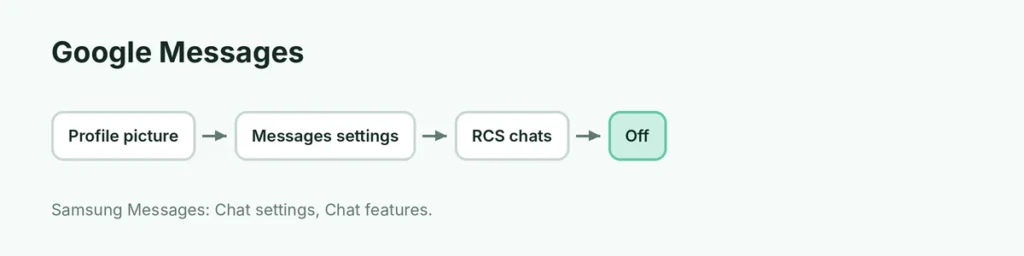
- Open Google Messages.
- Tap your profile picture (top right).
- Tap Messages settings.
- Tap RCS chats.
- Turn off Turn on RCS chats and tap Turn off to confirm.
How to turn off RCS in Samsung Messages
- Open Samsung Messages.
- Tap the three dots at the top → Settings.
- Tap Chat settings.
- Turn off Chat features.
On many newer Samsung phones, Google Messages is the default texting app; use the steps above instead.
How to turn off RCS on iPhone
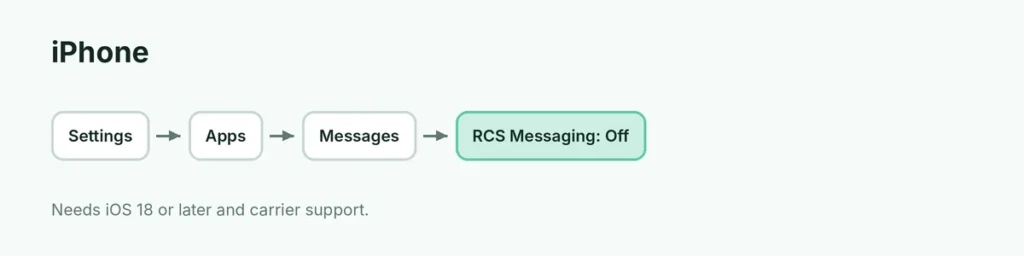
- Open Settings → Apps.
- Tap Messages.
- Tap RCS Messaging.
- Turn RCS Messaging off.
If you don’t see RCS Messaging, your carrier may not support RCS on iPhone yet. iMessage (blue bubbles) between Apple devices isn’t affected.
Switching from Android to iPhone? Deregister RCS
If you move your number to an iPhone or a non-RCS phone and texts from Android friends go missing:
- Before switching: turn off RCS chats on your old Android phone.
- Already switched? Go to messages.google.com/disable-chat.
- Under Without your previous device, choose your country, enter your number, type the code you receive and tap Verify.
RCS messages not sending?
Before turning RCS off, try:
- Check mobile data or Wi-Fi.
- In Google Messages, look at RCS chats → Status; if stuck on “Setting up”, restart the phone.
- Update Google Messages and Carrier Services from the Play Store.
- Send as SMS: long-press the failed message and choose Send as SMS/MMS.
Should I turn RCS off?
For most people, RCS is better: free over Wi-Fi, higher quality, and safer group chats. Turn it off if it’s causing failed messages, you’re switching phones, or you prefer messages that don’t show read receipts. You can also just turn off read receipts and typing indicators in RCS settings. On iPhone, here’s how to turn off read receipts.
Related guides
The short version
In Google Messages, go to Messages settings → RCS chats and turn it off; in Samsung Messages, turn off Chat features; on iPhone, turn off Settings → Apps → Messages → RCS Messaging. If you’ve left your old Android phone, deregister at messages.google.com/disable-chat.
Sources
- Apple Support: Turn on RCS messaging on your iPhone
- Guiding Tech: How to turn off RCS on Android