 By
Active Noise Cancellation (ANC) on AirPods blocks outside sound, which is great on a plane but not when you need to hear traffic, announcements or someone talking to you. Here’s how to turn off noise cancellation on AirPods Pro, AirPods 4 (ANC) and AirPods Max, switch to Transparency, and add the hidden Off mode.
Short answer: on iPhone, open Control Center, touch and hold the volume slider, tap Listening Mode and choose Transparency or Off. Or press and hold the stem of an AirPod until you hear a chime to switch modes. On AirPods Max, press the noise control button on the right ear cup. On AirPods Pro 2 and 3, Off only appears after you turn on Off Listening Mode in Settings → [your AirPods].
Applies to: AirPods Pro (2nd and 3rd generation), AirPods 4 with ANC and AirPods Max, with iPhone on iOS 26. Last checked in October 2026.
AirPods listening modes
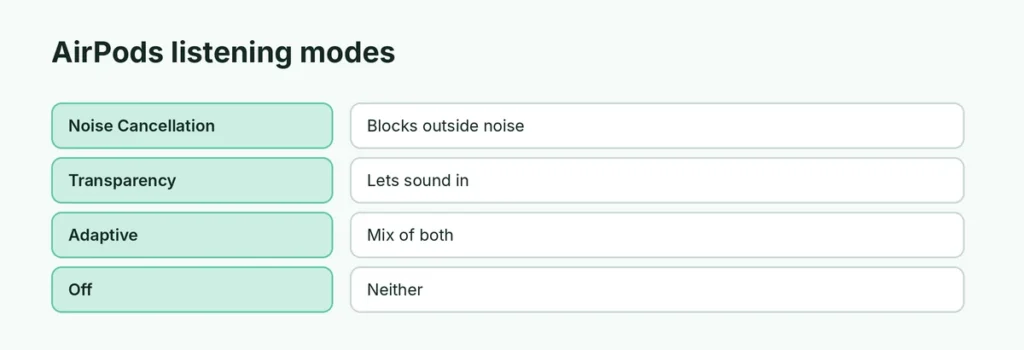
| Mode | What you hear |
|---|---|
| Noise Cancellation | Outside noise blocked |
| Transparency | Outside sound let in, so you hear people and traffic |
| Adaptive | Mixes both based on your surroundings |
| Off | No noise cancellation and no Transparency |
Turn off noise cancellation from Control Center
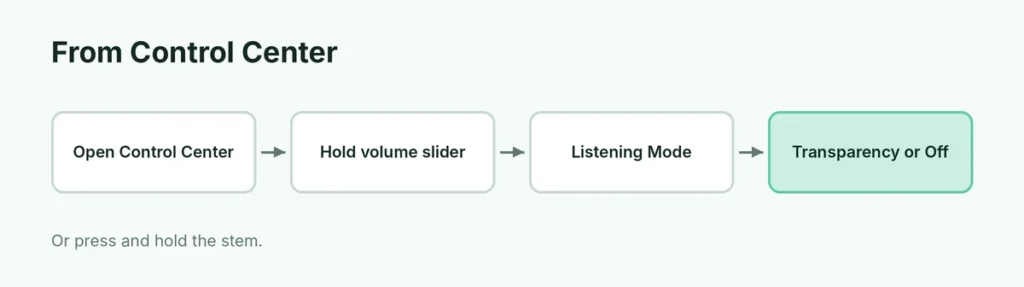
- Put your AirPods in and connect them.
- Open Control Center (swipe down from the top-right corner).
- Touch and hold the volume slider (it shows an AirPods icon).
- Tap Listening Mode (bottom left).
- Choose Transparency, Adaptive or Off.
Turn it off with the AirPods stem
- AirPods Pro / AirPods 4 (ANC): press and hold the stem until you hear a chime. Each press switches to the next mode.
- AirPods Max: press the noise control button on the right ear cup.
Add “Off” to your AirPods Pro
On AirPods Pro 2 and 3, Off is hidden by default:
- Open Settings and tap your AirPods’ name (near the top).
- Turn on Off Listening Mode (tap Audio & Routing first if you don’t see it).
Now Off appears in the Listening Mode options. Apple notes your hearing isn’t protected in loud places when listening mode is Off.
Choose which modes the stem switches between

- Settings → your AirPods name.
- Under Press and Hold AirPods, tap Left or Right.
- Choose Listening Mode and select the modes to cycle through (for example, Noise Cancellation and Transparency).
On a Mac, Apple Watch and Android
- Mac: click the AirPods icon in the menu bar (or Control Center → Sound) and pick a mode.
- Apple Watch: while playing audio, tap the AirPlay icon on the Now Playing screen and choose a listening mode.
- Android: use the stem press and hold; Android phones don’t have Apple’s settings menu. Here’s how to use AirPods with Android.
Why turn off noise cancellation?
- Hear traffic when walking or cycling.
- Talk to people without taking AirPods out (use Transparency or Conversation Awareness).
- Some people feel ear pressure with ANC.
- Saves a little battery.
Noise cancellation won’t switch?
- Make sure both AirPods are in your ears (ANC on one AirPod can be limited; check Accessibility → AirPods → Noise Cancellation with One AirPod).
- Update iOS and AirPods firmware (keep them charging near your iPhone).
- Clean the mesh and stems.
- Reset your AirPods if nothing works.
Related guides
The short version
Open Control Center, hold the volume slider and tap Listening Mode to pick Transparency or Off, or press and hold the AirPods stem to switch modes. Turn on Off Listening Mode in your AirPods settings to make Off available on AirPods Pro.
Sources
- Apple AirPods User Guide: Switch between listening modes on AirPods