 By
A loud AMBER Alert at 3 a.m. can scare anyone. These alerts help find missing children, but you can choose whether your phone shows them. Here’s how to turn off AMBER Alerts and other emergency alerts on iPhone and Android, what you can’t turn off, and how to keep the important ones.
Short answer: on iPhone, go to Settings → Notifications, scroll to the bottom, and under Government Alerts turn off AMBER Alerts (and Emergency Alerts or Public Safety Alerts if you want). On Android, go to Settings → Safety & emergency (or Notifications → Advanced settings) → Wireless emergency alerts and turn off AMBER alerts. National (Presidential) alerts can’t be turned off in the US, and some countries don’t allow turning off government alerts at all.
Applies to: iPhone on iOS 26 and Android phones (Pixel, Samsung and others) in the US and other regions with wireless emergency alerts, October 2026.
Types of emergency alerts
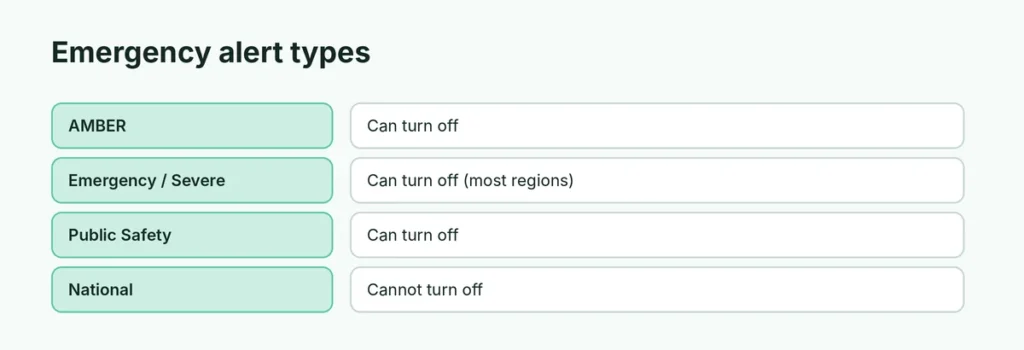
| Alert | What it’s for | Can you turn it off? |
|---|---|---|
| AMBER Alerts | Child abductions | Yes |
| Emergency / Extreme / Severe Alerts | Dangerous weather, disasters | Yes (in most regions) |
| Public Safety Alerts | Less severe local safety messages | Yes |
| Test Alerts (US) | System tests | Yes (off by default) |
| National / Presidential Alerts | Nationwide emergencies | No |
How to turn off AMBER Alerts on iPhone
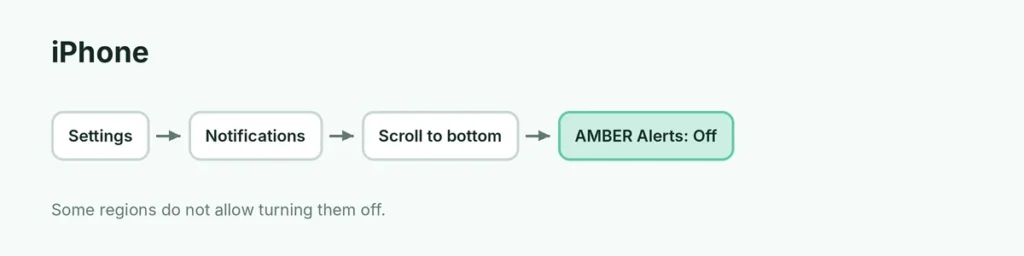
- Open Settings.
- Tap Notifications.
- Scroll to the very bottom to Government Alerts.
- Turn off AMBER Alerts.
On the same screen you can turn off Emergency Alerts and Public Safety Alerts. If you leave Emergency Alerts on, you can tap it and turn off Always Play Sound where available, so it doesn’t sound during Silent or Focus.
Enhanced Safety Alerts (US and Taiwan, iOS 26.2 or later): Settings → Notifications → Enhanced Safety Alerts → turn off Earthquake Alerts or Imminent Threat Alerts.
How to turn off AMBER Alerts on Android
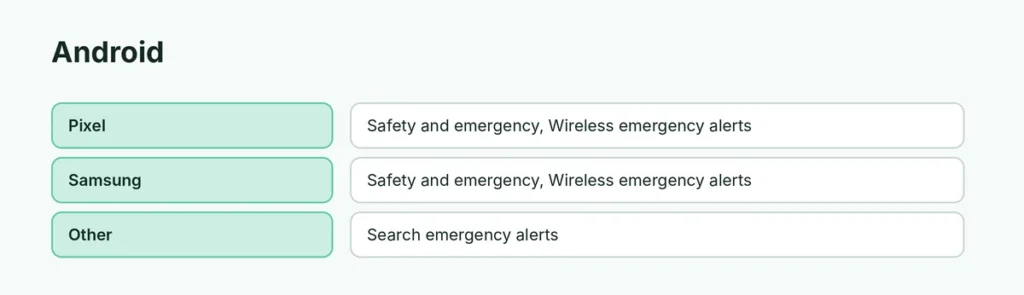
Menus vary by brand:
- Pixel / stock Android: Settings → Safety & emergency → Wireless emergency alerts → turn off AMBER alerts.
- Samsung: Settings → Safety and emergency → Wireless emergency alerts → turn off AMBER alerts.
- Other phones: search emergency alerts in the Settings search bar.
On some Android phones, it’s in the Messages app: Settings → Wireless emergency alerts.
Alerts you can’t turn off
- In the US, Presidential / National alerts always come through.
- In some countries, all government alerts are mandatory, and the switches are missing or greyed out.
Apple and Google follow local law, so your options depend on where you are and your carrier.
Should I turn off AMBER Alerts?
AMBER Alerts have helped find missing children, because people nearby see the car or description. If the sound is the problem, consider:
- Keeping alerts on but turning off Always Play Sound (iPhone) or the alert sound/vibration (Android, under Alert preferences).
- Using Do Not Disturb at night. Here’s how Do Not Disturb works; note that some emergency alerts can still sound.
Turn off alerts on Apple Watch
Apple Watch mirrors your iPhone’s alert settings. Open the Watch app on iPhone → Notifications → Government Alerts if you want different settings.
Related guides
The short version
On iPhone, turn off AMBER Alerts at the bottom of Settings → Notifications → Government Alerts. On Android, find Wireless emergency alerts in Safety & emergency settings and turn off AMBER alerts. National alerts can’t be switched off, and some countries make all alerts mandatory.
Sources
- Apple Support: Government, Emergency, and Enhanced Safety Alerts on iPhone