 By
Some websites ask you to turn off your ad blocker before they’ll load, or a payment page or video player breaks because of it. You don’t have to remove your ad blocker completely: you can pause it for one site. Here’s how to turn off an ad blocker in Chrome, Safari, Edge, Firefox and on your phone.
Short answer: click the ad blocker’s icon in your browser toolbar (it may be under the puzzle piece in Chrome or Edge) and choose Pause on this site or Don’t run on pages on this site, then reload. To turn it off everywhere, go to chrome://extensions (or edge://extensions) and switch the extension off. On iPhone, go to Settings → Apps → Safari → Extensions and turn off the content blocker. Built-in blockers like Brave Shields and Opera’s ad blocker have their own switches.
Applies to: Chrome, Edge, Firefox, Safari (iOS 26 / macOS 26), Brave, Opera and Samsung Internet, October 2026.
Option 1: Pause the ad blocker on one site (best)
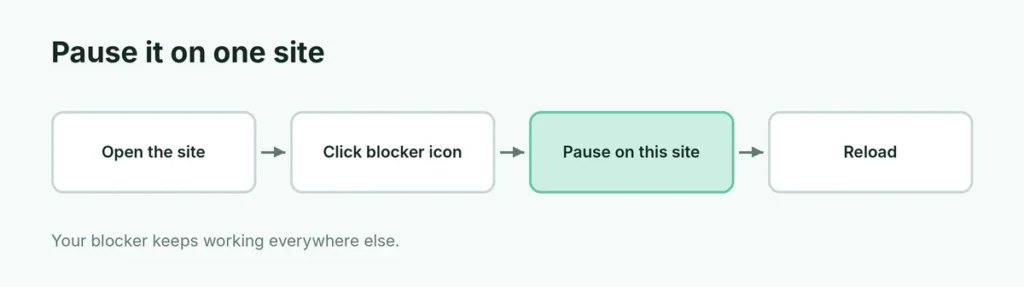
- Go to the website.
- Click the ad blocker icon in the toolbar. In Chrome and Edge, click the puzzle piece (Extensions) first if you don’t see it.
- Choose Pause on this site, Don’t run on this site or Allow ads on this site (wording depends on the blocker).
- Reload the page.
Your ad blocker keeps working everywhere else.
Option 2: Turn off the extension in Chrome or Edge
- Type chrome://extensions (or edge://extensions) in the address bar.
- Find your ad blocker (uBlock Origin Lite, AdBlock, Adblock Plus, etc.).
- Turn its switch off.
Turn it back on the same way. To remove it, click Remove.
Firefox
- Click the menu (three lines) → Add-ons and themes.
- Click Extensions.
- Turn off the ad blocker’s switch.
Firefox’s built-in Enhanced Tracking Protection can also break some sites: click the shield in the address bar and turn it off for that site.
Safari on iPhone and iPad
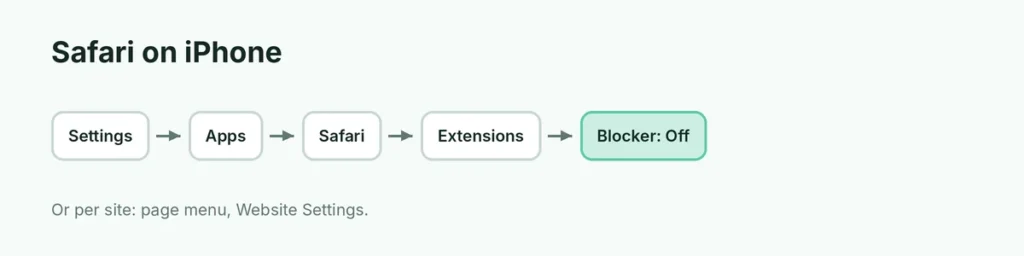
- Open Settings → Apps → Safari.
- Tap Extensions.
- Turn off the content blocker.
For one site only: in Safari, tap the page menu (the icon on the left of the address bar) → Website Settings → turn off Use Content Blockers.
Safari on Mac
- Safari → Settings → Extensions and uncheck the blocker, or
- Safari → Settings → Websites → Content Blockers and set the site to Off.
Browsers with built-in ad blocking
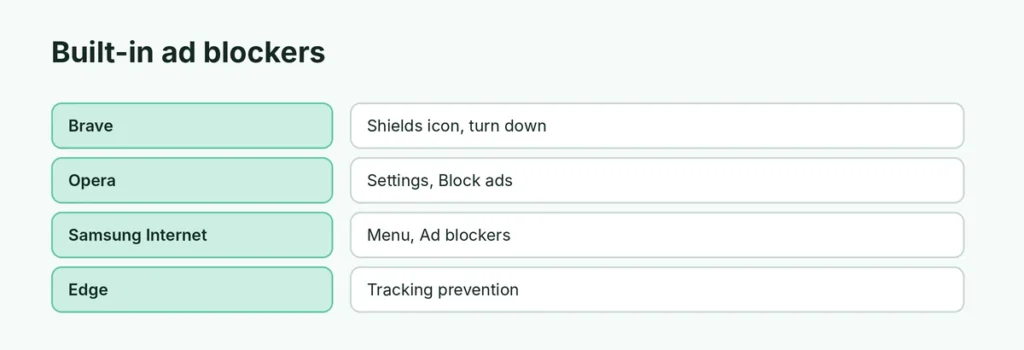
| Browser | How to turn it off |
|---|---|
| Brave | Click the lion (Shields) icon → turn Shields down for the site |
| Opera | Settings → Block ads → off (or click the shield in the address bar) |
| Samsung Internet | Menu → Ad blockers → turn off |
| Edge | Tracking prevention in Settings → Privacy, search, and services (not an ad blocker, but can break sites) |
Still says “turn off your ad blocker”?
- More than one blocker: check all extensions and built-in settings.
- VPN or DNS blocker: some VPNs, antivirus apps and DNS services block ads for the whole device.
- Router ad blocking: tools like Pi-hole block ads on your network.
- Cache: reload with Ctrl + F5 (Windows) or Command + Shift + R (Mac).
Why sites ask you to turn it off
Many free websites earn money from ads. Allowing ads on sites you trust supports the people who make them. Keep your blocker on for sites with aggressive pop-ups, and be careful of fake “virus” warnings; close them instead of clicking.
Related guides
The short version
Click your ad blocker’s icon and choose Pause on this site, then reload. To turn it off everywhere, switch it off in chrome://extensions, Firefox Add-ons, or Safari → Extensions. Check built-in blockers like Brave Shields and device-wide VPN or DNS blockers if a site still complains.
Sources
- Google Chrome Help: Install and manage extensions