 By
Pinning keeps an important WhatsApp message, like an address, a meeting time or group rules, stuck to the top of the chat so nobody has to scroll for it. It works in one-on-one and group chats, on Android and iPhone. Here’s how to pin and unpin a message, how long a pin lasts, the new option to pin indefinitely, and how to pin a whole chat instead.
Short answer: press and hold the message, tap Pin (on Android it’s under ⋮ More options; on iPhone it may be under More…), choose how long it stays pinned (24 hours, 7 days or 30 days, or indefinitely where the new option has reached you), and tap Pin. The message appears in a bar at the top of the chat. You can pin up to 3 messages per chat. To unpin, press and hold the pinned message and tap Unpin.
Applies to: WhatsApp on Android and iPhone, November 2026. The option to pin indefinitely is rolling out in stages from October 29, 2026.
Pin a message or pin a chat?
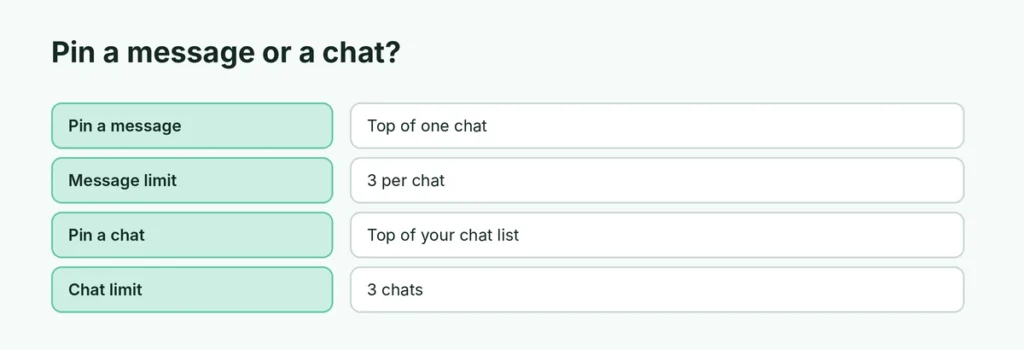
| Pin a message | Pin a chat | |
|---|---|---|
| What it does | Keeps one message at the top of a conversation | Keeps a whole conversation at the top of your chat list |
| Limit | 3 messages per chat | 3 chats |
| Who sees it | Everyone in that chat | Only you |
| How long | 24 h, 7 days, 30 days or indefinitely | Until you unpin it |
How to pin a message on Android
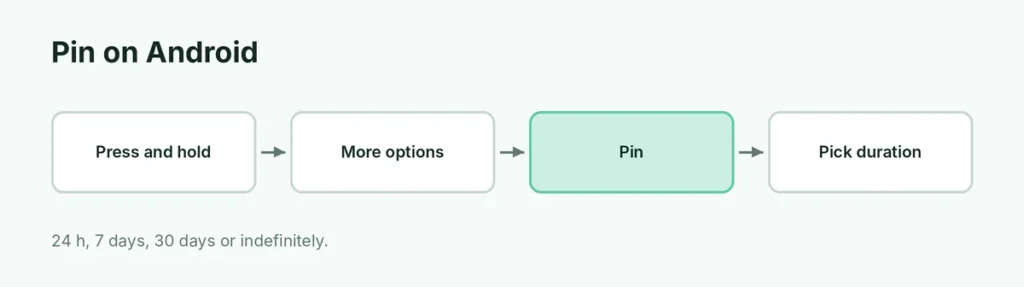
- Open the chat and press and hold the message.
- Tap ⋮ (More options) at the top right, then Pin.
- Choose 24 hours, 7 days or 30 days (or the indefinite option if you have it).
- Tap Pin.
The message now shows in a bar at the top of the chat. Tap the bar to jump to the message.
How to pin a message on iPhone
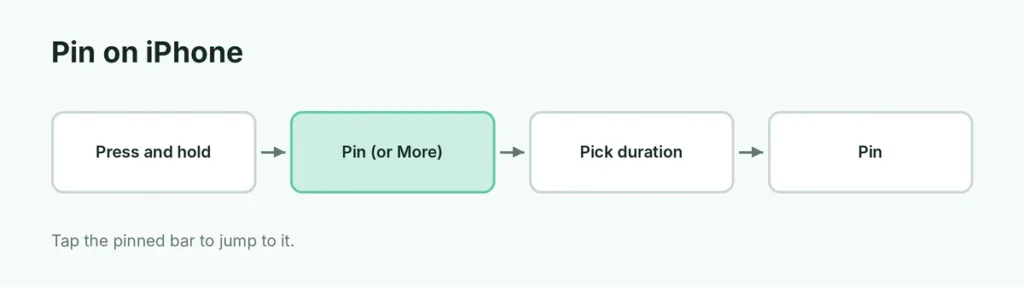
- Open the chat and press and hold the message.
- Tap Pin. If you don’t see it, tap More… first.
- Choose how long it stays pinned.
- Tap Pin.
How to unpin a message
- Tap the pinned bar at the top of the chat to jump to the message, or find it in the chat.
- Press and hold the message.
- Tap Unpin (Android: under ⋮), then confirm.
A pin also disappears on its own when the time you chose runs out.
Pin messages in a group
- Up to 3 messages can be pinned at once; if you pin a fourth, WhatsApp asks which one to replace.
- Admins choose who can pin. In the group, tap the group name → Group permissions. Turning off Edit group settings for members means only admins can pin messages (and change the group name, icon and description).
- Pin indefinitely is new in the October 29, 2026 update, so group rules or event details can stay at the top until an admin unpins them. See WhatsApp’s four new group features.
How to pin a whole chat
- Android: in the Chats list, press and hold the chat, then tap the pin icon at the top.
- iPhone: in the Chats list, swipe right on the chat, then tap Pin.
You can pin up to 3 chats. Pinned chats stay at the top of your list and only you can see that they’re pinned.
Pin option missing?
- Update WhatsApp from the Play Store or App Store.
- In a group, an admin may have limited pinning to admins.
- Already 3 pins: unpin one first, or replace it when asked.
- Indefinite option missing: it’s rolling out gradually; for now, choose 30 days and pin it again later.
Related guides
- WhatsApp’s new group features (October 2026)
- How to schedule a WhatsApp message
- WhatsApp ticks meaning
The short version
Press and hold a message, tap Pin (Android: under ⋮; iPhone: maybe under More…), pick 24 hours, 7 days, 30 days or indefinitely, and tap Pin. Up to 3 messages per chat can be pinned, and group admins decide who can pin. To pin a whole conversation instead, press and hold it (Android) or swipe right (iPhone) in your Chats list.
Sources
- 9to5Mac: WhatsApp now lets you pin up to three messages in a chat
- Tom’s Guide: How to pin WhatsApp messages
- WhatsApp Blog: Never miss what matters in your group chats