 By

WhatsApp announced four new features for group chats on October 29, 2026, all aimed at one problem: busy groups where the important messages get buried. You can now keep a message pinned for good, share a status with just one group, catch up on only the messages that mention you, and send chat history to someone after they’ve joined. Here’s what each feature does, how to use it, and when you’ll get it.
Short answer: the four new WhatsApp group features are pinning messages indefinitely (no 30-day limit), sending recent message history to someone after they join (tap their name in the chat), group status (a 24-hour status only that group’s members see), and a Mentions and replies filter that shows unread groups where you were @mentioned, replied to, or included in @all. They’re rolling out on Android and iPhone to some users first, with more over the coming weeks, so update WhatsApp from the Play Store or App Store.
Applies to: WhatsApp on Android and iPhone, announced October 29, 2026. Features reach accounts in stages, so you may not see all four yet.
The four new features at a glance
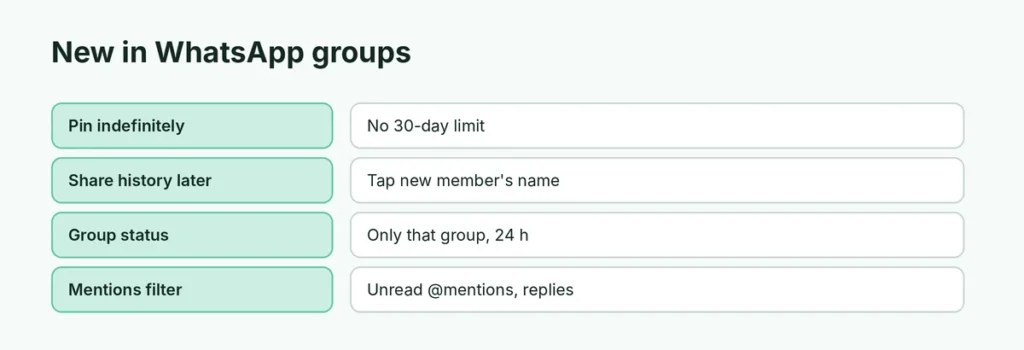
| Feature | What it does | Who sees it |
|---|---|---|
| Pin messages indefinitely | Keeps a pinned message at the top of the chat until you unpin it | Everyone in the chat |
| Share history after joining | Sends recent messages to a member who has already joined | That new member |
| Group status | A status update shared only with one group, gone after 24 hours | Members of that group |
| Mentions and replies filter | Shows unread groups where you were mentioned or replied to | Only you |
1. Pin a message with no time limit
Until now, a pinned message stayed for 24 hours, 7 days or 30 days, then dropped off. The update adds an option to keep it pinned indefinitely, so a group’s rules, an event address or a shared document link can stay at the top until someone unpins it.
Pinning works as before: press and hold the message, tap Pin (on Android it may be under ⋮), and choose how long. You can still pin up to three messages per chat, and group admins can decide whether everyone or only admins can pin. For full steps, see how to pin a message on WhatsApp.
2. Send message history to someone who already joined
WhatsApp already let you share recent messages while adding someone to a group. Now you can do it after they’ve joined, for example when they joined through an invite link and missed the conversation.
- Tap the new member’s name in the group chat and choose to send them recent messages.
- The shared messages stay end-to-end encrypted, like the rest of your chats.
3. Share a status with just one group
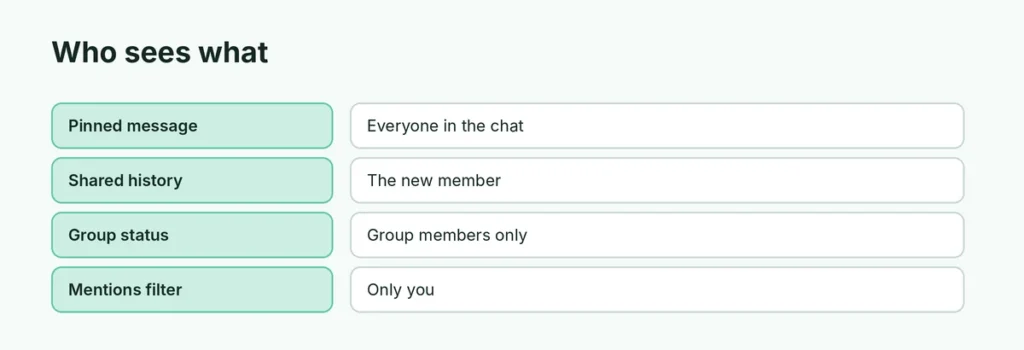
Group status lets you post a status update that only members of a specific group can see, instead of all your contacts. Think a running club, a class or a family group.
- Members can view it, react to it, and add their own group status.
- Like a normal status, it disappears after 24 hours.
- Your regular status privacy settings don’t change; this is a separate, group-only audience.
4. Mentions and replies filter
If you’re in dozens of groups, the new Mentions and replies filter in your chat list shows only unread group and community chats where someone:
- @mentioned you,
- replied directly to one of your messages, or
- used @all to mention everyone.
It sits with the other filters at the top of your chat list (All, Unread, Favorites, Groups). You can move it or remove it if you don’t use it.
When will you get the new features?

WhatsApp is rolling them out in stages on Android and iPhone. Some users have them now; WhatsApp says more accounts will get them over the coming weeks. To get them as soon as possible:
- Update WhatsApp: Play Store (Android) or App Store (iPhone) → search WhatsApp → Update.
- Check again after a few days; the features switch on from WhatsApp’s side, so there’s nothing else to turn on.
Other group features worth knowing
WhatsApp’s announcement also pointed to a few existing group tools:
- Private reply: reply to one person privately without derailing the group chat.
- Single-answer polls: turn off Allow multiple answers when creating a poll.
- Member tags: add a short tag explaining who you are in each group, such as “Leo’s mom” in a school group.
Related guides
- How to pin a message on WhatsApp
- How to add a caption to a WhatsApp Status
- WhatsApp ticks meaning
The short version
WhatsApp’s October 29, 2026 update adds four group features: pinning messages indefinitely, sending recent history to someone after they join, group-only statuses that last 24 hours, and a filter for unread groups where you were mentioned or replied to. They’re rolling out on Android and iPhone over the coming weeks; update the app and they’ll appear automatically.
Sources
- WhatsApp Blog: Never miss what matters in your group chats
- WABetaInfo: WhatsApp launches four updates to help users catch up in groups
- HardwareZone: WhatsApp’s new group chat features