 By
Wondering if someone will know you took a screenshot of their Instagram story, post or chat? In most cases, no. Instagram only tells people about screenshots of disappearing photos and videos sent in direct messages. Here’s exactly what Instagram notifies about in 2026, and what it doesn’t.
Short answer: Instagram does not notify anyone when you screenshot a story, post, reel, profile, highlight or normal DM. It does notify the sender when you screenshot or screen-record a disappearing photo or video (sent with View once or Allow replay) and messages in Vanish mode. In that case, the sender sees a small dashed circle icon next to the message, or a note in the chat saying you took a screenshot.
Last updated: November 2026. Instagram tests new features often; this reflects how it works for most users right now.
What Instagram notifies about (and what it doesn’t)
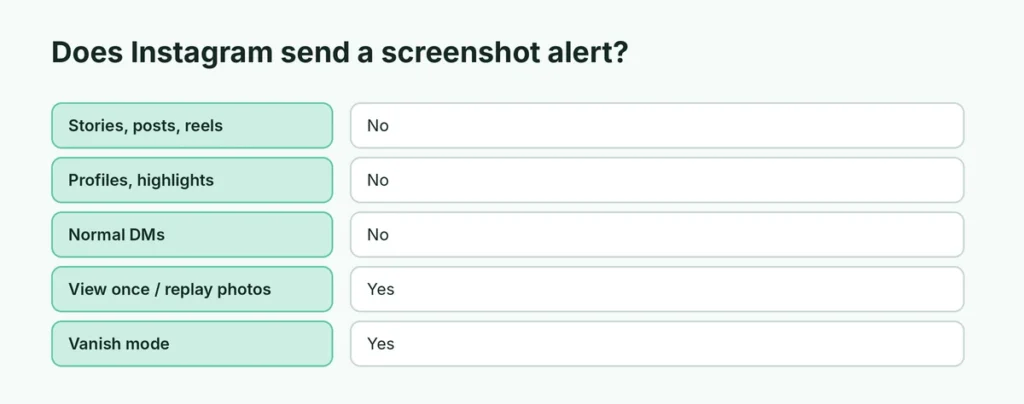
| What you screenshot | Do they get notified? |
|---|---|
| Stories (including Close Friends) | No |
| Posts and reels | No |
| Profiles and highlights | No |
| Normal DM messages and photos | No |
| Disappearing photos/videos in DMs (View once, Allow replay) | Yes |
| Messages in Vanish mode | Yes |
| Screen recording of disappearing DMs | Yes |
Does Instagram notify when you screenshot a story?
No. Instagram tested story screenshot alerts back in 2018 but removed the feature. Today, you can screenshot or screen-record anyone’s story, including Close Friends stories, and they won’t get a notification.
Keep in mind that the person can still see that you viewed their story: your name appears in the viewer list for 48 hours.
Does Instagram notify when you screenshot a post or reel?
No. Screenshots and screen recordings of feed posts, carousels and reels don’t trigger any alert. If you want to save a post properly, tap the bookmark icon to save it to your private Saved collection instead, or share it to a friend in a DM.
Does Instagram notify when you screenshot a DM?
It depends on the type of message:
- Normal messages, photos and videos (sent from the gallery and kept in the chat): no notification.
- Disappearing photos and videos (taken with the camera in DMs and sent with View once or Allow replay): yes, the sender is notified.
- Vanish mode chats (swipe up in a chat to turn it on): yes, Instagram tells the other person that you took a screenshot.
How do you know if someone screenshotted your Instagram?
You can only find out for disappearing messages and Vanish mode:
- Disappearing photo or video: in the chat, a dashed circle icon (or “Screenshot” label) appears next to the message you sent.
- Vanish mode: a message appears in the chat saying the person took a screenshot.
For stories, posts, reels and normal chats, there’s no way to know, and apps that claim to tell you are not reliable.
How to send a photo on Instagram that can’t be screenshotted secretly
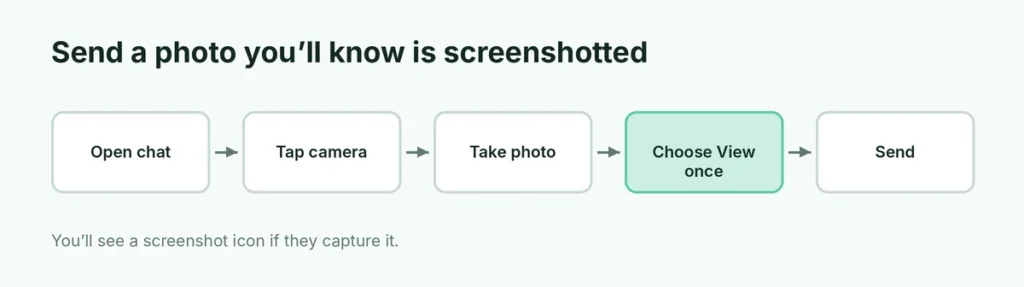
If you want to know when someone screenshots your photo:
- Open a chat and tap the camera icon.
- Take a photo or video.
- At the bottom, choose View once or Allow replay (not Keep in chat).
- Tap Send.
If they screenshot it, you’ll see the screenshot icon. You can’t stop the screenshot itself, though; you’ll just know about it.
Does Instagram notify screen recordings?
Only for disappearing DM photos and videos and Vanish mode. Screen-recording stories, reels, posts or lives does not send an alert.
Do the “airplane mode tricks” work?
You may read that turning on airplane mode before taking a screenshot of a disappearing message stops the alert. This is not reliable: Instagram can still send the notification when your phone goes back online, and app updates change how it works. The respectful thing is to simply not screenshot someone’s disappearing messages.
Screenshot alerts in other apps
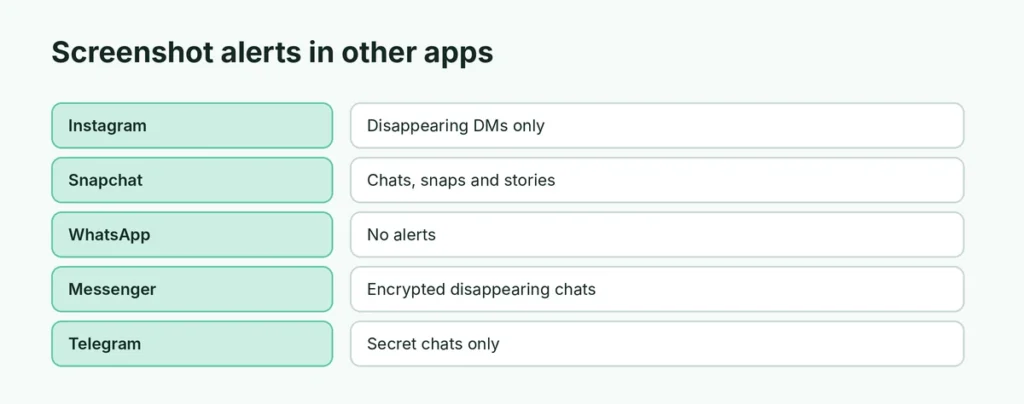
| App | Screenshot alerts |
|---|---|
| Only disappearing DMs and Vanish mode | |
| Snapchat | Yes, for chats, snaps and stories |
| No alerts (but View Once media blocks screenshots) | |
| Facebook Messenger | Only in encrypted disappearing chats |
| Telegram | Only in secret chats |
For WhatsApp, here’s whether WhatsApp notifies when you take a screenshot.
Is it okay to screenshot someone’s Instagram?
Taking a screenshot for yourself is common and usually fine. But:
- Don’t repost someone’s photos or content without permission. It can break Instagram’s rules and copyright law.
- Private accounts share content with followers they trust. Sharing their stories elsewhere can hurt the relationship.
- Screenshots of private chats shared publicly can be hurtful or even illegal in some places.
How to protect your own content on Instagram
- Make your account private to choose who sees your posts. Here’s how to hide your followers on Instagram with a private account.
- Use Close Friends for personal stories.
- Send sensitive photos as View once, so they disappear and you’re told about screenshots.
- Turn off resharing of your posts and stories: ☰ → Sharing and reuse (or Sharing and remixes).
Does Instagram notify when you screenshot a profile picture?
No. Profile pictures, bios and follower lists can be screenshotted without any alert. Instagram also doesn’t show who viewed your profile, so apps that claim to show “profile visitors” are fake and often steal accounts.
Does Instagram notify when you screenshot a live video or Notes?
No. Instagram Lives, Notes (short status messages above the inbox) and Broadcast channels don’t send screenshot alerts either. Only disappearing photos and videos in DMs and Vanish mode messages do.
Related Instagram guides
The short version
Instagram doesn’t notify anyone when you screenshot stories, posts, reels, profiles or normal chats. It only alerts the sender when you screenshot or screen-record disappearing photos and videos in DMs or messages in Vanish mode. To know if someone screenshots your photo, send it with View once, and don’t trust apps that claim to show story screenshots.