 By
Want to hide your followers list on Instagram so strangers or certain people can’t see who follows you? Here’s the honest answer first: Instagram doesn’t have a setting to hide your followers or following list from people who can see your profile. But there are four ways to control who sees it, and one of them hides it from everyone who doesn’t follow you.
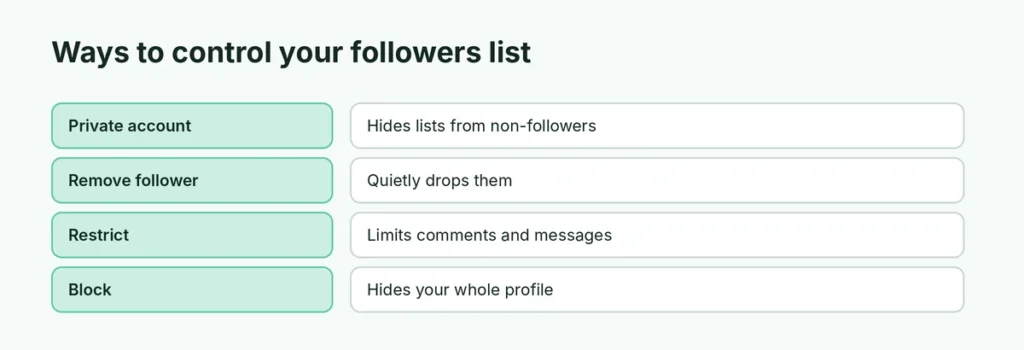
Short answer: you can’t hide your followers list on its own. The closest option is a private account: Profile → ☰ menu → Account privacy → turn on Private account. Then only approved followers can see your followers and following lists. You can also remove a follower (they aren’t notified), restrict someone, or block them so they can’t see your profile at all. You can hide like counts on posts.
Last updated: November 2026. Instagram changes menus often; names may differ slightly.
Can you hide followers on Instagram?
Not directly. On a public account, anyone can tap Followers or Following on your profile and see the full list. On a private account, only people you’ve approved as followers can see the lists.
Business and creator accounts must be public (or switch to personal to go private), so their followers lists are always visible.
Option 1: Make your account private
This hides your followers list, following list, posts and stories from anyone who doesn’t follow you.
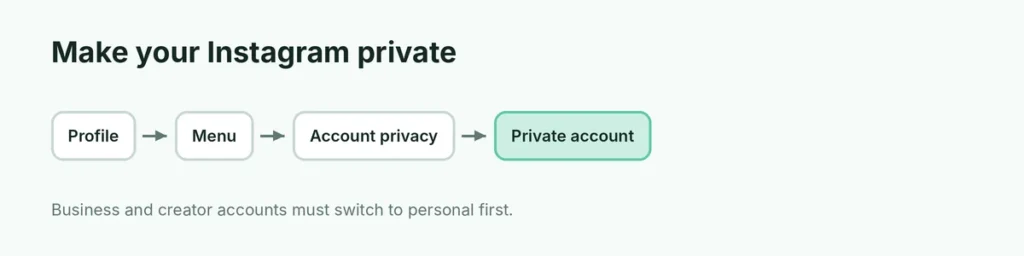
- Open Instagram and tap your profile picture at the bottom right.
- Tap the ☰ menu at the top right.
- Tap Account privacy.
- Turn on Private account and confirm.
What changes: new people must send a follow request. Your current followers stay, and they can still see your lists. If you have a business or creator account, you’ll need to switch to a personal account first (☰ → Account type and tools → Switch to personal account).
Option 2: Remove a follower (without blocking)
If one person shouldn’t see your lists or posts, remove them from your followers. They aren’t notified.
- Go to your profile and tap Followers.
- Find the person and tap Remove next to their name.
- Confirm.
On a private account, they can no longer see your followers list. On a public account, they still can, unless you block them.
Option 3: Restrict someone
Restrict is a quiet way to limit someone without them knowing:
- Their comments on your posts are only visible to them (unless you approve them).
- Their messages go to Message requests, and they can’t see when you’re online or if you’ve read messages.
Restrict doesn’t hide your followers list, but it’s useful for someone you want to keep at a distance. Open their profile → ⋮ → Restrict.
Option 4: Block someone
Blocking hides your whole profile from that person, including your followers and following lists.
- Open their profile.
- Tap ⋮ (top right) → Block.
- Choose whether to also block new accounts they may create, then tap Block.
They aren’t told they’ve been blocked, but they may notice your profile has disappeared.
Hide your Instagram story from specific people
You can’t hide the followers list from a single follower, but you can hide your stories:
- Tap your profile → ☰ → Hide story and live (under “Who can see your content”).
- Select the people and tap Done.
Or use Close Friends to share stories with only a small list.
Hide like counts on your posts
If what you really want is to hide numbers, Instagram lets you hide like and view counts:
- On your own posts: before sharing, tap Advanced settings (or More options) → turn on Hide like and view counts on this post. For posts already shared, tap ⋯ on the post → Hide like count.
- On everyone’s posts you see: ☰ → Likes and shares → turn on Hide like and share counts.
Follower and following numbers on your profile can’t be hidden.
Hide who you follow (“Following” list)
The same rules apply: a private account hides your following list from non-followers. Other options:
- Unfollow accounts you don’t want people to associate with you.
- Mute accounts instead of following them closely: open their profile → Following → Mute.
Do third-party apps hide followers?
No. Apps or websites that promise to hide your followers list, or to show who views your profile, can’t do that, and many are scams that steal your password. Never give your Instagram login to another app. If you already did, change your password right away and check Accounts Center → Password and security → Where you’re logged in.
Does Instagram notify when you remove or block someone?
No. Instagram doesn’t send notifications when you remove a follower, restrict, block or hide your story from someone. They might notice if they check your profile or follower count.
Can people see if I follow someone on a private account?
Your following list is hidden from non-followers on a private account too. But the people you follow may still appear to others in a few ways: if the account you follow is public, its followers list shows your name to anyone who opens it (unless you’re blocked by the viewer). Mutual friends can also see your name in “Followed by” lines on profiles. Unfollowing is the only way to remove yourself from those lists.
Can I hide my follower count?
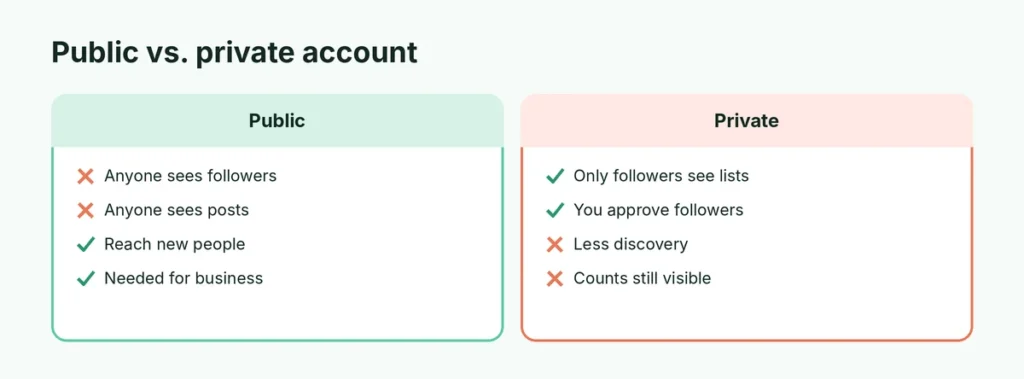
No. The number of followers and following always shows on your profile, for public and private accounts. Only the lists behind the numbers are hidden on a private account. If the number bothers you, remember that focusing on good content and real connections matters more than the count.
How to see who you’ve removed or blocked
To review or undo, go to ☰ → Blocked to see blocked accounts and unblock them. There’s no list of removed followers; they can simply request to follow you again.
Related Instagram guides
The short version
Instagram can’t hide your followers list by itself, but a private account (☰ → Account privacy → Private account) hides it from everyone who doesn’t follow you. Use Remove to quietly drop a follower, Restrict to limit someone, and Block to hide your whole profile from them. You can hide like counts on posts, but not your follower numbers, and apps that claim otherwise are scams.