 By
Ready to leave Facebook for good, or just want a break? Facebook lets you delete your account permanently or deactivate it temporarily, both from Accounts Center. Here’s exactly how to do each on a phone or computer, what to download first, and what happens to Messenger and your Instagram.
Short answer: open Facebook → ☰ menu (or your profile picture on a computer) → Settings & privacy → Settings → Accounts Center → Personal details → Account ownership and control → Deactivation or deletion. Choose your Facebook account, select Delete account, tap Continue, enter your password and confirm. Facebook waits 30 days before deleting; logging in during that time cancels it. Download your information first if you want to keep your photos.
Last updated: November 2026. Meta moves menus from time to time; the path through Accounts Center is the current one.
Delete or deactivate: which should you choose?
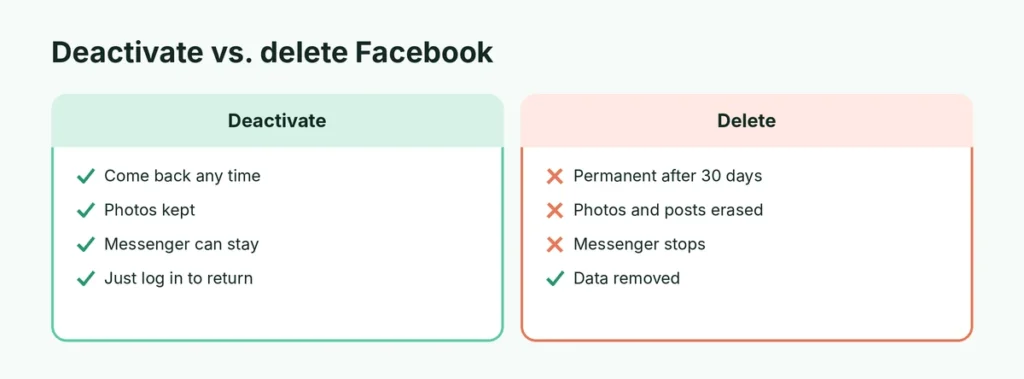
| Deactivate | Delete | |
|---|---|---|
| Profile visible | No | No |
| Can come back | Yes, just log in | Only within 30 days |
| Photos and posts kept | Yes | Deleted permanently |
| Messenger | Can keep using it | Stops working |
| Friends can still message you | Yes (on Messenger) | No |
| Facebook login for other apps | Paused | Lost |
Choose deactivate if you want a break. Choose delete if you’re sure you’re done.
Before you delete: download your information
Your photos, videos, posts and messages are gone forever after deletion. Save them first:
- Go to Accounts Center → Your information and permissions → Download your information.
- Tap Download or transfer information and choose your Facebook account.
- Pick All available information or only some types (for example, photos).
- Choose Download to device, the date range (All time), format (HTML is easiest to open) and media quality.
- Tap Create files. Facebook notifies you when the download is ready, usually within a few hours to a few days.
Also check: apps and websites where you log in with Facebook (games, shopping sites, Spotify). Change them to email and password first, or you may lose access.
How to delete your Facebook account on iPhone or Android
- Open the Facebook app and tap the ☰ menu (bottom right on iPhone, top right on Android).
- Tap Settings & privacy → Settings.
- Tap Accounts Center (near the top).
- Tap Personal details → Account ownership and control → Deactivation or deletion.
- Select your Facebook account.
- Choose Delete account → Continue.
- Pick a reason (optional) and tap Continue again.
- Enter your password and tap Continue → Delete account.
How to delete your Facebook account on a computer
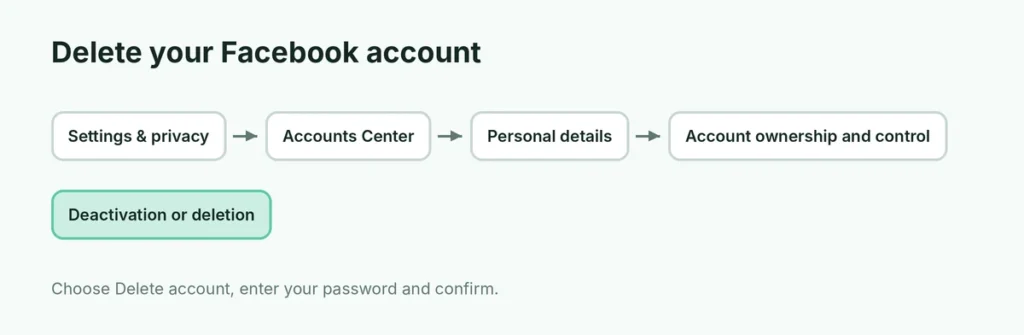
- Go to facebook.com and click your profile picture at the top right.
- Click Settings & privacy → Settings.
- Click Accounts Center (on the left).
- Click Personal details → Account ownership and control → Deactivation or deletion.
- Select your Facebook account → Delete account → Continue.
- Follow the prompts, enter your password and confirm.
What happens after you delete Facebook
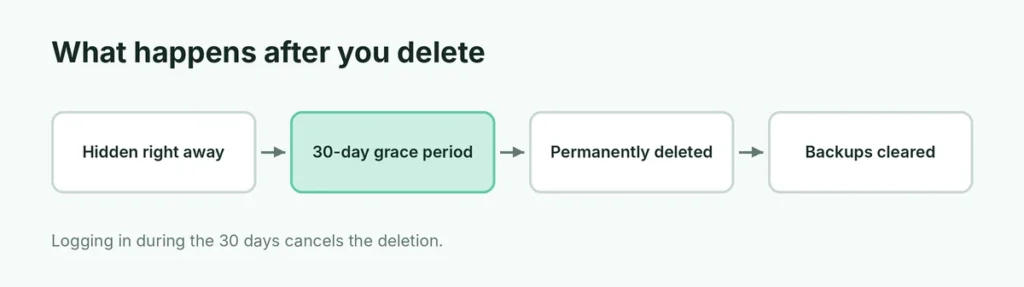
- 30-day waiting period: your account is hidden immediately, but Facebook waits 30 days. Logging in during this time cancels the deletion.
- After 30 days: your profile, photos, posts, videos and everything you added are permanently deleted. It can take up to 90 days for Facebook to remove all copies from its backup systems, but no one can see them during that time.
- Messages you sent may still be visible to the people you sent them to; they keep their copies.
- Messenger stops working with that account.
- Pages you’re the only admin of are deleted too. Add another admin first if you want to keep a page.
How to deactivate Facebook instead (temporary)
- Follow the same path: Accounts Center → Personal details → Account ownership and control → Deactivation or deletion.
- Select your account and choose Deactivate account → Continue.
- Pick a reason and, if offered, choose whether to keep using Messenger.
- Enter your password and confirm.
To come back, just log in again with your email and password. Everything returns as it was.
Will deleting Facebook delete Instagram or WhatsApp?
No. Instagram and WhatsApp are separate accounts, even if they’re linked in Accounts Center. Deleting Facebook doesn’t delete them. If you want to remove the link, go to Accounts Center → Accounts → Remove next to the account first.
To delete Instagram too, do it separately in Instagram’s Accounts Center.
Can I delete Facebook without a password?
You need to log in to delete your account. If you’ve forgotten the password:
- Tap Forgot password? on the Facebook login screen.
- Enter your email or phone and reset the password with the code Facebook sends.
- Then follow the deletion steps.
If the account was hacked, go to facebook.com/hacked first to secure it.
How to delete a Facebook account of someone who died
Family members can ask Facebook to memorialize the account or remove it. Search Facebook’s Help Center for “deceased person’s account” and fill in the request form. You’ll need proof, such as a death certificate, for removal. If the person chose a legacy contact, that person can manage the memorialized profile.
Cancel a Facebook deletion
Changed your mind within 30 days? Simply log in to Facebook with your email and password, and tap Cancel deletion. Your account is restored.
Delete Facebook but keep Messenger?
You can’t keep Messenger after deleting Facebook. If you only want Messenger, deactivate Facebook instead and choose to keep using Messenger when asked.
Related guides
The short version
Download your information first, then go to Settings & privacy → Settings → Accounts Center → Personal details → Account ownership and control → Deactivation or deletion → Delete account. Facebook waits 30 days, and logging in cancels the deletion. Choose Deactivate instead if you just want a break, and remember Instagram and WhatsApp are separate.