By
By 
Missed calls are easier to deal with when the caller can leave a message. Setting up voicemail on Android takes a couple of minutes, but the steps depend on your carrier and your phone’s Phone app. Here’s how to do it on Samsung, Pixel and other Android phones, plus how to fix voicemail that won’t work.
Short answer: open the Phone app and press and hold 1 on the keypad. Your carrier’s voicemail answers and walks you through creating a PIN and recording a greeting. To check messages later, hold 1 again, or use visual voicemail: in the Phone app, tap ⋮ → Settings → Voicemail (or the Voicemail tab on Pixel), or install your carrier’s visual voicemail app.
Last updated: October 2026. Works on Android 13, 14, 15 and 16 with US carriers such as Verizon, AT&T and T-Mobile; steps are similar with other carriers.
Step 1: Call your voicemail and set it up
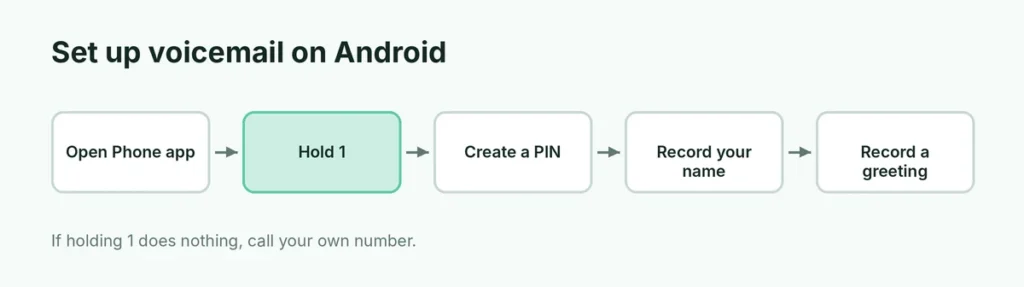
- Open the Phone app and go to the Keypad.
- Press and hold 1 until it dials voicemail. (If nothing happens, dial your own phone number and press the call button.)
- Follow the voice prompts to:
- choose a voicemail password (PIN), usually 4 to 7 digits,
- record your name,
- record a greeting or choose the default one.
- Hang up when it says setup is complete.
If you’re asked for a temporary password you don’t know, it’s often the last four digits of your phone number or your account PIN. If that doesn’t work, call your carrier’s customer service.
Step 2: Turn on visual voicemail (see messages as a list)
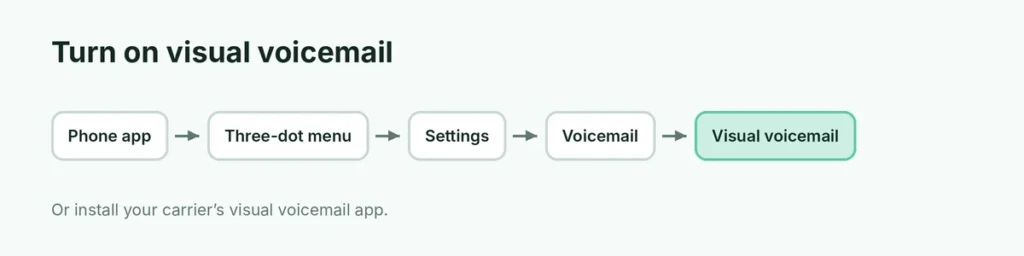
Visual voicemail shows your voicemails as a list, like emails, so you can play them in any order, read transcriptions and delete them without calling in.
Google Pixel and phones using the Google Phone app
- Open the Phone app.
- Look for a Voicemail tab at the bottom. If you don’t see it, tap ⋮ → Settings → Voicemail and turn on Visual voicemail.
- Allow any permissions it asks for.
Samsung Galaxy
- Open the Phone app → ⋮ → Settings → Voicemail.
- Check Voicemail service is your carrier and the voicemail number is set.
- For visual voicemail, Samsung phones on many carriers include a Voicemail or Visual Voicemail app; on others, install your carrier’s app from the Play Store.
Carrier visual voicemail apps
| Carrier | App |
|---|---|
| Verizon | Verizon’s visual voicemail (inside the My Verizon app or the Phone app on many phones) |
| AT&T | AT&T Visual Voicemail |
| T-Mobile | T-Mobile Visual Voicemail |
| Others | Search “[your carrier] visual voicemail” in the Play Store |
Some carriers include basic visual voicemail free and charge for extras such as transcription.
Step 3: Change your greeting
- By phone: hold 1, enter your PIN, and follow the menu (usually an option for Personal options or Greetings).
- In a visual voicemail app: open the app’s Settings → Greeting and record a new one.
A good greeting: “Hi, you’ve reached [name]. Please leave your name, number and a short message, and I’ll call you back.”
How to check your voicemail
- Hold 1 in the Phone app and enter your PIN.
- Tap the voicemail notification that appears after a missed call.
- Open the Voicemail tab or your carrier’s visual voicemail app.
- From another phone: call your own number, press * or # when the greeting starts (depends on carrier), and enter your PIN.
Voicemail not working? Try these fixes
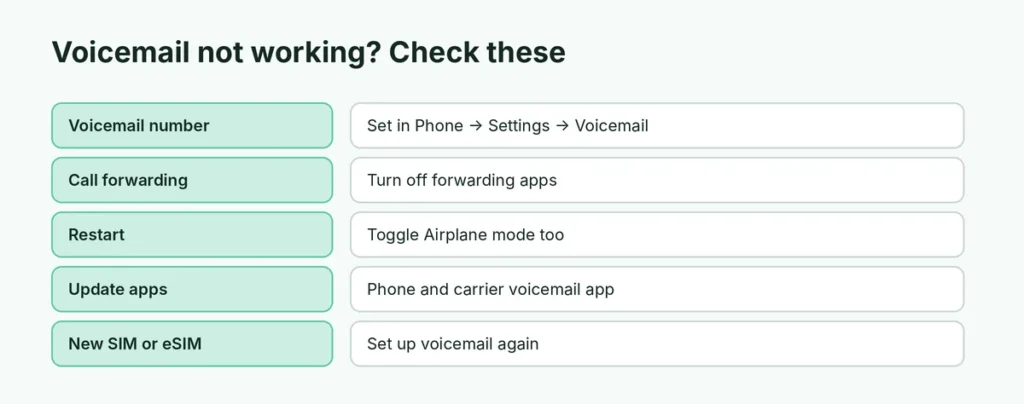
- Check the voicemail number: Phone app → ⋮ → Settings → Voicemail → Voicemail number (or Advanced → Setup). If it’s empty, ask your carrier for the correct number.
- Turn off call forwarding apps: if a call-blocking or forwarding app is set, calls may never reach voicemail. Check Settings → Calls → Call forwarding (or Supplementary services).
- Restart the phone and toggle Airplane mode on and off.
- Update the Phone app and your carrier’s voicemail app in the Play Store.
- Reset the voicemail PIN: most carriers let you do this in their app or website.
- New SIM or eSIM? Voicemail may need to be set up again on a new line. Call your carrier.
Voicemail is full
Old voicemails count toward a limit set by your carrier (often 20 to 40 messages). Delete old ones in the visual voicemail app or by calling in. Saved messages usually expire after a set number of days.
Turn off voicemail
Android doesn’t have a single switch for this, because voicemail lives on the carrier’s side. Options:
- ask your carrier to disable voicemail on your line,
- or dial a carrier code to cancel conditional call forwarding (on many GSM carriers, ##004#; ask your carrier first).
Voicemail vs. call screening
Pixel phones offer Call Screen, where Google Assistant answers unknown callers and shows you a live transcript before you pick up. Samsung offers a similar Bixby text call in some regions. These are great for spam calls, and voicemail still catches the rest. Getting lots of spam calls on an iPhone too? Here’s how to stop spam calls on iPhone.
Voicemail on Xiaomi, OnePlus, Motorola and other brands
Most other brands use either the Google Phone app or their own dialer:
- Google Phone app (Motorola, OnePlus, many others): ⋮ → Settings → Voicemail. Visual voicemail appears in the Voicemail tab when your carrier supports it.
- Xiaomi, Redmi, Poco: open the Phone app → ⋮ or Settings → Voicemail (sometimes under Advanced settings).
- Realme, Oppo: Phone → ⋮ → Settings → Voicemail or Call settings.
If your phone uses a dual SIM, choose which SIM’s voicemail to set up; each line has its own mailbox.
Get voicemail transcripts by text or email
Many visual voicemail apps can transcribe messages into text, so you can read them in a meeting. Some carriers also offer voicemail to text or email as a paid add-on. On Pixel phones, the Phone app shows transcripts for supported carriers. Transcripts aren’t perfect, so listen to important messages.
Set how long the phone rings before voicemail
By default, calls usually go to voicemail after about 20 to 30 seconds. Some carriers let you change this in their app, or by calling customer service. On many GSM networks, a code like 61*[voicemail number][seconds]# changes the delay (for example, 30 seconds), but codes vary by carrier, so ask yours first.
Voicemail when you travel abroad
Calls that go to voicemail while you’re roaming can sometimes be charged as international calls. Before traveling, check your carrier’s roaming rules, or turn off voicemail forwarding temporarily so unanswered calls simply ring out.
Protect your voicemail from hackers
- Use a voicemail PIN that isn’t 0000, 1234 or the last digits of your number.
- Don’t skip the PIN when calling from your own phone; some carriers let you require it.
- Change the PIN if you think someone knows it.
Moving to a new phone
Your voicemails stay with your carrier, not your phone, so they’re usually still there after you switch. Save important voicemails first: in most visual voicemail apps, tap the message → Share or Save to keep a copy. Before resetting your old phone, here’s how to back up an Android phone.
The short version
Open the Phone app, press and hold 1, and follow the prompts to set a PIN and record a greeting. Turn on visual voicemail in the Phone app (⋮ → Settings → Voicemail) or install your carrier’s visual voicemail app to see messages as a list. If voicemail doesn’t work, check the voicemail number in settings, turn off call forwarding, restart, and contact your carrier.