 By
The green dot on Facebook and Messenger tells friends you’re online right now. If you want to check messages without everyone knowing, you can turn off active status. The catch: it’s set separately in the Facebook app, the Messenger app and the website. Here’s how to turn off active status on Facebook everywhere.
Short answer: in the Facebook app, open the menu → Settings & privacy → Settings → Active Status and turn off Show when you’re active. In Messenger, open the menu → Settings → Active status and turn it off. On a computer, click Messenger (top right) → Options (three dots) → Active Status, turn it off and Save. Do it in each place you use, and log out of old devices.
Applies to: Facebook and Messenger apps for iPhone and Android, and facebook.com, October 2026.
How to turn off active status in the Facebook app

- Tap the menu (three lines or your profile picture).
- Tap Settings & privacy → Settings.
- Under Audience and visibility, tap Active Status.
- Turn off Show when you’re active.
- Tap Turn Off to confirm.
How to turn off active status in Messenger

- Open Messenger.
- Tap the menu (three lines) → Settings (gear icon).
- Tap Active status.
- Turn off Show when you’re active.
- If asked how long, choose the option that keeps it off until you change it.
How to turn off active status on a computer
- Go to facebook.com.
- Click the Messenger icon (top right).
- Click Options (three dots) next to Chats.
- Click Active Status (or Turn off Active Status).
- Choose to turn it off for all contacts, all contacts except… or only some contacts, then click Save (or Okay).
Meta has retired the Messenger desktop app for Windows and Mac, so use the website.
Why do I still show as active?
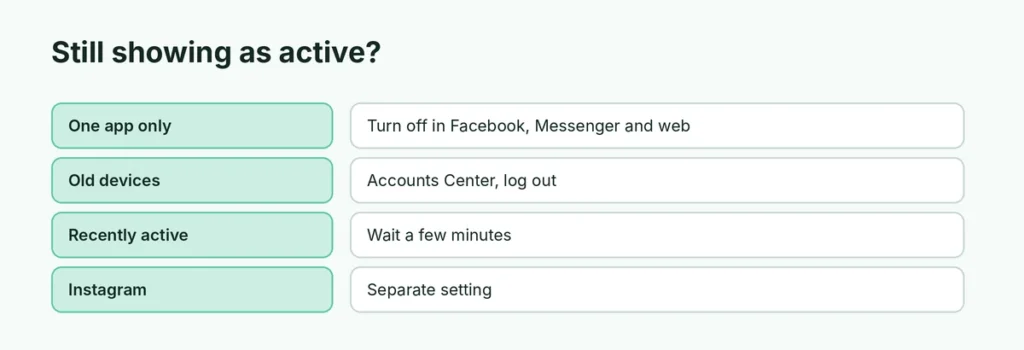
| Reason | Fix |
|---|---|
| Turned off in only one app | Turn it off in Facebook, Messenger and the website |
| Old logged-in devices | Accounts Center → Password and security → Where you’re logged in → log out |
| Recently active | “Active 5m ago” can show until the setting applies |
| Instagram has its own activity status |
What happens when active status is off?
- Friends won’t see the green dot or “Active now” for you.
- In most cases, you also won’t see when friends are active.
- You can still send and receive messages and calls as usual.
- Messenger read receipts (“Seen”) may still appear in normal chats.
Turn off active status for some people only
On a computer, the Active Status options let you hide your status from specific friends while keeping it on for others. This is handy if you want family to see you’re online but not coworkers.
Instagram activity status
Facebook and Instagram are separate. On Instagram: Settings and activity → Messages and story replies → Show activity status → off. Also see how to turn off Instagram read receipts.
Related guides
- How to turn off professional mode on Facebook
- How to delete your Facebook account
The short version
Turn off Show when you’re active in the Facebook app (Settings → Active Status), in Messenger (Settings → Active status), and on facebook.com (Messenger → Options → Active Status). Log out of old devices in Accounts Center if you still show as active.
Sources
- Technobezz: How to appear offline on Facebook
- iGeeksBlog: How to turn off Active Status in Facebook on iPhone