 By
A Gmail account is free, takes about five minutes to create, and gives you more than email: it’s a full Google account with Google Drive, Photos, YouTube and the Play Store. Here’s how to create a new Gmail account on a computer, iPhone or Android phone, including a second account for work or business.
Short answer: go to accounts.google.com/signup (or open Gmail → Create account), choose For my personal use, enter your name, date of birth and gender, pick a Gmail address (or let Google suggest one), create a strong password, and add a recovery phone number and email. Accept the terms and you’re done. On Android, you can also go to Settings → Passwords & accounts → Add account → Google.
Last updated: November 2026.
What you need
- A device with internet access.
- About 5 minutes.
- A phone number is recommended. Google may ask to verify one to prevent spam accounts.
- You must meet Google’s minimum age (13 in most countries; older in some). Children under that age can get an account through Family Link, managed by a parent.
How to create a Gmail account on a computer
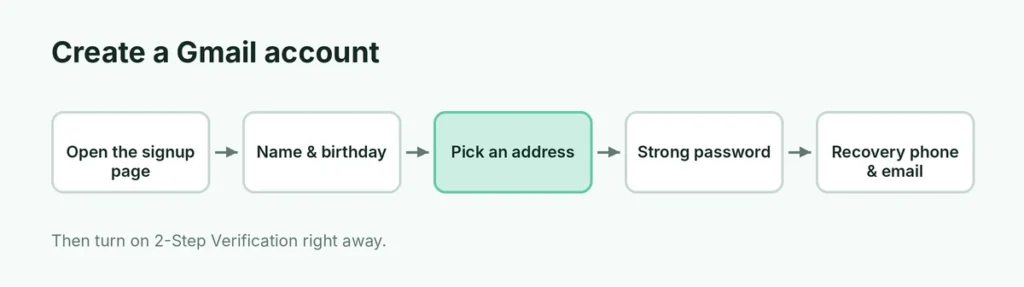
- Go to accounts.google.com/signup, or open gmail.com and click Create an account.
- Choose For my personal use (or For work or my business).
- Enter your first and last name → Next.
- Enter your date of birth and gender → Next.
- Choose a Gmail address: pick a suggestion or select Create your own Gmail address and type one. If it’s taken, try adding a word, a number or a dot.
- Create a strong password (at least 8 characters; use a mix of letters, numbers and symbols) and confirm it.
- Add a recovery phone number and verify it with the code Google sends, if asked.
- Add a recovery email (optional but strongly recommended).
- Review your account info, read and accept the Privacy and Terms.
Your new Gmail inbox opens. You can sign in at gmail.com from now on.
How to create a Gmail account on iPhone
- Install the Gmail app from the App Store and open it.
- Tap Sign in → Google → Create account → For my personal use.
- Follow the same steps: name, birthday, address, password, recovery details.
You can also add the account to Apple Mail: Settings → Apps → Mail → Mail Accounts → Add Account → Google.
How to create a Gmail account on Android
- Open Settings → Passwords & accounts (or Accounts and backup → Manage accounts on Samsung).
- Tap Add account → Google.
- Tap Create account → For my personal use and follow the steps.
The new account is added to your phone, and you can switch to it in the Gmail app by tapping your profile picture.
Choosing a good Gmail address
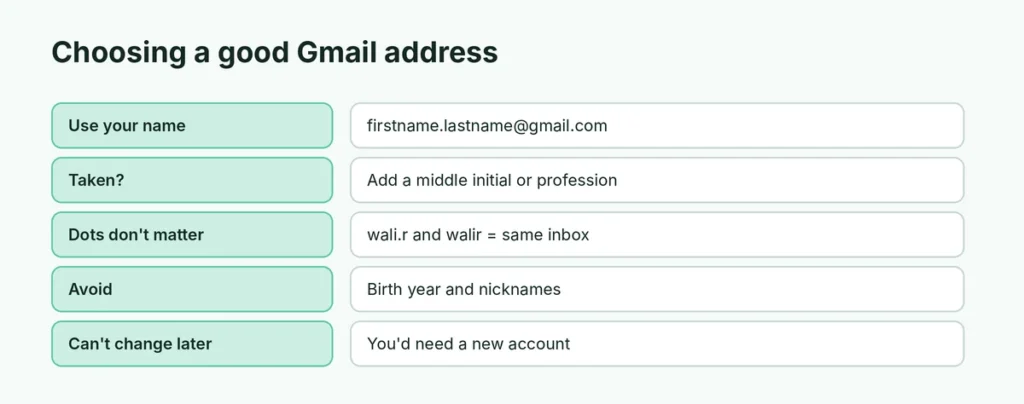
- Use your name for a professional address: firstname.lastname@gmail.com.
- If it’s taken, try adding a middle initial, your profession or a number.
- Avoid nicknames you may regret later or your birth year (useful to scammers).
- Dots don’t matter in Gmail: wali.rahman@gmail.com and walirahman@gmail.com are the same inbox.
- You can’t change the Gmail address later; you’d need a new account.
Create a second Gmail account
You can have several Gmail accounts, for example personal and business:
- In Gmail, click your profile picture (top right) → Add another account.
- Click Create account and follow the steps.
Switch between accounts by clicking your profile picture. If the wrong account keeps opening first, sign out of all accounts and sign in to your main one first.
Business email: Gmail vs. Google Workspace
| Free Gmail | Google Workspace | |
|---|---|---|
| Address | name@gmail.com | name@yourbusiness.com |
| Price | Free | Monthly per user |
| Storage | 15 GB shared | More, depending on plan |
| Admin tools | No | Yes |
For a small business starting out, a free Gmail account is fine. A custom address (@yourbusiness.com) through Google Workspace looks more professional when you’re ready.
Can I create a Gmail account without a phone number?
Sometimes. Google often lets you skip the phone number during signup, especially on a computer or a phone where you haven’t created accounts recently. When the screen says “Add phone number”, look for a Skip button. If there’s no Skip option, Google requires verification for that signup to prevent spam.
Even if you skip it, adding a phone number later in myaccount.google.com → Personal info is a good idea: it’s the easiest way to get back into your account if you forget the password.
Can I use my existing email instead of creating a Gmail address?
Yes. On the address screen, choose Use your existing email (on some versions, Use my current email address instead). You’ll get a Google account that signs in with your Yahoo, Outlook or work address. You can use YouTube, Drive and the Play Store, but you won’t have a @gmail.com inbox. You can add Gmail to that account later if you change your mind.
How many Gmail accounts can I have?
There’s no fixed public limit on how many accounts one person can create, but Google limits how many accounts can be verified with the same phone number. In the Gmail app and in your browser, you can be signed in to many accounts at once and switch between them by tapping your profile picture.
How do I create a Gmail account for my child?
Children under 13 (or the minimum age in your country) need a parent-managed account:
- Install Google Family Link on your phone.
- Tap Create account for your child and follow the steps.
- You’ll approve apps, set screen time limits and see the child’s location.
When your child reaches the minimum age, they can choose to manage their own account.
How much free storage does a Gmail account have?
Every free Google account comes with 15 GB of storage, shared between Gmail, Google Drive and Google Photos. When it fills up, you can’t send or receive emails. You can buy more with a Google One plan, or free up space by deleting large emails and old files.
Make your new account secure
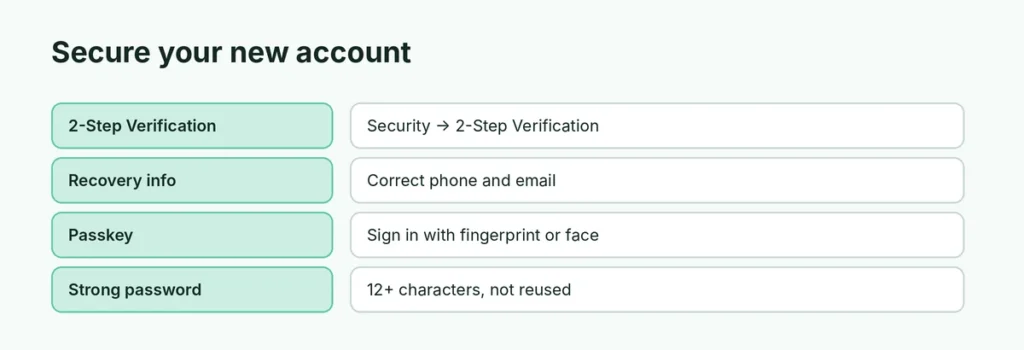
Right after creating your account:
- Turn on 2-Step Verification: myaccount.google.com → Security → 2-Step Verification. Use an authenticator app or passkeys for extra safety.
- Check recovery info: make sure your recovery phone and email are correct, so you can get back in if you forget your password.
- Create a passkey: sign in with your fingerprint or face instead of a password on supported devices.
Can’t create a Gmail account? Common problems
- “This phone number has been used too many times”: use another number, or try later.
- “Sorry, we could not create your Google Account”: Google’s anti-spam checks sometimes block signups from new devices or networks. Try another browser, a different network, or wait a day.
- Age restriction: if your birthday shows you’re under the minimum age, the account will be limited or need parent approval.
- Username taken: try a variation.
The short version
Go to accounts.google.com/signup (or tap Create account in the Gmail app), choose For my personal use, and enter your name, birthday, a Gmail address and a strong password. Add a recovery phone and email, accept the terms, and turn on 2-Step Verification right away. On Android, you can also add a new account in Settings → Passwords & accounts → Add account → Google.