By
By 
You pressed Shift five times, heard a beep, and now a box asks about Sticky Keys. Or your keyboard acts strange: Shift, Ctrl or Alt seem stuck. Sticky Keys is an accessibility feature that lets you press keyboard shortcuts one key at a time. Here’s how to turn off Sticky Keys on Windows 11, Windows 10 and Mac, and how to stop the pop-up forever.
Short answer: on Windows 11, go to Settings → Accessibility → Keyboard and turn off Sticky keys. Then click Sticky keys and turn off Keyboard shortcut for Sticky keys so pressing Shift five times no longer brings it back. Quick fix: press Shift five times again, or press two modifier keys at once (like Ctrl + Shift). On Mac, go to System Settings → Accessibility → Keyboard and turn off Sticky Keys.
Applies to: Windows 11, Windows 10 and macOS 26. Last checked in October 2026.
What is Sticky Keys?
Normally you hold keys together for shortcuts like Ctrl + C. With Sticky Keys on, you press Ctrl, let go, then press C. It helps people who find holding several keys hard. If you didn’t turn it on on purpose, it can make typing feel broken.
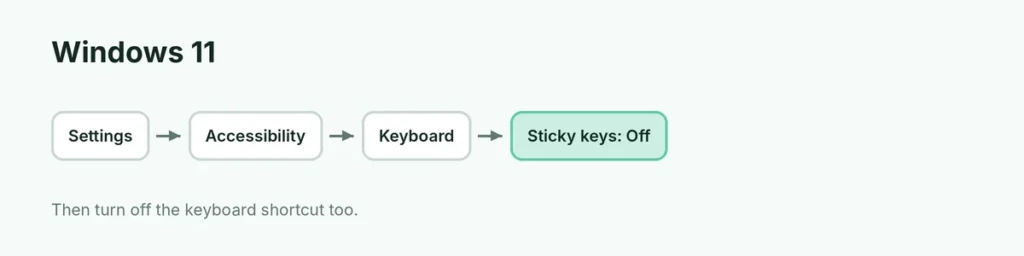
How to turn off Sticky Keys on Windows 11
- Press Windows key + I to open Settings.
- Click Accessibility.
- Click Keyboard.
- Turn off Sticky keys.
Stop the pop-up for good:
- On the same page, click the Sticky keys row (not just the switch).
- Turn off Keyboard shortcut for Sticky keys.
Now pressing Shift five times does nothing. This is the fix gamers usually want.
How to turn off Sticky Keys on Windows 10
- Open Settings → Ease of Access → Keyboard.
- Turn off Use Sticky Keys.
- Uncheck Allow the shortcut key to start Sticky Keys.
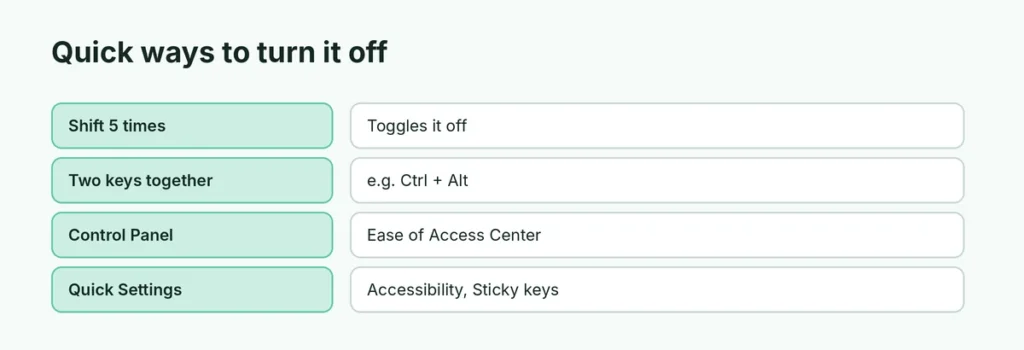
Quick ways to turn it off
| Method | How |
|---|---|
| Shift 5 times | Press Shift five times in a row (if the shortcut is on) |
| Two keys together | Press two modifier keys at once, e.g. Ctrl + Alt (when “Turn off Sticky keys when two keys are pressed at the same time” is on) |
| Control Panel | Control Panel → Ease of Access Center → Make the keyboard easier to use → uncheck Turn on Sticky Keys |
| Quick Settings | Click the network/volume area → Accessibility → turn off Sticky keys |
Turn off Filter Keys and Toggle Keys too
These similar features can also cause odd typing:
- Filter keys (hold Right Shift for 8 seconds): ignores quick or repeated key presses, so typing feels slow.
- Toggle keys (hold Num Lock for 5 seconds): beeps when you press Caps Lock, Num Lock or Scroll Lock.
Both are on the same Accessibility → Keyboard page. Turn them off, and turn off their shortcuts.
How to turn off Sticky Keys on Mac
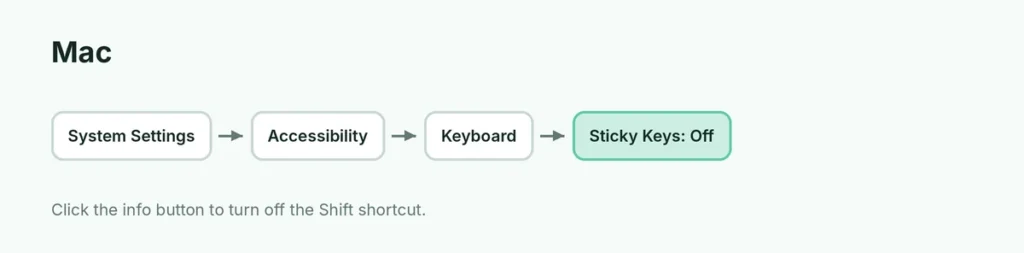
- Open System Settings (Apple menu).
- Click Accessibility → Keyboard.
- Turn off Sticky Keys.
To stop the shortcut, click the info (i) button next to Sticky Keys and turn off Press the Shift key five times to toggle Sticky Keys.
Slow Keys is on the same page; turn it off if keys need a long press to work.
Keys still seem stuck?
- Restart the computer.
- Check for a physically stuck key (Shift, Ctrl or Alt) and clean around it.
- Try a different keyboard to see if the problem follows.
- Remote desktop or game overlay apps sometimes hold modifier keys; close them.
Should I keep Sticky Keys?
If you find shortcuts hard to press, Sticky Keys is very helpful, and it can lock a key when you press it twice. If you don’t need it, turning off the shortcut is the most useful step, so it never surprises you again.
Related guides
- How to start Windows 11 in Safe Mode
- How to connect a keyboard to an iPad
The short version
On Windows 11, open Settings → Accessibility → Keyboard, turn off Sticky keys, then click it and turn off Keyboard shortcut for Sticky keys to stop the Shift-five-times pop-up. On Windows 10 it’s under Ease of Access → Keyboard; on Mac, System Settings → Accessibility → Keyboard.
Sources
- Zapier: How to turn off Sticky Keys in Windows
- Laptop Mag: How to turn off Sticky Keys in Windows 11