 By
Low Data Mode on iPhone saves mobile data and Wi-Fi data by pausing background tasks. But it can also stop photos syncing to iCloud, make videos look blurry and delay notifications. Here’s how to turn off Low Data Mode on iPhone for mobile data and Wi-Fi, and what changes when it’s on.
Short answer: for mobile data, go to Settings → Cellular (or Mobile Data) → Cellular Data Options → Data Mode and choose Standard (or Allow More Data on 5G). With Dual SIM, tap the line first. For Wi-Fi, go to Settings → Wi-Fi, tap the info (i) button next to your network, and turn off Low Data Mode. Each Wi-Fi network has its own setting.
Applies to: iPhone and iPad on iOS 26 / iPadOS 26. Last checked in October 2026.
What Low Data Mode does
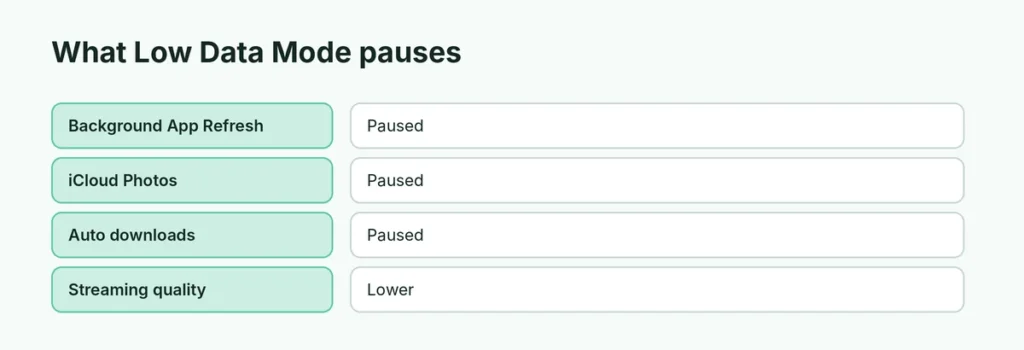
| With Low Data Mode on | What happens |
|---|---|
| Background App Refresh | Paused |
| Automatic downloads and backups | Paused |
| iCloud Photos sync | Paused |
| Streaming quality | Lower (music and video) |
| App updates | Not automatic |
| FaceTime video | Lower bitrate |
How to turn off Low Data Mode for mobile data
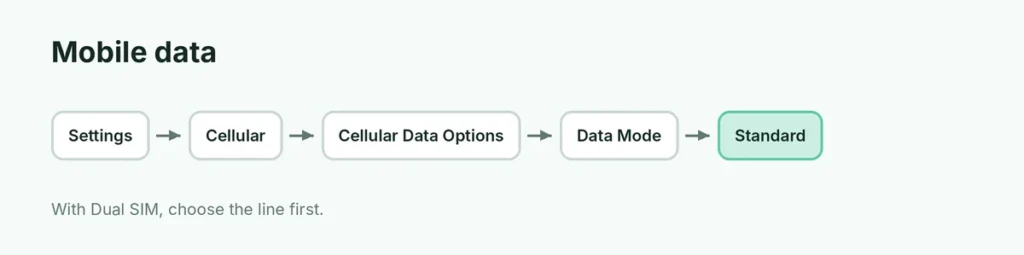
- Open Settings.
- Tap Cellular (or Mobile Data, depending on your region).
- Tap Cellular Data Options. With two SIMs, choose the line first.
- Tap Data Mode.
- Choose Standard (or Allow More Data on 5G).
How to turn off Low Data Mode for Wi-Fi
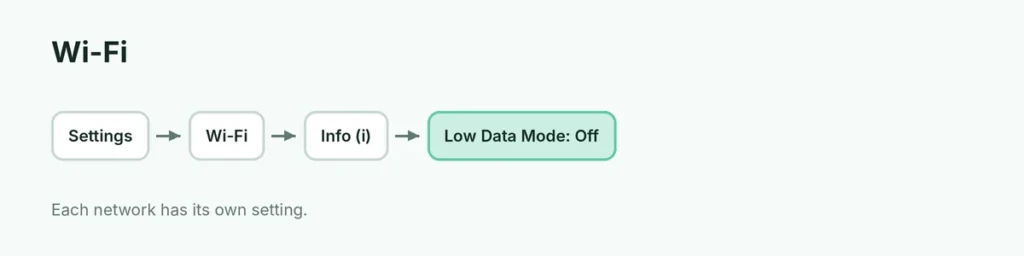
- Open Settings → Wi-Fi.
- Tap the info (i) button next to the network.
- Turn off Low Data Mode.
Repeat for other networks. iPhone remembers the setting per network.
Data Mode options explained
| Option | Best for |
|---|---|
| Allow More Data on 5G | Unlimited 5G plans; higher-quality video and FaceTime |
| Standard | Normal use |
| Low Data Mode | Limited data plans or roaming |
Why does Low Data Mode keep turning on?
- Personal Hotspot: when you connect to another iPhone’s hotspot, Low Data Mode may be suggested.
- Carrier settings: some prepaid plans turn it on by default.
- Different Wi-Fi network: each network has its own setting.
Low Data Mode vs. Low Power Mode
They’re different: Low Data Mode saves internet data; Low Power Mode saves battery (the yellow battery icon). Here’s how to turn off Low Power Mode.
Turn off data-hungry features instead
If you need to save data but want normal sync on Wi-Fi:
- Settings → Cellular → turn off mobile data for big apps (scroll the app list).
- Settings → Photos → Cellular Data → turn off.
- Settings → App Store → turn off Automatic Downloads on mobile data.
Android: Data Saver
On Android, the similar setting is Data Saver: Settings → Network & internet → Data Saver (Samsung: Connections → Data usage → Data saver).
Related guides
- How to turn off Low Power Mode
- How to turn off 5G on iPhone
The short version
Turn off Low Data Mode for mobile data in Settings → Cellular → Cellular Data Options → Data Mode → Standard, and for Wi-Fi by tapping (i) next to the network and switching off Low Data Mode. It’s set separately for each line and each Wi-Fi network.
Sources
- Apple Support: Use Low Data Mode on your iPhone and iPad