 By
Copilot in Microsoft Word offers AI drafts, summaries and rewrite suggestions, and on many versions an icon pops up next to your text. If you’d rather write on your own, you can turn it off. Here’s how to turn off Copilot in Word on Windows and Mac, and what to do on older versions without the switch.
Short answer: on Windows, go to File → Options → Copilot, uncheck Enable Copilot, click OK and restart Word. On Mac, go to Word → Preferences (or Settings) → Authoring and Proofing Tools → Copilot, uncheck Enable Copilot and restart Word. If you don’t see a Copilot option, update Word, or turn off connected experiences in File → Account → Account Privacy → Manage Settings (this also turns off some other online features).
Applies to: Word for Microsoft 365 on Windows (Version 2412 or later) and Mac (Version 16.93 or later), October 2026.
How to turn off Copilot in Word on Windows

- Open Word.
- Click File → Options.
- Click Copilot in the left list.
- Uncheck Enable Copilot.
- Click OK and close and reopen Word.
The Copilot button disappears from the ribbon and the pop-up icon stops appearing.
How to turn off Copilot in Word on Mac
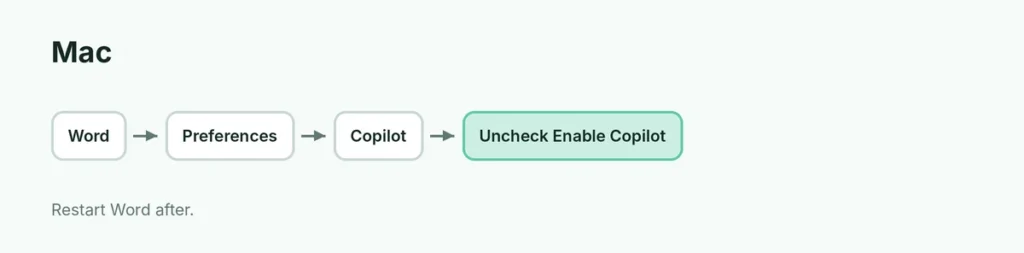
- Open Word.
- Click Word in the menu bar → Preferences (or Settings).
- Under Authoring and Proofing Tools, click Copilot.
- Uncheck Enable Copilot.
- Quit and reopen Word.
No Copilot option in Options?
| Situation | What to do |
|---|---|
| Old Word version | File → Account → Update Options → Update Now |
| Work or school account | Your admin controls Copilot |
| Still no option | Turn off connected experiences (below) |
Turn off connected experiences (older versions)
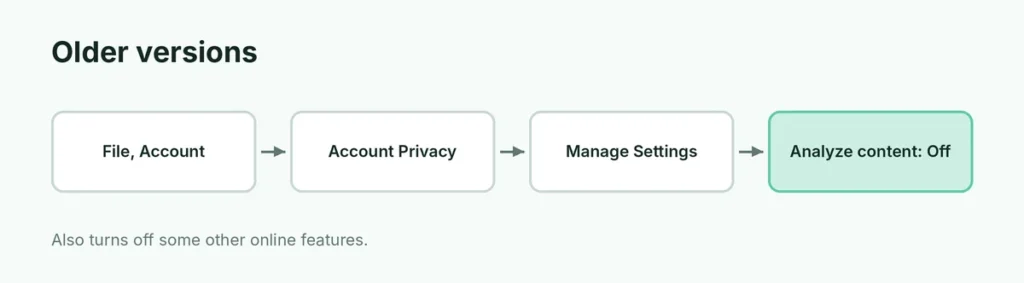
- File → Account → Account Privacy → Manage Settings.
- Uncheck Turn on experiences that analyze your content.
- Restart Word.
Note: this also turns off features like Editor suggestions, translation, dictation and Designer, across Microsoft 365 apps.
Hide just the Copilot pop-up icon
On some versions, you can hide the small Copilot icon next to your text without turning Copilot off: right-click the icon or look in Options → Copilot for a setting to show Copilot icon and turn it off.
Copilot in other Microsoft apps
The same Enable Copilot setting exists in Excel, PowerPoint and OneNote (File → Options → Copilot). Turn it off in each app.
Windows Copilot app: that’s separate; uninstall it from Settings → Apps → Installed apps if you don’t use it.
Does turning off Copilot change my Microsoft 365 price?
No. Turning Copilot off in Word doesn’t change your subscription. If your plan price went up because of Copilot, check account.microsoft.com → Subscriptions for plan options.
Related guides
- How to turn off Track Changes in Word
- How to turn off dark mode in Word
The short version
On Windows, uncheck File → Options → Copilot → Enable Copilot; on Mac, uncheck it in Word → Preferences → Copilot. Restart Word. On older versions, update Word or turn off connected experiences in Account Privacy.
Sources
- SlashGear: How to turn off Copilot in Microsoft Word