 By
Your Apple Watch is on the charger but the battery won’t go up, or you see a red lightning bolt and nothing else. In most cases the fix takes a minute: the watch isn’t sitting right on the charger, the back is dirty, or the watch needs a force restart. Here’s how to fix an Apple Watch that’s not charging, in the order Apple recommends, plus what the charging icons mean.
Short answer: use the Apple charging cable that came with the watch, plug the power adapter straight into a wall outlet, and place the watch back-down on the charger until a green lightning bolt appears. Clean the back of the watch and the charger, and remove any plastic film. If it’s completely dead, leave it on the charger for up to 30 minutes. Still nothing? Force restart: press and hold the side button and the Digital Crown for at least 10 seconds, until the Apple logo appears.
Applies to: every Apple Watch model, including Series 11, Ultra 3 and SE 3, with watchOS 26, November 2026.
What the charging icons mean
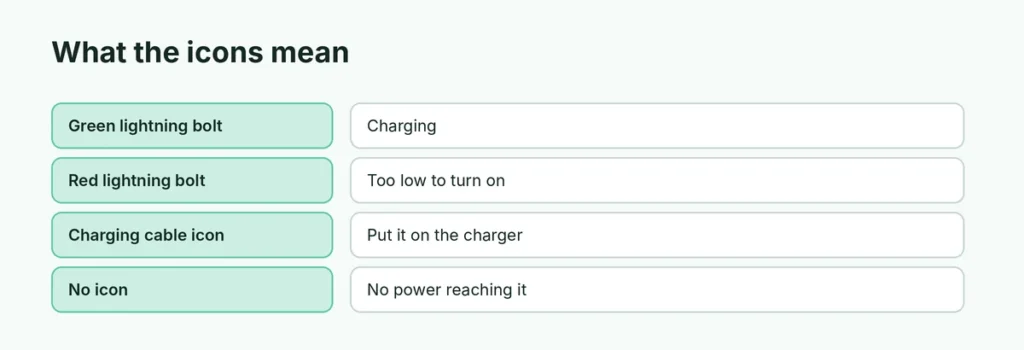
| What you see | What it means | What to do |
|---|---|---|
| Green lightning bolt | The watch is charging | Nothing, leave it on the charger |
| Red lightning bolt | The battery is too low to turn on | Leave it charging for up to 30 minutes |
| Red bolt inside a ring | It’s connected and charging from empty | Keep waiting |
| Charging cable icon | The watch needs to be put on a charger | Reposition it on the charger |
| No icon at all | No power is reaching the watch | Check the cable, adapter and outlet |
Quick fixes to try first
- Use the right cable. Use the Apple Magnetic Charging Cable or USB-C Magnetic Fast Charging Cable that came with your watch. Cheap third-party pucks are a common cause.
- Plug it in firmly. Push the cable fully into the power adapter, and the adapter fully into a wall outlet. Skip laptop USB ports and power strips while you test.
- Reposition the watch. Take it off the charger and put it back, centred, until a lightning bolt appears on the watch face.
- Clean both sides. Wipe the back of the watch and the charger with a soft, dry, lint-free cloth. Peel off any plastic wrap still on the charger.
- Wait 30 minutes if it’s dead. A fully drained watch can take up to 30 minutes before the lightning bolt even appears.
Force restart your Apple Watch
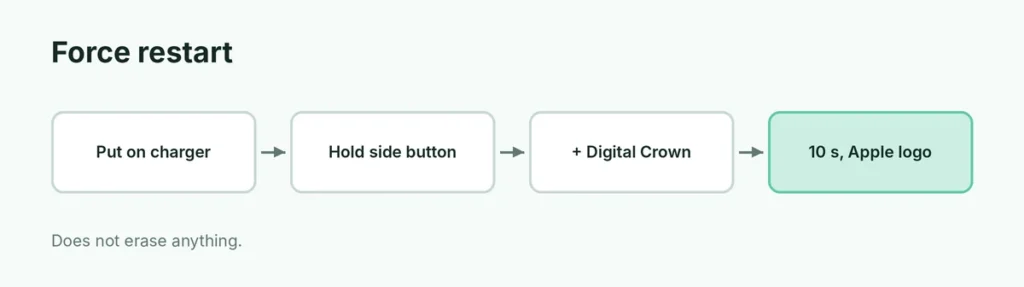
If the watch still won’t charge, force it to restart:
- Put the watch on the charger.
- Press and hold the side button and the Digital Crown together.
- Keep holding for at least 10 seconds, until the Apple logo appears, then let go.
A force restart doesn’t erase anything. For a normal restart, see how to restart an Apple Watch.
Big watches and charging docks
On 44 mm, 45 mm, 46 mm and 49 mm watches, a dock or 2-in-1 charger may not line up with the magnets:
- Tilt the dock to a different angle, or lay it flat.
- Apple Watch Ultra: if it still won’t connect reliably, take the band off before placing it on the charger.
- Thick cases can stop the magnet from connecting. Remove any case or screen bumper.
Charging stops at 80 percent

If the watch charges but stops at 80%, that’s usually on purpose. Optimized Battery Charging learns your routine and holds the charge at 80% until shortly before you usually take the watch off. To charge to 100% now, open Settings → Battery on the watch, tap Battery Health and turn off Optimized Battery Charging for a day. The exact wording can vary by watchOS version.
When it’s the charger, not the watch
Try a different Apple charging cable and a different USB power adapter. If another cable works, replace the old one. If you see “Unable to charge. This is a country-specific charger”, the charger was made for a different market (China or Indonesia) and won’t work with your watch.
When to get it repaired
If you’ve tried another cable and adapter, cleaned it and force-restarted it, and it still won’t charge, the battery or charging coil may be faulty. Contact Apple Support or visit an Apple Store or Apple Authorized Service Provider. A watch under warranty or AppleCare+ is usually repaired at low or no cost.
Related guides
- How to restart an Apple Watch
- How to reset an Apple Watch
- iPhone not charging? How to fix it
The short version
Use the original Apple cable, plug the adapter into a wall outlet, clean the back of the watch and the charger, and centre the watch until a green lightning bolt appears. A dead watch can take 30 minutes to show the bolt. If nothing works, hold the side button and Digital Crown for 10 seconds to force restart, then try another cable before booking a repair.
Sources
- Apple Support: If your Apple Watch won’t turn on or won’t charge
- Apple Support: If your Apple Watch is stuck on the Apple logo